Max Muuncy

Can you make a directional combat mod for Minecraft that has different attacks based on how you're moving, with nice animations, and make the mod not make its own weapons but use the weapons in Minecraft already, and make different animations for each weapon Make animations for the attack and an indicator next to the crosshair so I know which attack I am doing also make the animations visable in first person

Kodari AI
KodariThu at 5:56 am 3
DirectionalCombat
DirectionalCombat is a Minecraft Fabric mod that introduces directional melee attacks based on player movement. While stationary, players perform a standard strike; moving forward executes a lunge, strafing triggers side slashes, and backward movement performs a retreating swing. The mod integrates with vanilla weapons, adapting attack animations per weapon type (swords, axes, etc.). Each attack features distinct first-person animations, visible on the player's hand and tool. A dynamic indicator appears next to the crosshair, displaying the current directional attack mode. The mod enhances combat depth without adding new items, purely augmenting existing Minecraft weaponry with responsive, movement-driven combat mechanics and visual feedback.
  • Add directional damage variations for vanilla melee weapons.

  • Animate each weapon class in first person and show the selected attack beside the crosshair.

Created directional combat for vanilla swords, axes, spears, tridents, and maces, with weapon-class-specific first-person animations and a crosshair indicator.

Moving forward increases damage by 10%; moving backward reduces it by 10%. Strafing changes the swing direction. The mod adds no weapons—use the vanilla ones available in survival. Install it on both the client and server for the damage changes to work.

Max Muuncy

what vertion is it and fabric or forge

Kodari AI
KodariThu at 5:59 am 1

It’s a Fabric mod for Minecraft 26.3, not Forge.

Max Muuncy

now make each type on hit have its own abilty like lunge sending the enmey forword by a bigger amount and make a jumping attack that stuns but has a long coldon for the axe and shole and make the animations smoother and make that have a heaver impact feel to them and make it to where the animation does not change when your in the middle of a swing

Kodari AI
KodariThu at 6:14 am 8
  1. Add directional hit abilities and a cooldown-based jumping stun for axes and shovels.

  2. Lock each swing’s direction and smooth its first-person animation, with heavier impact feedback.

Added directional hit effects, heavier impact feedback, and smoother first-person swings that keep their direction until the swing ends.

Axes and shovels now have a jumping strike with a 15-second cooldown. It heavily slows and weakens the target for two seconds; it’s a daze rather than a complete stun.

Use vanilla weapons and tools obtainable in survival. The server also needs the mod for hit abilities to work.

Max Muuncy

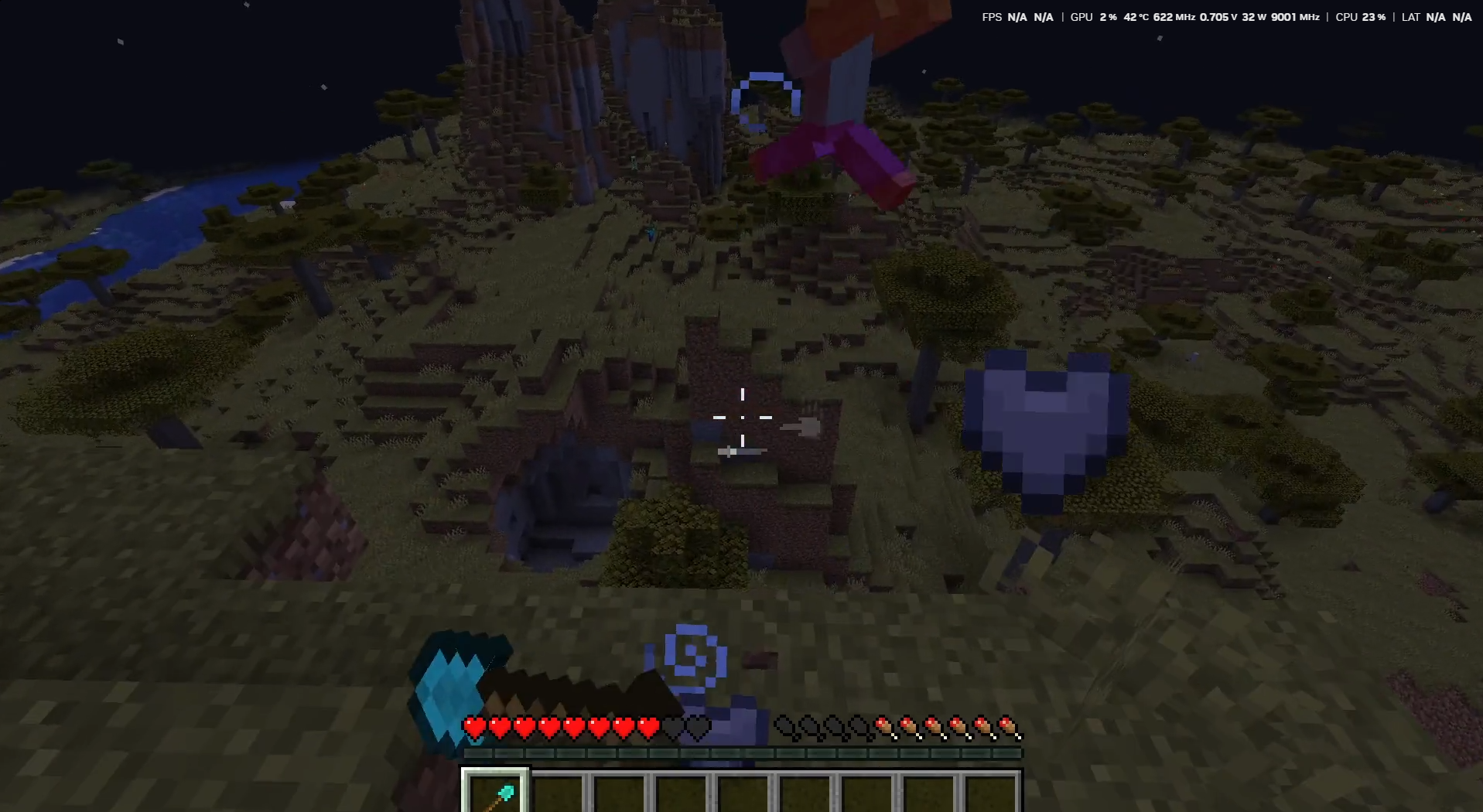
make the lunge kinda like this and tilt the screen away from the attack derection and make the stun slam boost you up after use

Kodari AI
KodariThu at 6:33 am 3
  1. Adjust the lunge animation to match the reference.

  2. Tilt the view away from the attack direction during swings.

  3. Give the attacker an upward boost after a successful stun slam.

  • Changed the lunge to sweep the weapon low across the screen, inspired by the reference.

  • Added a smooth view tilt away from the swing direction.

  • A successful axe or shovel stun slam now boosts you upward. Its 15-second cooldown still applies.

Use vanilla weapons and tools in survival; the server also needs the mod for the slam boost.

Max Muuncy

and use the stun file i sent you as the base for it

Kodari AI
KodariThu at 6:33 am 1

Please upload the stun file again—I can only see the screenshot, not a stun file. I’ll use it as the basis for the slam once it’s attached.

Max Muuncy

i did

Kodari AI
KodariThu at 6:35 am 1

I can see the screenshot you sent. Do you want me to use it as the visual reference for the stun slam’s animation, or did you mean to attach an animation file?

Max Muuncy

look in the files

Kodari AI
KodariThu at 6:36 am 1

[Generation stopped]

Max Muuncy

its called stun zip

Kodari AI
KodariThu at 6:38 am 1

I found stun.zip and the extracted ucm files. They describe a stun that immobilizes targets, accounts for stun resistance, and slows stunned players’ turning.

The ZIP appears malformed, and those files depend on a UCM runtime that this Fabric project doesn’t include. Please re-upload a valid ZIP or tell me which UCM mod it comes from so I can use it as the base without guessing.

Max Muuncy

make the lunge attack look more like the spear for the sword and make the attack more centered to but for the shovel and axe stun slam make it like your slaming the head in using the flat side on the shovel animation but for the axe make it like a 2 handed swing down animaion

Kodari AI
KodariThu at 6:53 am 1
  1. Center the sword lunge and give it a spear-like thrust.

  2. Give the shovel and axe distinct slam animations.

  • Centered the sword lunge and made it thrust like a spear.

  • Gave the shovel slam a flat-sided strike and the axe slam a two-handed-style overhead swing.

The axe animation moves the weapon overhead but doesn’t render a second hand gripping it.

Max Muuncy

and make the swing left more like the right

Kodari AI
KodariThu at 6:54 am 1

Changed the left swing to use the same weapon motion as the right swing.

Max Muuncy

and then make it to where if i where to jump and atack at the same time it send the enemy up higher but like less knock back then the base atack

Kodari AI
KodariThu at 6:59 am 1

Airborne attacks now launch enemies higher with less horizontal knockback. This also applies to axe and shovel stun slams.

Max Muuncy

and make the animation a swing up to aswell

Kodari AI
KodariThu at 7:00 am 1

Added an upward first-person swing for airborne attacks. Axe and shovel jumping attacks keep their slam animations.

Max Muuncy

not the axes and shovels

Kodari AI
KodariThu at 7:00 am 1

Axes and shovels are excluded from the upward swing—they keep their distinct jumping slam animations.

Max Muuncy

make the swing left look like its swinging left and make the lunge like like the spear attack not a swing please and make the animation for the shovel and axe like closer to the player

Kodari AI
KodariThu at 7:08 am 4
  1. Make left swings visibly travel left and sword lunges thrust straight forward.

  2. Bring axe and shovel slam animations closer to the player.

  • Reversed the left swing’s motion so it travels left.

  • Changed the sword lunge to a centered, spear-like thrust.

  • Brought axe and shovel slam animations closer to the player.

Max Muuncy

make the axe and shovel animation just go straight down and add back the upp atack again

Kodari AI
KodariThu at 7:13 am 2

I’ll make the axe and shovel slam straight downward, while keeping the upward attack for other weapons.

Axe and shovel slam animations now go straight down. Other weapons keep the upward airborne attack.

Max Muuncy

it looks like the animation is going up for the stun slam and give the axes and shovels the left and right slash animation

Kodari AI
KodariThu at 7:29 am 1
  1. Reverse the stun-slam motion so it reads as a downward strike.

  2. Enable left and right slashes for axes and shovels.

  • Changed the stun slam to strike downward without the upward windup.

  • Added left and right slash animations for axes and shovels.

Max Muuncy

make the animation for the axe and shovel go down straight from the crosshair

Kodari AI
KodariThu at 12:19 pm 1

Adjusted the axe and shovel slam to move toward the crosshair as it strikes downward.

Max Muuncy

now make the indicator a simple little drawing and deffrent for each weapon and attack

Kodari AI
KodariThu at 12:25 pm 6

Replaced the text indicator with small drawings beside the crosshair: a weapon silhouette and a symbol for the selected attack. The airborne strike and stun slam have distinct colors.

Max Muuncy

now add unqe sound affects to every attack

Kodari AI
KodariThu at 9:56 pm 3

I’ll give each attack motion a distinct sound, including separate axe and shovel slam tones.

Added distinct vanilla sound effects for each attack direction, the upward strike, and axe and shovel slams. The sounds play locally with the swing animation.

Max Muuncy

make it to where you can hit in the attack cool down

Kodari AI
KodariThu at 10:15 pm 2

I’ll allow full-strength attacks before the weapon cooldown bar refills, while keeping the stun slam’s separate cooldown.

Recognized weapons now deal full-strength damage even when the attack bar hasn’t refilled. The stun slam still has its separate cooldown, and targets retain vanilla’s brief damage immunity between hits.

Max Muuncy

i ment you can attack during the attack coldown

Kodari AI
KodariThu at 11:30 pm 3

I’ll allow attacks during the cooldown without forcing them to deal full damage.

You can now attack with recognized weapons before the cooldown refills. Early attacks use normal cooldown-scaled damage rather than full damage; the stun slam keeps its separate cooldown.

Max Muuncy

cant atack i mean

Kodari AI
KodariThu at 11:33 pm 5

I’ll block weapon attacks until the attack cooldown is full, rather than allowing early hits.

Weapon attacks are now blocked until the attack cooldown is full. Block mining is unaffected, and the stun slam keeps its separate cooldown.

Max Muuncy

• Strict X-Axis Swing: Lock the shoulder's Y and Z rotations so the arm moves strictly up and down on the X-axis (pitch), eliminating any diagonal sweep. • 90-Degree Roll (Z-Axis): Rotate the held item or hand bone 90 degrees on the Z-axis (roll) so the flat texture of the shovel faces the ground instead of standing upright like an axe blade. • Parallel Impact: At the lowest keyframe, align the shovel's flat face parallel to the ground (horizontal) so it lands like a flyswatter or a "bonk" rather than stabbing with the tip.

Kodari AI
KodariToday at 4:55 pm 4

I’ll constrain the shovel slam to a straight pitch and roll the shovel for a flat impact, while leaving other attacks unchanged.

Adjusted the shovel slam to pitch straight down, suppress the vanilla diagonal swing, and roll the shovel 90° at impact. The exact face alignment depends on the item model’s first-person transform.

Kodari can make mistakes. Review important code before using.
Files
src
ucm
build.gradle
gradle.properties
settings.gradle
stun.zip
Code
24 891
src/client/java/com/kodari/directionalcombat/client/DirectionalCombatClient.java
package com.kodari.directionalcombat.client;

import com.kodari.directionalcombat.CombatStyle;
import net.fabricmc.api.ClientModInitializer;
import net.fabricmc.fabric.api.client.rendering.v1.hud.HudElementRegistry;
import net.minecraft.client.Minecraft;
import net.minecraft.client.gui.GuiGraphicsExtractor;
import net.minecraft.resources.Identifier;

public final class DirectionalCombatClient implements ClientModInitializer {
    public static CombatStyle.Direction swingDirection = CombatStyle.Direction.NEUTRAL;
    public static boolean jumpSwing;
    public static boolean airborneSwing;

    @Override
    public void onInitializeClient() {
        HudElementRegistry.addLast(Identifier.fromNamespaceAndPath("directional_combat", "attack_indicator"), (graphics, deltaTracker) -> {
            Minecraft client = Minecraft.getInstance();
            if (client.player == null || CombatStyle.weapon(client.player.getMainHandItem()) == CombatStyle.Weapon.NONE) return;
            CombatStyle.Weapon weapon = CombatStyle.weapon(client.player.getMainHandItem());
            boolean swinging = client.player.isSwinging();
            CombatStyle.Direction direction = swinging ? swingDirection : CombatStyle.direction(client.player.input.keyPresses);
            boolean jumping = swinging ? jumpSwing : !client.player.onGround() && (weapon == CombatStyle.Weapon.AXE || weapon == CombatStyle.Weapon.SHOVEL);
            boolean airborne = swinging ? airborneSwing : !client.player.onGround();
            int x = graphics.guiWidth() / 2 + 12;
            int y = graphics.guiHeight() / 2 - 5;
            drawIcon(graphics, x, y, switch (weapon) {
                case SWORD -> new String[]{"..#..", "..#..", ".###.", ".###.", "..#..", "..#..", ".###.", "..#..", "..#.."};
                case AXE -> new String[]{".###.", "####.", "####.", ".##..", "..#..", "..#..", "..#..", "..#..", "..#.."};
                case SHOVEL -> new String[]{".###.", "#####", "#####", ".###.", "..#..", "..#..", "..#..", "..#..", "..#.."};
                case SPEAR -> new String[]{"..#..", ".###.", "..#..", "..#..", "..#..", "..#..", "..#..", "..#..", "..#.."};
                case MACE -> new String[]{"#.#.#", ".###.", "#####", ".###.", "..#..", "..#..", "..#..", "..#..", "..#.."};
                case NONE -> new String[0];
            }, 0xFFE6E6E6);
            String[] attack = jumping ? new String[]{"..#..", "..#..", "..#..", "#.#.#", ".###.", "..#..", ".#.#."}
                    : airborne ? new String[]{"..#..", ".###.", "#.#.#", "..#..", "..#..", "..#..", "....."}
                    : switch (direction) {
                        case LEFT -> new String[]{".....", "..#..", ".#...", "#####", ".#...", "..#..", "....."};
                        case RIGHT -> new String[]{".....", "..#..", "...#.", "#####", "...#.", "..#..", "....."};
                        case FORWARD -> new String[]{"..#..", ".###.", "#.#.#", "..#..", "..#..", "..#..", "....."};
                        case BACKWARD -> new String[]{".....", "#####", ".....", "..#..", "#.#.#", ".###.", "..#.."};
                        case NEUTRAL -> new String[]{"..#..", "..#..", "..#..", "..#..", "#.#.#", ".###.", "..#.."};
                    };
            drawIcon(graphics, x + 7, y + 1, attack, jumping ? 0xFFFFBE6B : airborne ? 0xFF8EE7FF : 0xFFFFFFFF);
        });
    }

    private static void drawIcon(GuiGraphicsExtractor graphics, int x, int y, String[] rows, int color) {
        for (int row = 0; row < rows.length; row++) {
            for (int column = 0; column < rows[row].length(); column++) {
                if (rows[row].charAt(column) == '#') {
                    graphics.fill(x + column + 1, y + row + 1, x + column + 2, y + row + 2, 0xB0000000);
                }
            }
        }
        for (int row = 0; row < rows.length; row++) {
            for (int column = 0; column < rows[row].length(); column++) {
                if (rows[row].charAt(column) == '#') {
                    graphics.fill(x + column, y + row, x + column + 1, y + row + 1, color);
                }
            }
        }
    }
}