
Majed
📎 1 file 1,978 chars
📄
pasted-code-1795344034355.txt
txt 1 lines
▶
Create a Minecraft homes plugin called MJHOMES using Minecraft's native Dialog API for interactive menus. Support the commands and aliases /mjhomes, /mjhome, /home, /homes, /sethome, /delhome and /renamehome. Integrate LuckPerms to determine home limits using permissions such as MJHOMES.HOMES.3, MJHOMES.HOMES.5, MJHOMES.HOMES.10 and MJHOMES.HOMES.30, automatically detecting the highest permission a player has, with a maximum of 30 homes. The homes GUI should display available home slots, used homes and the maximum limit, with teleport, rename and delete options. Include a More button for navigating through additional slots, up to 30, with pagination and a back button. Use green to indicate accessible home slots and red for homes exceeding the player's current permission limit. If a player loses their rank and their home limit decreases, never delete their existing homes or prevent them from teleporting to them. However, prevent them from creating additional homes until they delete enough existing homes to get below their new limit. Allow players to create, rename, delete and teleport to homes with custom names, preventing duplicate names and invalid characters. Allow players to assign Minecraft blocks or items as icons displayed beside their home names, change or remove icons, and use a default icon when none is selected. Save all icons permanently. Home names must have a maximum of 18 characters, and if a name does not fit inside its GUI button, automatically shorten its displayed version using three dots (...), for example, Skeleton Spawner becomes Skeleton Sp..., while preserving the original name. Store homes permanently, including their names, icons, worlds, coordinates, yaw and pitch. Support different worlds and dimensions, configurable teleport delays and cooldowns, proper error handling, and customizable GUI messages through config.yml. Ensure the plugin is optimized for multiplayer servers, fully functional, and not just a GUI mockup.
Kodari AI
KodariToday at 10:41 am 3
MJHomes
A comprehensive Minecraft homes plugin using the native Dialog API for interactive menus. Players create, rename, delete, and teleport to named homes with custom block/item icons, stored permanently with world, coordinates, yaw, and pitch. LuckPerms integration automatically detects the highest home limit permission (MJHOMES.HOMES.3/5/10/30, max 30). The GUI displays used slots, limits, and pagination with a More button for up to 30 homes. Green slots indicate accessible homes; red shows homes exceeding the player's current limit—existing homes are never deleted or blocked from teleporting, but new ones are prevented until under the limit. Features configurable teleport delays/cooldowns, duplicate/invalid name prevention, 18-character name limits with automatic truncation using ellipses, persistent icons, and customizable messages via config.yml.
  • Build native Paper dialogs with paginated slots and home management.

  • Persist locations and icons, enforce LuckPerms-backed limits, and handle teleport timing.

Created MJHOMES with native dialogs, persistent homes and icons, permission-based limits, and configurable teleport delays and cooldowns.

Requires Paper 1.21.7 or newer. LuckPerms can supply the mjhomes.homes.<number> permissions. For names containing spaces, rename with /renamehome old name | new name.

Majed

make absolutely everything configurable, add a block/item searcher for the icon also the more... button should not open new page it should just add more buttons also make if it is like empty slot its says New Home in &8 gray and if home has no icon just put top half of bed just like img

Kodari AI
KodariToday at 10:49 am 4
  1. Make menu text, layout and behavior configurable.

  2. Add a searchable item and block icon picker.

  3. Expand the home list in place and update empty-slot and default-icon styling.

Added configurable menu layout, labels and name rules; a searchable block and item icon picker; and a More button that expands the existing home list.

Native dialogs can’t render item sprites inside buttons, so the list uses configurable symbols. The actual selected icon—or a white bed by default—appears in the home details. An exact bed-half button icon would require client-side assets.

Existing config.yml values are preserved, so update default-icon and gui.empty-slot there if you want the new defaults.

Majed

the icons are not working please fix it when a home is made it says gui.home-slot as its name not its actual name, also add configurable sounds to each button click like empty slot, unaivailbe slot ect

Kodari AI
KodariToday at 10:59 am 4
  1. Fix home names and icons in the dialogs.

  2. Add configurable sounds for each button action.

  • Fixed home buttons showing gui.home-slot instead of the home name.

  • Home icons now appear as item previews in the dialog, labeled with their slot and name. Native dialog buttons still cannot contain item sprites.

  • Added configurable sounds, volume and pitch for each button action, including unavailable slots.

Majed

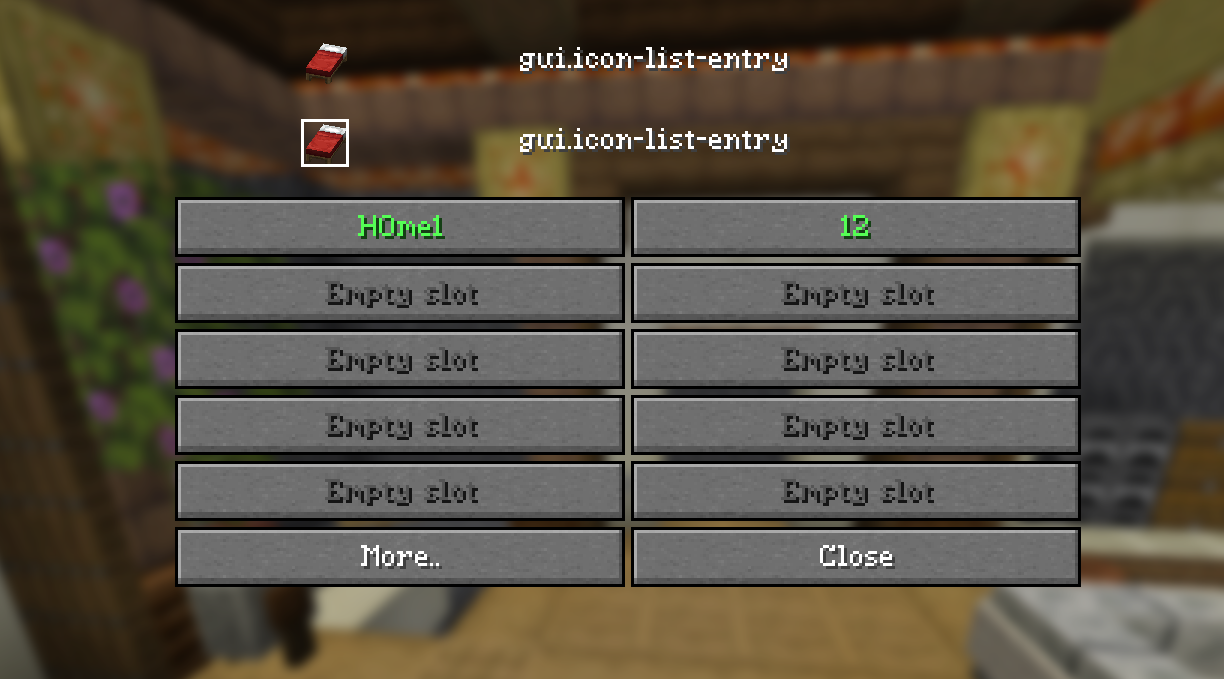
i want the icon to be next to the text on the left of the button of the home also why does it still say gui.icon-list ect.. and stuff can you fix it and make it better

Kodari AI
KodariToday at 11:04 am 4
  1. Fix missing config entries so dialog labels use bundled defaults.

  2. Remove the misleading icon list and keep item previews in home details.

Fixed missing dialog labels to use the bundled defaults and removed the disconnected icon list above the buttons. The selected item still appears in the home’s details.

Native Minecraft dialogs cannot place an item sprite inside a button. They can only show a configurable text symbol beside the home name; an actual bed or item icon there would require client-side assets.

Majed

i want the icon to be actually the item/block not a text dude

Kodari AI
KodariToday at 11:07 am 2

You want the actual item or block rendered beside the home name—not a text symbol. Paper’s native Dialog API can display items in the dialog body, but not inside or beside individual buttons.

A vanilla inventory menu can show the actual item as the clickable home slot, with its name on hover. Would you like me to switch the home list to that?

Majed

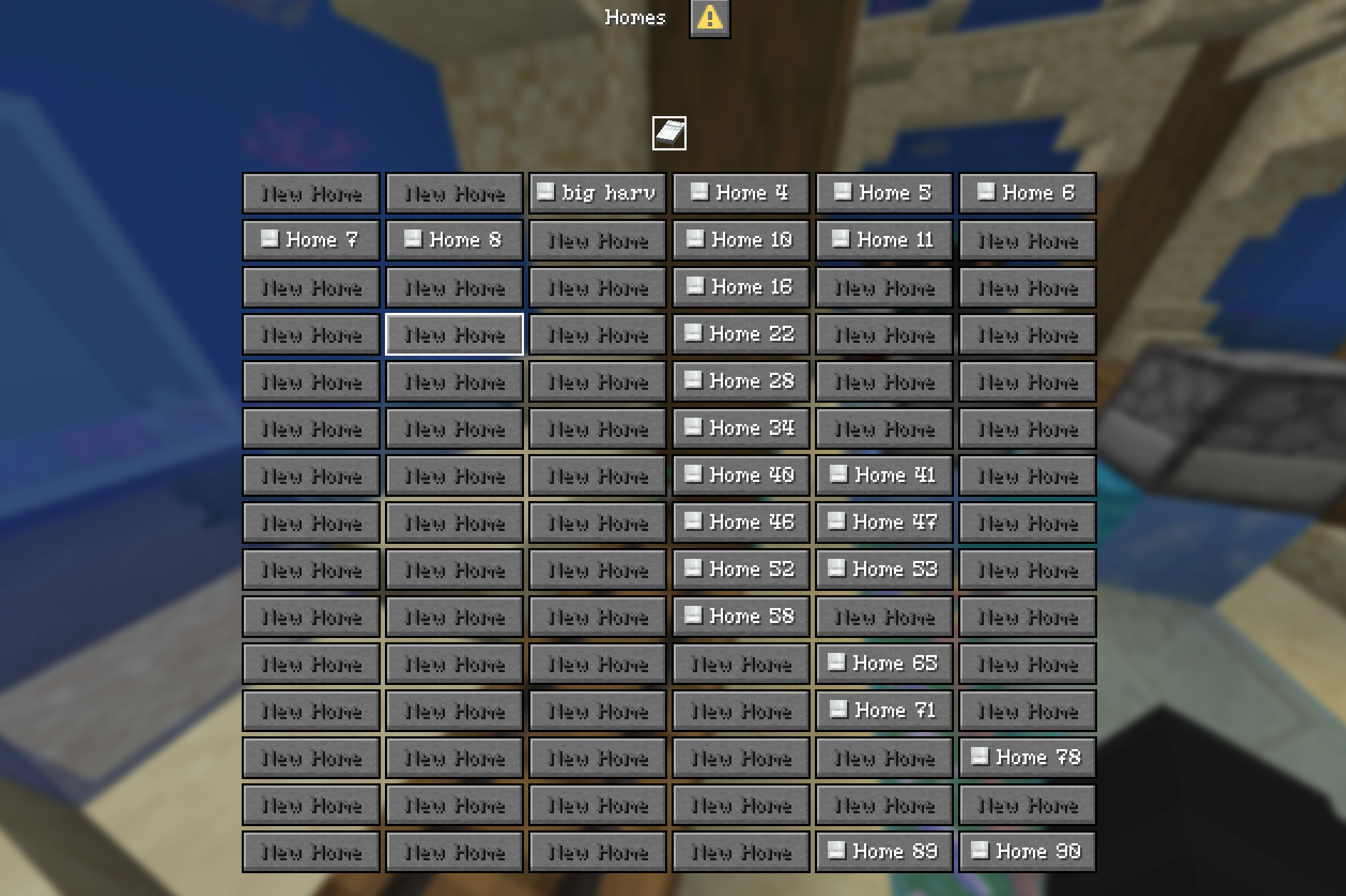
no dialog just like this img also if the text is too long can u like make it move and stuff also also make the button size changable in config

Kodari AI
KodariToday at 11:09 am 3

The button width is already configurable: set gui.button-width in config.yml (1–1024).

The image shows the result you want, but Paper’s native Dialog API doesn’t expose a way to put an actual item sprite inside a button or animate its label. Long names currently shorten with ...; you can adjust that using home-name.display-length.

Do you know what plugin or client setup produced that image? That could help identify how it renders the icons.

Majed

its donutsmp folia (schengen velocity)

Kodari AI
KodariToday at 11:10 am 1

DonutSMP using Folia and Velocity doesn’t by itself explain how those icons are rendered. They may use a resource pack, custom fonts, or another client-side technique alongside their dialogs.

I can’t reproduce those actual item sprites or moving text inside native dialog buttons with the Paper Dialog API alone. If you can share the plugin or resource pack responsible, I can check how it works.

Majed

item sprites and skin heads if the item doesnt have a sprite use its closest brother for eg, if no acaicia trapdoor use acacia plank sprite

Kodari AI
KodariToday at 11:12 am 1

That fallback could work, but the dialog still needs a way to render those sprites inside button text. Native dialogs don’t provide item or player-head sprites there; that appearance needs a resource pack or client-side support.

If you have the resource pack DonutSMP uses—or one with item and head glyphs—share it and I can check whether the plugin can use its glyphs and configure fallback mappings.

Majed

another plugin uses this

📎 1 file 8,253 chars
📄
pasted-code-1795346049186.txt
txt 178 lines
▶
ELIMINATE CHEST GUI LIMITATIONS
For years, Minecraft server owners have relied on 9x6 inventory containers as menus. They suffer from inventory click desyncs, ghost items, container drag exploits, and click delay lag.

Dialog Master uses Minecraft's official Client Dialog Packet Protocol to render pristine, high-performance UI windows directly on the player's client. Offer triple-A gaming menus with native input controls, zero inventory lag, and instant responsiveness without requiring client mods or server resource packs.


FEATURE COMPARISON MATRIX

​
Feature Capability	Traditional Chest GUIs	Dialog Master Packet Engine
Menu Rendering Location	Server Container Packets	Native Client Rendering
Inventory Click Lag & Ghost Items	High Risk / Frequent Desync	Zero Lag / Impossible
Native Player Input Controls	Chat Typing / Anvil GUIs Only	Sliders, Text Fields, Dropdowns, Toggles
Item Textures & Player Heads	Inventory Slots Only	Inline Sprite Tags & Skin Heads
Client Pause Screen Integration	Unsupported	Direct ESC & G Button Injection
In-Game Visual GUI Editor	Manual File Editing	Built-In Interactive In-Game Editor


COMPREHENSIVE PLUGIN FEATURES​

1. Native Client-Rendered Screens
Info boxes, purchase prompts, selector grids, and server-link hubs render using the client's built-in dialog protocol. No client-side mods or resource pack downloads required.

2. Interactive Client Input Controls
Transform menus into interactive forms using native control fields:
Text Fields: Character limits, placeholders, multi-line support (report reasons, home names, input prompts).
Number Sliders: Horizontal sliders with configurable min, max, snap step size, and display format.
Boolean Toggles: Native client-side on/off switches.
Single-Option Dropdowns: Clean dropdown selection menus for preferences, kit selections, or particle modes.

Settings Preview:

1783693676098.png​

3. Item Icons & Player Heads Without Resource Packs
Use  to embed item sprites in labels, tooltips, and lists (e.g. ), and  to display a player's skin head—both render client-side from the vanilla item atlas.

4. DeluxeMenus-Style Requirement Logic
view-requirements control button visibility and click-requirements gate actions, both evaluated against PlaceholderAPI using ==, !=, >, >=, <, <=, and contains.

5. Priority Layout Groups
Define multiple layouts for the same button slot. Requirements are checked top-to-bottom and the first valid layout is rendered—useful for kit cooldowns, rank-gated buttons, or permission states.

6. Dynamic Lists & Addon System
Generate buttons on the fly for homes, online players, or friend lists, using simple modes or custom templates with placeholders like $(home_name) or $(player_name).
- Homes Addon: Built-in home management system with custom grid layout.

Homes Addon Preview:

1783693637971.png​

7. Asynchronous Leaderboards
Paginated leaderboards for Vault balances or statistics (kills, blocks mined, playtime), backed by off-thread queries so leaderboard lookups do not affect TPS.

8. Pause Menu & Quick-Actions Integration
Register custom buttons into the client's ESC pause screen and quick-actions bar at startup, so players can reach your main menu without typing a command.

9. Chat Hovers & Item Sharing
Adventure-based join/quit messages with hoverable stat tooltips, plus a /share command that lets players post their held item to chat with a full tooltip preview.

10. Reusable Action Packages
Define modular action files in plugins/DialogMaster/actions/ to eliminate duplicated code. Supports positional tokens $(0), named arguments $(price), fallback defaults $(amount|1), and conditional branching (if: then: else:).

11. DeluxeMenus & TrMenu Auto-Migrator
Migrate your entire library of chest-based menus with one command: /ydm migrate deluxemenus or /ydm migrate trmenu. Automatically translates 0-53 slots to responsive flows, legacy color codes to MiniMessage, and converts custom items and skull heads.

12. Multi-Provider Legacy & Bedrock Fallback
Players on clients older than 1.21.6 (Protocol < 771) or Bedrock Edition via Geyser/Floodgate are automatically detected via ViaVersion, ProtocolLib, PacketEvents, or Floodgate and seamlessly redirected to a forms menu.
Bedrock Forms example:
1787503445572.png
13. Custom 3D Models, ItemsAdder & Oraxen
Full support for custom item models and textures: Paper 1.21.8+ Item Models , ItemsAdder , Oraxen , CustomModelData .


14. Complete Action Engine & Sequences
Chain multiple actions on a single button using actions:, complete with configurable delays (delay: 3s), titles (title:), actionbars (actionbar:), broadcasts (broadcast:), sounds (sound:), and interactive chat prompts (suggest:).

15. Folia & Paper Native
All I/O, database access, and leaderboard queries are asynchronous and use region-aware schedulers, with no assumptions about single-threaded ticking.


EXAMPLE CONFIGURATION​

A main hub menu using a two-column grid, item icons, and several button action types (menu navigation, URL, command, clipboard copy, chat suggestion):

YAML:
# File: plugins/DialogMaster/menus/main-menu.yml
main-menu:
  title: "Yowsef Studio"
  external-title: "Main Menu"
  type: multiAction
  columns: 2
  command: "/menu"
  body:
    - type: plain-message
      content: "Welcome, %player_name%!"
    - type: plain-message
      content: "Balance: $%vault_eco_balance_formatted%"
  buttons:
    - label: " Homes"
      tooltip: "Manage your homes"
      width: 150
      action: open-menu
      target: homes-menu
      action-key: "dm:main_menu_open"

    - label: " Auction"
      tooltip: "Browse the auction house"
      width: 150
      action: static-run-command
      command: "/ah"

    - label: " Website"
      tooltip: "Opens the server website"
      width: 150
      action: static-open-url
      target: "https://yourserver.net"

    - label: " Copy IP"
      tooltip: "Copy server IP to clipboard"
      width: 150
      action: static-copy
      target: "play.yourserver.net"

    - label: " Msg Staff"
      tooltip: "Pre-fills chat with message command"
      width: 150
      action: static-suggest
      command: "/msg staff "

    - label: " Pay"
      tooltip: "Send money to a player"
      width: 150
      action: open-menu
      target: pay-menu
      action-key: "dm:main_menu_open"

    - label: " Teleport"
      tooltip: "Teleport options"
      width: 150
      action: open-menu
      target: teleport-menu
      action-key: "dm:teleport"

    - label: " Leaderboards"
      tooltip: "Server leaderboards"
      width: 150
      action: open-menu
      target: leaderboard-hub
      action-key: "dm:leaderboard_open"

    - label: " Close"
      tooltip: "Close the menu"
      width: 150
      action: close
      action-key: "dm:cancel"

10+ additional fully configurable menus are included in the default package.


COMMANDS & PERMISSIONS

​
Command	Permission Node	Description
/menu	dialogmaster.open	Opens the main navigation menu.
/links	dialogmaster.open	Opens the server links menu.
/share	dialogmaster.share	Shares the held item to chat with hover inspect.
/ydm editor	dialogmaster.admin	Opens the in-game interactive visual dialog editor.
/ydm reload	dialogmaster.admin	Reloads config, menus, and caches.
/ydm migrate 	dialogmaster.admin	Migrates DeluxeMenus or TrMenu chest GUIs into DialogMaster.
/ydm debug [player]	dialogmaster.admin	Live protocol diagnostics, Bedrock status, and active hooks.
/ydm open  	dialogmaster.admin	Opens a specific menu for a target player.
/ydm close 	dialogmaster.admin	Closes a player's open dialog menu.
Kodari AI
KodariToday at 11:15 am 2

That’s useful evidence—and I was too definitive earlier. Dialog Master claims it can render item sprites and heads inline without a resource pack, but its configuration doesn’t show how those tags are converted into client-renderable components.

Could you share the plugin’s download or source link, and the Minecraft version you’re running? I can check the implementation and whether MJHOMES can use the same technique.

Majed

https://limewire.com/d/9h6FQ#20NX7l6obx

Kodari AI
KodariToday at 11:17 am 1

The link shows a downloadable file, but I can’t inspect its contents from the LimeWire page.

Please attach the plugin JAR or its source code directly here, and tell me your Minecraft server version. I can then investigate how it renders the icons.

Majed

its in the files dialogsplus-22.jar

Kodari AI
KodariToday at 11:19 am 1

I found DialogsPlus-2.2.jar in the project, but I couldn’t inspect its contents in this environment, so I can’t yet verify how it renders icons.

Could you provide its source code or a source repository link? Also, is DialogsPlus the same plugin as the Dialog Master description you shared?

Majed

its in the files now

Kodari AI
KodariToday at 11:27 am 4

The source reveals the technique: it uses Adventure object components for inline sprites. I’ll adapt that for home buttons, with configurable sprite overrides for items whose textures need a fallback.

Added inline item sprites to home buttons using the technique in DialogsPlus. I was wrong earlier—thanks for sharing its source.

The default is a white bed; player-head icons show the viewer’s head. Trapdoors use a related block texture, and other sprite paths can be configured under gui.icon-sprite-overrides.

This change targets Paper 1.21.11 or newer. Not every material’s texture path is guaranteed, so some icons may need an override.

Majed

The compilation failed with this error:

code
Compilation failed with 7 error(s):

ERROR in src/main/java/com/mjhomes/MJHomes.java at line 259: cannot find symbol
        if (name.equals("player_head")) return Component.object(ObjectContents.playerHead(player.getUniqueId()));
                                                        ^
  symbol: method object(PlayerHeadObjectContents)
  location: interface Component

ERROR in src/main/java/com/mjhomes/MJHomes.java at line 273: cannot find symbol
            return Component.object(ObjectContents.sprite(atlas, sprite));
                            ^
  symbol: method object(SpriteObjectContents)
  location: interface Component

ERROR in src/main/java/com/motol/dialogsplus/dialog/ActionExecutor.java at line 30: cannot find symbol
               player.closeDialog();
                     ^
  symbol: method closeDialog()
  location: variable player of type Player

ERROR in src/main/java/com/motol/dialogsplus/editor/MenuEditor.java at line 75: cannot find symbol
      buttons.add(this.button("Close", (pl, v) -> pl.closeDialog()));
                                                    ^
  symbol: method closeDialog()
  location: variable pl of type Player

ERROR in src/main/java/com/motol/dialogsplus/dialog/IconParser.java at line 25: cannot find symbol
            return Component.object(ObjectContents.playerHead(viewer.getUniqueId()));
                            ^
  symbol: method object(PlayerHeadObjectContents)
  location: interface Component

ERROR in src/main/java/com/motol/dialogsplus/dialog/IconParser.java at line 29: cannot find symbol
            return id == null ? null : Component.object(ObjectContents.playerHead(id));
                                                ^
  symbol: method object(PlayerHeadObjectContents)
  location: interface Component

ERROR in src/main/java/com/motol/dialogsplus/dialog/IconParser.java at line 55: cannot find symbol
         return Component.object(ObjectContents.sprite(atlas, sprite));
                         ^
  symbol: method object(SpriteObjectContents)
  location: interface Component


=== COMPILATION ERROR ANALYSIS ===

MISSING METHODS:
  - object(PlayerHeadObjectContents)
  - object(SpriteObjectContents)
  - closeDialog()
ACTION: Check method names and signatures

FILES TO INVESTIGATE:
  - src/main/java/com/mjhomes/MJHomes.java
  - src/main/java/com/motol/dialogsplus/dialog/ActionExecutor.java
  - src/main/java/com/motol/dialogsplus/editor/MenuEditor.java
  - src/main/java/com/motol/dialogsplus/dialog/IconParser.java

Please fix this error by creating a new artifact with the corrected code.

Kodari AI
KodariToday at 11:31 am 4

The errors point to an older Adventure API on the compile classpath. I’ll pin the version that provides both inline object components and closeDialog().

Added Adventure API 4.25.0 as a compile-only dependency. It provides the missing Component.object(...) and closeDialog() methods without bundling Adventure into the plugin.

The updated project is ready to compile; I can’t confirm the artifact until the build succeeds.

Majed

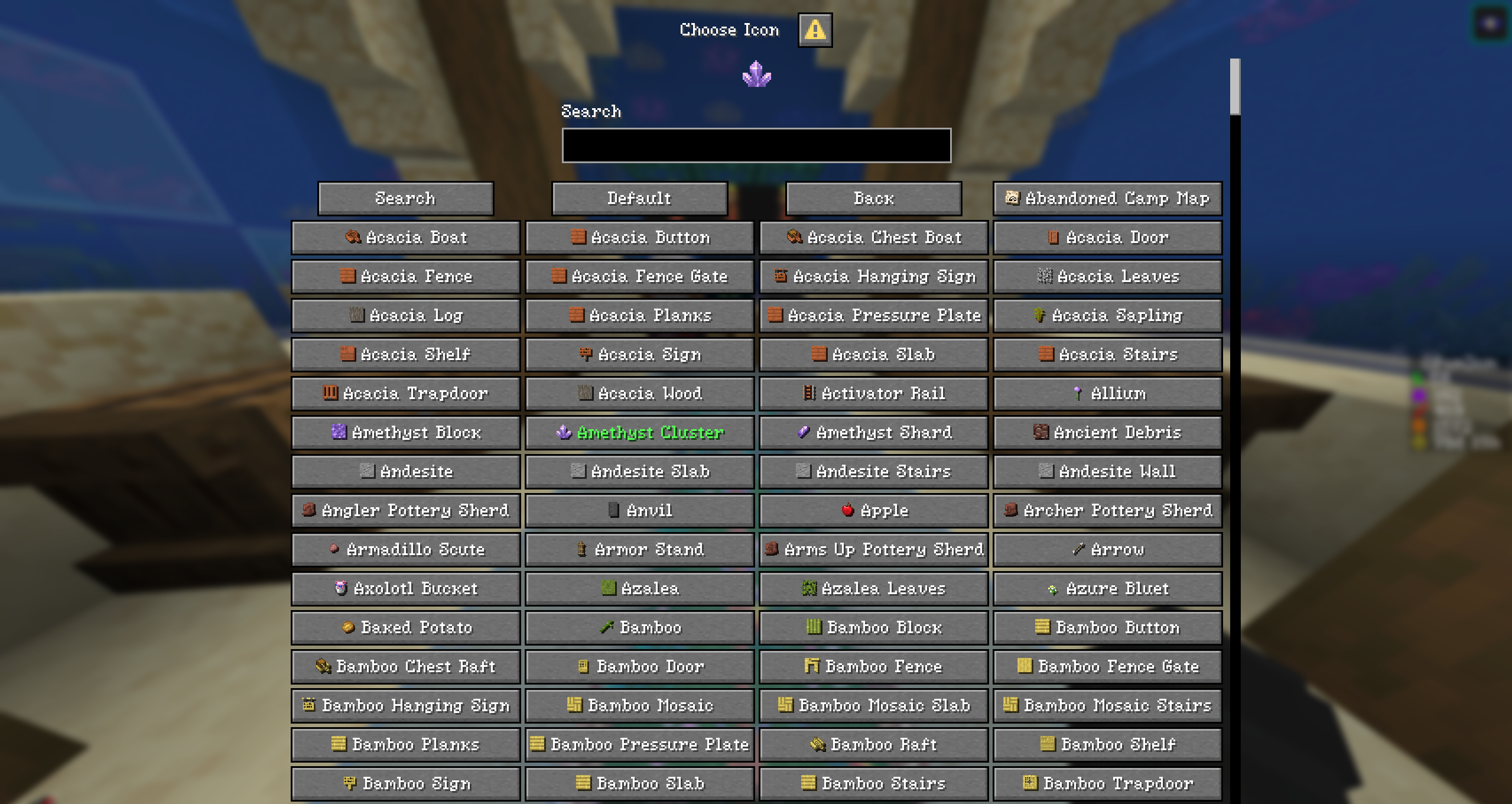
make the search thing like this pls also fix the red-bed not showing plsss

Kodari AI
KodariToday at 12:09 pm 6
  1. Redesign the icon picker as a searchable sprite grid.

  2. Fix bed sprite rendering.

Updated the icon picker with a searchable four-column grid, clickable item sprites, a selected-icon preview, and a Default button. The grid size and search width are configurable.

Also changed item sprites to use Minecraft’s blocks atlas, fixing the red-bed sprite path. Existing icon-results-per-page settings remain unchanged; set it to 80 for a longer grid.

Kodari can make mistakes. Review important code before using.
Files
com
META-INF
src
build.gradle
config.yml
plugin.yml
README.txt
settings.gradle
Code
26 3,078
src/main/java/com/mjhomes/MJHomes.java
package com.mjhomes;

import com.cryptomorin.xseries.XSound;
import io.papermc.paper.dialog.Dialog;
import io.papermc.paper.dialog.DialogResponseView;
import io.papermc.paper.registry.data.dialog.ActionButton;
import io.papermc.paper.registry.data.dialog.DialogBase;
import io.papermc.paper.registry.data.dialog.action.DialogAction;
import io.papermc.paper.registry.data.dialog.body.DialogBody;
import io.papermc.paper.registry.data.dialog.input.DialogInput;
import io.papermc.paper.registry.data.dialog.type.DialogType;
import net.kyori.adventure.key.Key;
import net.kyori.adventure.text.Component;
import net.kyori.adventure.text.event.ClickCallback;
import net.kyori.adventure.text.object.ObjectContents;
import net.kyori.adventure.text.serializer.legacy.LegacyComponentSerializer;
import org.bukkit.Bukkit;
import org.bukkit.Location;
import org.bukkit.Material;
import org.bukkit.World;
import org.bukkit.command.Command;
import org.bukkit.command.CommandSender;
import org.bukkit.configuration.ConfigurationSection;
import org.bukkit.configuration.file.YamlConfiguration;
import org.bukkit.entity.Player;
import org.bukkit.event.EventHandler;
import org.bukkit.event.Listener;
import org.bukkit.event.player.PlayerQuitEvent;
import org.bukkit.inventory.ItemStack;
import org.bukkit.plugin.java.JavaPlugin;
import org.bukkit.scheduler.BukkitTask;

import java.io.File;
import java.io.IOException;
import java.util.ArrayList;
import java.util.Arrays;
import java.util.Comparator;
import java.util.HashMap;
import java.util.List;
import java.util.Locale;
import java.util.Map;
import java.util.UUID;
import java.util.function.BiConsumer;

public final class MJHomes extends JavaPlugin implements Listener {
    private final Map<UUID, Map<Integer, Home>> cache = new HashMap<>();
    private final Map<UUID, Long> cooldowns = new HashMap<>();
    private final Map<UUID, BukkitTask> pending = new HashMap<>();
    private final LegacyComponentSerializer colors = LegacyComponentSerializer.legacyAmpersand();

    private record Home(String name, String world, double x, double y, double z, float yaw, float pitch, String icon) {}

    @Override
    public void onEnable() {
        saveDefaultConfig();
        getServer().getPluginManager().registerEvents(this, this);
    }

    @Override
    public void onDisable() {
        pending.values().forEach(BukkitTask::cancel);
        pending.clear();
        cache.clear();
    }

    @EventHandler
    public void onQuit(PlayerQuitEvent event) {
        UUID id = event.getPlayer().getUniqueId();
        BukkitTask task = pending.remove(id);
        if (task != null) task.cancel();
        cache.remove(id);
    }

    private File file(UUID id) {
        return new File(new File(getDataFolder(), "homes"), id + ".yml");
    }

    private Map<Integer, Home> homes(Player player) {
        return cache.computeIfAbsent(player.getUniqueId(), id -> {
            Map<Integer, Home> result = new HashMap<>();
            File file = file(id);
            if (!file.exists()) return result;
            YamlConfiguration yaml = new YamlConfiguration();
            try {
                yaml.load(file);
            } catch (Exception ex) {
                getLogger().severe("Cannot load homes for " + id + ": " + ex.getMessage());
                throw new IllegalStateException("Cannot load homes", ex);
            }
            ConfigurationSection section = yaml.getConfigurationSection("homes");
            if (section == null) return result;
            for (String key : section.getKeys(false)) {
                try {
                    int slot = Integer.parseInt(key);
                    ConfigurationSection h = section.getConfigurationSection(key);
                    if (slot < 1 || slot > 30 || h == null || h.getString("name") == null || h.getString("world") == null) continue;
                    result.put(slot, new Home(h.getString("name"), h.getString("world"), h.getDouble("x"), h.getDouble("y"), h.getDouble("z"), (float) h.getDouble("yaw"), (float) h.getDouble("pitch"), h.getString("icon")));
                } catch (NumberFormatException ex) {
                    getLogger().warning("Invalid home slot " + key + " for " + id);
                }
            }
            return result;
        });
    }

    private boolean save(Player player) {
        File file = file(player.getUniqueId());
        File directory = file.getParentFile();
        if (!directory.isDirectory() && !directory.mkdirs()) {
            message(player, "save-failed");
            return false;
        }
        YamlConfiguration yaml = new YamlConfiguration();
        homes(player).forEach((slot, h) -> {
            String p = "homes." + slot + ".";
            yaml.set(p + "name", h.name());
            yaml.set(p + "world", h.world());
            yaml.set(p + "x", h.x());
            yaml.set(p + "y", h.y());
            yaml.set(p + "z", h.z());
            yaml.set(p + "yaw", h.yaw());
            yaml.set(p + "pitch", h.pitch());
            yaml.set(p + "icon", h.icon());
        });
        try {
            File temp = new File(directory, file.getName() + ".tmp");
            yaml.save(temp);
            java.nio.file.Files.move(temp.toPath(), file.toPath(), java.nio.file.StandardCopyOption.REPLACE_EXISTING);
            return true;
        } catch (IOException ex) {
            getLogger().severe("Cannot save homes for " + player.getUniqueId() + ": " + ex.getMessage());
            message(player, "save-failed");
            return false;
        }
    }

    private boolean put(Player player, int slot, Home home) {
        Map<Integer, Home> map = homes(player);
        Home previous = home == null ? map.remove(slot) : map.put(slot, home);
        if (save(player)) return true;
        if (previous == null) map.remove(slot); else map.put(slot, previous);
        return false;
    }

    private int limit(Player player) {
        int ceiling = maxSlots();
        int limit = Math.max(0, Math.min(ceiling, getConfig().getInt("default-home-limit", 1)));
        for (int i = 1; i <= ceiling; i++) if (player.hasPermission("mjhomes.homes." + i)) limit = Math.max(limit, i);
        return limit;
    }

    private int setting(String path, int fallback, int min, int max) {
        return Math.max(min, Math.min(max, getConfig().getInt(path, fallback)));
    }

    private int maxSlots() { return setting("maximum-home-slots", 30, 1, 30); }
    private int increment() { return setting("gui.slots-per-expansion", 10, 1, 30); }
    private int buttonWidth() { return setting("gui.button-width", 150, 1, 1024); }

    private String text(String key, String... replacements) {
        String fallback = getConfig().getDefaults() == null ? null : getConfig().getDefaults().getString(key);
        String value = getConfig().getString(key, fallback == null ? key : fallback);
        for (int i = 0; i + 1 < replacements.length; i += 2) value = value.replace("{" + replacements[i] + "}", replacements[i + 1]);
        return value;
    }

    private Component component(String value) { return colors.deserialize(value); }
    private Component gui(String key, String... replacements) { return component(text("gui." + key, replacements)); }
    private void message(Player player, String key, String... replacements) { player.sendMessage(component(text("messages." + key, replacements))); }

    private boolean valid(String name) {
        if (name == null || name.isEmpty() || name.length() > setting("home-name.max-length", 18, 1, 18)) return false;
        try {
            return name.matches(getConfig().getString("home-name.allowed-pattern", "[A-Za-z0-9_-]+(?: [A-Za-z0-9_-]+)*"));
        } catch (java.util.regex.PatternSyntaxException ex) {
            getLogger().warning("Invalid home-name.allowed-pattern: " + ex.getMessage());
            return false;
        }
    }

    private int find(Player player, String name) {
        if (name == null) return -1;
        for (Map.Entry<Integer, Home> entry : homes(player).entrySet()) if (entry.getValue().name().equalsIgnoreCase(name)) return entry.getKey();
        return -1;
    }

    private void create(Player player, String name, int requestedSlot) {
        if (!valid(name)) { message(player, "invalid-name"); return; }
        if (find(player, name) != -1) { message(player, "duplicate"); return; }
        Map<Integer, Home> map = homes(player);
        int limit = limit(player);
        if (map.size() >= limit) { message(player, "limit", "limit", String.valueOf(limit)); return; }
        int slot = requestedSlot;
        if (slot == 0) {
            for (int i = 1; i <= limit; i++) if (!map.containsKey(i)) { slot = i; break; }
        }
        if (slot < 1 || slot > limit || map.containsKey(slot)) { message(player, "limit", "limit", String.valueOf(limit)); return; }
        Location loc = player.getLocation();
        Home home = new Home(name, loc.getWorld().getUID().toString(), loc.getX(), loc.getY(), loc.getZ(), loc.getYaw(), loc.getPitch(), null);
        if (put(player, slot, home)) message(player, "created", "home", name);