# MASTER PROMPT — AWANFLIP AI AUTO-CF MOD

## 1. PROJECT OVERVIEW

Build a complete, standalone Minecraft client-side Fabric mod named **AwanFlip** from scratch.

Do not use, upload, decompile, depend on, or copy any existing AutoCF or CatFlip mod. Create the complete project independently.

### Target Environment
- Minecraft Java Edition 1.21.11
- Fabric Loader
- Compatible Fabric API
- Java 21, subject to the target environment's actual requirements
- Client-side mod
- Gradle build system
- Gemini API for AI pattern analysis
- Windows-compatible development and installation

### Primary Goal

AwanFlip must automatically create CoinFlip games, detect confirmed results from Minecraft chat, record every result, track user-defined winning patterns, discover candidate patterns through statistical analysis, and manage betting risk.

The mod must not depend on access to the server's internal source code or database.

## 2. COMMAND INTEGRATION

The server's existing CF creation command is:

`/cf create `

Example:

`/cf create 1000`

Requirements:
- Send the command through Minecraft's normal client command/chat mechanism.
- Do not create a separate server plugin.
- Do not assume a command succeeded merely because it was sent.
- Wait for a recognizable server confirmation.
- Handle command rejection, cooldowns, timeouts, and unresolved games.
- Never submit a second creation command while a previous CF is unresolved.
- Do not repeatedly retry an ambiguous command that might already have succeeded.
- Allow the starting amount to be configured.

The mod must work only with the actual command syntax and behavior supported by the connected server.

## 3. KEYBINDS

Register configurable keybinds using Fabric's supported client input APIs.

| Key | Function |
|---|---|
| J | Start/Pause AutoCF |
| K | Emergency Stop |
| , | Settings GUI |
| H | Statistics GUI |

Requirements:
- J toggles between RUNNING and PAUSED.
- K immediately stops further automated actions.
- Emergency Stop cancels pending actions and requires a deliberate restart.
- Comma opens the configuration screen.
- H opens statistics.
- Show the current automation state.
- Avoid duplicate key registration.
- Ensure keybinds do not repeatedly trigger while a key is held.
- Make the keybinds configurable.

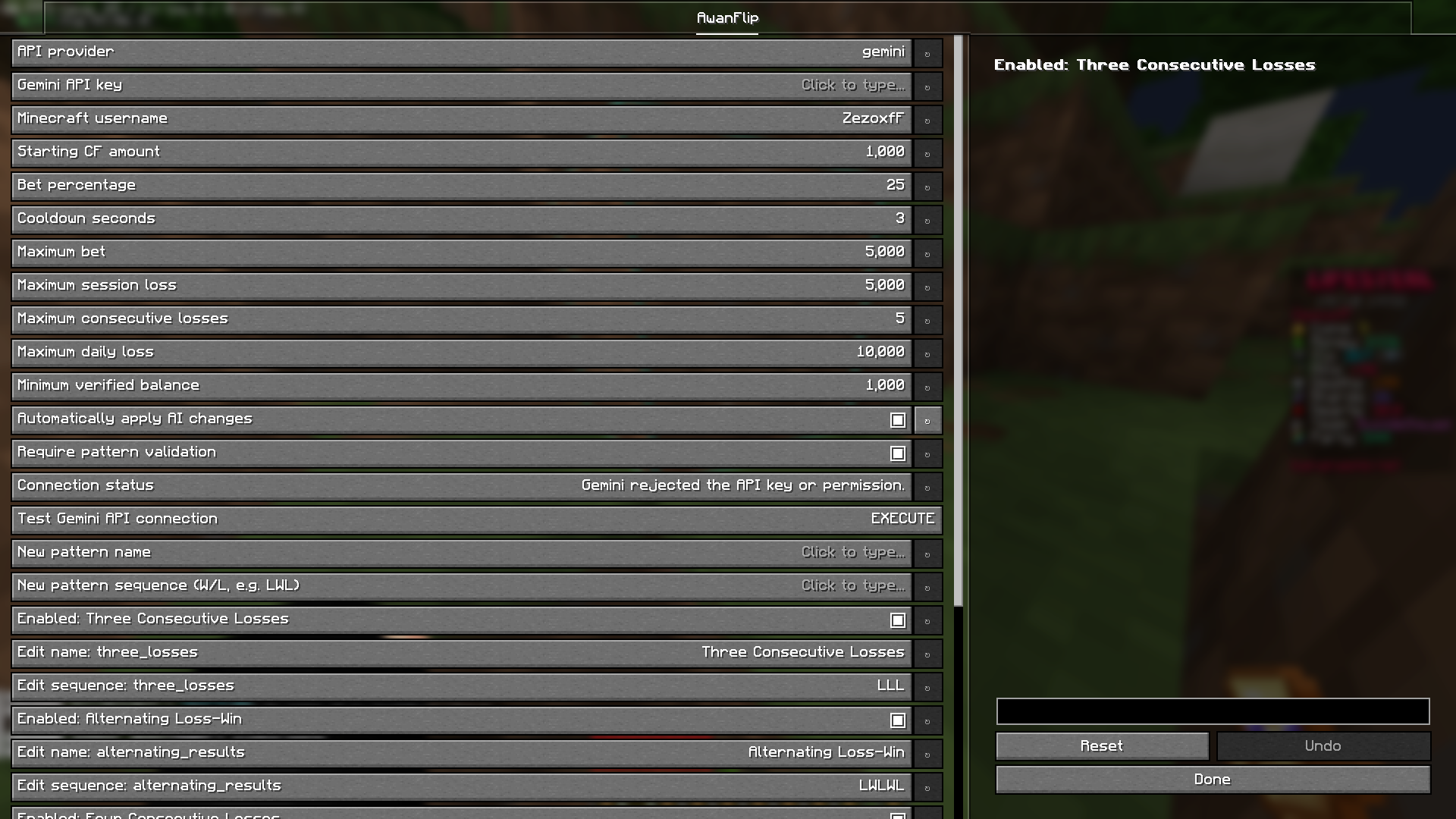
## 4. CONFIGURATION FILE

Automatically create:

`.minecraft/config/awanflip.json`

Use the following default structure:

{
  "apiProvider": "gemini",
  "apiKey": "",
  "minecraftUsername": "",
  "startingCF": 1000,
  "betPercentage": 25,
  "cooldownSeconds": 3,
  "maxBetAmount": 5000,
  "maxLossAmount": 5000,
  "maxConsecutiveLosses": 5,
  "maxDailyLoss": 10000,
  "minimumBalance": 1000,
  "autoApplyAIChanges": false,
  "requirePatternValidation": true,
  "winningPoints": [
    {
      "id": "three_losses",
      "name": "Three Consecutive Losses",
      "pattern": ["L", "L", "L"],
      "enabled": true,
      "source": "user"
    },
    {
      "id": "alternating_results",
      "name": "Alternating Loss-Win",
      "pattern": ["L", "W", "L", "W", "L"],
      "enabled": true,
      "source": "user"
    },
    {
      "id": "four_losses",
      "name": "Four Consecutive Losses",
      "pattern": ["L", "L", "L", "L"],
      "enabled": true,
      "source": "user"
    }
  ]
}

These are initial user-defined hypotheses, not verified guarantees of future wins.

Configuration requirements:
- Create the file on first launch.
- Never overwrite a valid existing configuration on startup.
- Validate fields and recover gracefully from malformed JSON.
- Preserve valid settings when possible.
- Write changes atomically.
- Support manual editing and GUI-based editing.
- Provide Reload Config and Save Config actions.
- Never print API keys to Minecraft chat or logs.
- Keep non-AI functionality operational if the API key is absent.
- Do not require recompilation to change the API key.

The API key will be entered by the user into the configuration file.

## 5. MINECRAFT CHAT RESULT PARSER

Only process actual Minecraft chat messages that match the result summary format.

Example:

GAME SUMMARY
LOSER
Amount Bet: $1,000
Winner: clo0p3rs
Loser: MinisterXD

The status line may be WINNER or LOSER. Do not assume it is always LOSER.

Extract:
- Summary identifier, when available.
- Status text.
- Amount Bet.
- Winner username.
- Loser username.
- Timestamp.
- Original parsed result sequence number.

Requirements:
- Parse Minecraft text components rather than screenshots.
- Handle formatting codes and component-based messages.
- Normalize whitespace safely.
- Support currency numbers with thousands separators.
- Do not mistake unrelated messages for results.
- Do not count the same result twice.
- Do not convert missing data into a guessed result.
- Do not infer a player's outcome from the status line alone if the winner and loser fields are available.
- Compare Winner and Loser against the configured Minecraft username.
- If the username matches Winner, record W.
- If the username matches Loser, record L.
- If the username cannot be identified, mark the result UNKNOWN and do not include it in the win/loss pattern sequence.
- Record parse failures in sanitized diagnostic logs.
- Make the parser configurable if the server's actual format differs.

The result history must remain available after the game closes or Minecraft restarts.

## 6. RESULT HISTORY

Store records locally, for example in:

`.minecraft/config/awanflip/history.jsonl`

Each confirmed result should include:
- Unique event identifier or duplicate-detection fingerprint.
- Timestamp.
- Bet amount.
- Winner username.
- Loser username.
- Player outcome: W, L, or UNKNOWN.
- Relevant pattern matches.
- Balance before and after the CF, only if independently verified.
- Source and validation status.

Requirements:
- Never modify past results to fit an AI prediction.
- Use append-only records where practical.
- Detect duplicate summaries.
- Recover gracefully from a partially written final record.
- Keep backups when migrating the history format.
- Provide export and clear-history controls, with confirmation before deletion.

## 7. USER-DEFINED WINNING POINTS

Track the following initial patterns independently.

### Pattern A — Three Consecutive Losses

L → L → L

After the third consecutive loss, the next CF is a candidate winning point.

### Pattern B — Alternating Results

L → W → L → W → L

After this exact sequence, the next CF is a candidate winning point.

### Pattern C — Four Consecutive Losses

L → L → L → L

After the fourth consecutive loss, the next CF is a candidate winning point.

Requirements:
- Track sequences in chronological order.
- Use only confirmed W/L outcomes.
- Never count UNKNOWN results as wins or losses.
- Avoid duplicate CF creation if multiple patterns trigger together.
- Record which patterns triggered each decision.
- Make pattern matching deterministic and unit-testable.
- Reset or update the sequence according to explicitly defined rules.
- Do not assume that a candidate winning point guarantees the next CF will win.

### Bet Calculation

At an enabled candidate point:

`bet = floor(verifiedBalance × betPercentage / 100)`

Default bet percentage: 25%.

Final bet must not exceed:
- Verified available balance.
- Configured maximum bet.
- Any applicable minimum or maximum supported by the server.

If balance cannot be verified, do not automatically place a bet based on a guess.

## 8. GEMINI API INTEGRATION

Use Google Gemini API as the initial AI provider.

Use official, current documentation to select a supported model, API endpoint, request schema, and response format. Never hardcode an assumed model name or unsupported endpoint.

The API key must be loaded from:

`.minecraft/config/awanflip.json`

Requirements:
- Provide an API connection test.
- Handle invalid keys, rate limits, timeouts, network failures, and malformed responses.
- Run API requests asynchronously.
- Never block Minecraft's render or client thread.
- Limit concurrency and prevent duplicate requests.
- Use exponential backoff where appropriate.
- Do not send a request after Emergency Stop if it could trigger an automated action.
- Validate every response before applying it.
- Never let an AI response directly execute a Minecraft command.
- Enforce all risk limits locally.
- Do not include unrelated chat messages or credentials in AI requests.
- Never send the user's API key to another AI service.
- Keep the core mod functional without AI connectivity.

Perform deterministic statistics locally. Use Gemini primarily to propose, explain, and prioritize candidate patterns.

## 9. AI PATTERN DISCOVERY

The AI must investigate patterns beyond the three initially supplied.

For example, it may evaluate sequences such as:

L → W → W → L → L

This is only an example of a candidate, not a known winning pattern.

### Discovery Pipeline

1. Collect confirmed results.
2. Build chronological W/L sequences.
3. Generate candidate sequences of configurable lengths.
4. Calculate how often each sequence occurs.
5. Calculate the next-CF win rate after each occurrence.
6. Compare the observed rate against the baseline win rate.
7. Calculate sample size and confidence intervals.
8. Account for overlapping sequences and repeated testing.
9. Reserve later observations for out-of-sample validation.
10. Report results with clear statistical limitations.
11. Track the performance of each pattern as new results arrive.
12. Reassess previously accepted patterns periodically.

### Avoid False Discoveries

- Do not treat a few wins as evidence of a predictive advantage.
- Do not select only the most successful sequences without accounting for the number of patterns tested.
- Do not confuse historical association with causation.
- Do not claim certainty about a future win.
- If results are consistent with independent random outcomes, report that no reliable predictive edge has been demonstrated.
- If the dataset is too small, report INSUFFICIENT DATA.
- If the data format changes, pause pattern analysis until parsing is reliable.

The AI must be able to conclude that no useful pattern has been found.

## 10. AUTOMATIC PATTERN CORRECTION

AwanFlip must evaluate both user-defined and AI-discovered patterns.

For each pattern, track:
- Pattern identifier.
- Current version.
- Origin: USER or AI.
- Number of occurrences.
- Wins and losses after the pattern.
- Observed win rate.
- Baseline win rate.
- Confidence interval.
- Out-of-sample performance.
- Last evaluation timestamp.
- Current status: UNVERIFIED, CANDIDATE, VALIDATED, UNDERPERFORMING, DISABLED.

### Correction Rules

If a user-defined pattern performs poorly:
- Mark it UNDERPERFORMING or UNVERIFIED.
- Explain the evidence.
- Suggest a replacement only when supported by sufficient data.
- Preserve the original pattern.
- Store revisions as new versions.
- Provide Undo and Restore actions.

If an AI-discovered pattern performs poorly:
- Reduce its priority or disable it.
- Do not keep betting merely because it once performed well.
- Reevaluate it using new observations.

If a new pattern appears promising:
- Add it as a candidate.
- Validate it on unseen data.
- Do not immediately use it for automated betting.
- Promote it only if predefined statistical and risk criteria are satisfied.

### Automatic Changes

Default setting:

`autoApplyAIChanges = false`

When false, show suggested changes and request user confirmation.

When true, allow automatic status changes only if:
- Minimum evidence requirements are met.
- Validation criteria are satisfied.
- Risk limits are unchanged.
- The modification is versioned and reversible.
- The change cannot increase the configured risk limits.

Never silently erase the user's original rules.

## 11. RISK MANAGEMENT

Implement the following configurable controls:
- Maximum bet.
- Maximum loss per session.
- Maximum daily loss.
- Maximum consecutive losses.
- Minimum balance.
- Cooldown.
- Manual pause.
- Emergency Stop.
- Session reset with confirmation.

Requirements:
- Never automatically double a bet after a loss.
- Never increase the bet to chase previous losses.
- Never override Emergency Stop through an API response.
- Stop when a risk limit is reached.
- Clearly display the reason for a stop.
- Reset daily statistics according to a documented timezone setting.
- Do not claim that a stop-loss can recover past losses.

## 12. SETTINGS GUI

Build a clean Minecraft-compatible configuration screen with:

- API provider.
- API key field with masked display where practical.
- Test API button.
- Starting CF amount.
- Bet percentage.
- Maximum bet.
- Maximum loss.
- Maximum consecutive losses.
- Minimum balance.
- Cooldown.
- Winning-point list.
- Add Pattern.
- Edit Pattern.
- Enable/Disable Pattern.
- Restore Default Pattern.
- AI auto-apply toggle.
- Reload Config.
- Save Config.
- Export History.

Display API connection state and sanitized error messages.

## 13. STATISTICS GUI

Show:
- Total confirmed CFs.
- Wins and losses.
- Unknown or unparsed results.
- Current loss streak.
- Longest loss streak.
- Total amount wagered.
- Net result, only if reliable balance changes can be verified.
- Pattern-by-pattern occurrences and observed win rates.
- AI candidate patterns and validation status.
- Last 50 confirmed results.
- Current automation state.
- Last result and last triggered pattern.
- Reason for any automatic pause.

Never display a guessed balance as verified.

## 14. MOD ARCHITECTURE

Use clean, independent, testable components, for example:

- AwanFlipClient
- ConfigManager
- KeybindManager
- ChatResultParser
- ResultHistory
- PatternEngine
- PatternDiscoveryEngine
- PatternValidator
- AIAnalysisService
- RiskManager
- CFCommandController
- SettingsScreen
- StatisticsScreen

Use APIs compatible with the actual target environment. Verify Minecraft 1.21.11 and Fabric dependencies before selecting event hooks.

Do not invent nonexistent Fabric methods or rely on obsolete mappings.

## 15. TESTING REQUIREMENTS

Write and execute automated tests for:

1. Three consecutive losses.
2. Alternating L-W-L-W-L.
3. Four consecutive losses.
4. Multiple patterns triggering simultaneously.
5. Duplicate chat summaries.
6. Missing winner or loser.
7. Username matching.
8. Currency parsing with commas.
9. Invalid API key.
10. Network timeout.
11. Malformed AI response.
12. Insufficient balance.
13. Invalid configuration.
14. Corrupted history recovery.
15. Emergency Stop during a pending action.
16. Rejected CF creation command.
17. Repeated or overlapping sequences.
18. Patterns with insufficient samples.
19. Patterns that fail out-of-sample validation.
20. Automatic pattern rollback.

Build the project and fix actual compilation errors. Do not claim the project works until the build and relevant tests have actually run.

## 16. FINAL DELIVERABLES

Provide:

1. Complete Java source code.
2. Complete Gradle project.
3. Fabric metadata.
4. Gradle wrapper.
5. Unit tests.
6. Build instructions.
7. Installation instructions.
8. Sample `awanflip.json`.
9. Documentation for Gemini API setup.
10. A compiled and tested AwanFlip JAR.

The finished mod must be standalone and must not require CatFlip or any other existing AutoCF mod.

Prioritize correctness, reliable chat parsing, duplicate prevention, risk enforcement, transparent AI analysis, reversible pattern changes, and recovery from errors.

Do not promise guaranteed wins, error-free software, or predictive ability unsupported by validated data.