
Hey Kodari! I have a cool feature idea for a mod.
Could we get an in-game RGB Gradient Text Creator? Basically, something like the Birdflop website but built right into the game.
Here is how I picture it working: • Quick Access: You just press the G key to pop open a clean custom GUI menu. • Visual Color Picker: Instead of just typing hex codes, add a color selector wheel/box with a dot you can drag around to visually pick whatever color you want. • More Gradients: Let us add multiple color points (not just a start and end) so we can create complex, multi-color gradients! • Full Format Support: It should let you toggle bold (&l), italics (&o), underline (&n), and strikethrough (&m). • Cool Obfuscated Brackets: When you toggle the obfuscated/magic effect (&k) on, it should automatically add exactly 4 shifting characters to each side of your text to frame it and make it look awesome. • Dedicated Settings Keybind: Give us a separate hotkey in the controls menu so we can easily change these keybinds or adjust default gradient settings whenever we want. • Easy Copying: It outputs everything using the &#rrggbb hex style with a simple "Copy to Clipboard" button in the GUI so you can instantly paste the generated code into chat, signs, or commands.

Add the Fabric mod entrypoints and two configurable keybinds.
Build an owo-ui gradient editor with a draggable color picker, multiple stops, formatting toggles, and clipboard output.
Add a YACL settings page for default gradient settings and package the required libraries.
Added the RGB Gradient Text Creator mod.
G opens the owo-ui editor; H opens YACL settings. Both keybinds can be reassigned under Options → Controls → Key Binds.
The editor has a draggable color picker, editable gradient stops, live gradient preview, text input, and bold, italic, underline, strikethrough, and magic toggles.
Copy to Clipboard generates per-character
&#rrggbbcodes. Magic mode adds exactly four obfuscated characters on each side.Settings persist in
config/gradienttext.json; they set the editor’s default colors and formatting options.
add preview so i can see what the result will be
Add a live rendered-text preview alongside the generated code.
Rebuild its per-character RGB styles and formatting whenever text, colors, or toggles change.
Added a live rendered-text preview. It updates as you edit the text, colors, gradient stops, and formatting options, including the obfuscated brackets.
as you can see in the mod theres a line on top of the generated code when i press it creates a point or stop
Make the gradient bar clickable to add a stop at the clicked position.
Interpolate that position’s color from the current gradient and select the new stop.
Click the gradient strip to add a stop at that position using the color shown there. The new stop is selected automatically so you can recolor it with the picker. The Add stop button now inserts a stop between the selected stop and its neighbor.
the gradient strip is incorrect if i press the center its not the center of a text that i just wrote and problem 2 is that when i delete a stop the color of the text is still the same it was even after i deleted a stop problem 3 i cant remove one of the two stops if i im gonna make a text
Align stop positions to the characters in the current text.
Ensure deleting a stop immediately changes the generated text and preview.
Allow removing either of the two stops while keeping at least one valid color.
Fixed the gradient strip and stop removal behavior. Stop positions now track the typed text itself, with obfuscated brackets kept at the gradient’s ends. Removing either of the last two stops now leaves a valid single-color gradient, and the preview and generated code update immediately.
what is this. so i want the part of the gradient strip to not be blank it breaks i want when u press the gradient strip if u only have one color it places a stop but the gradient strip doesnt have a blank
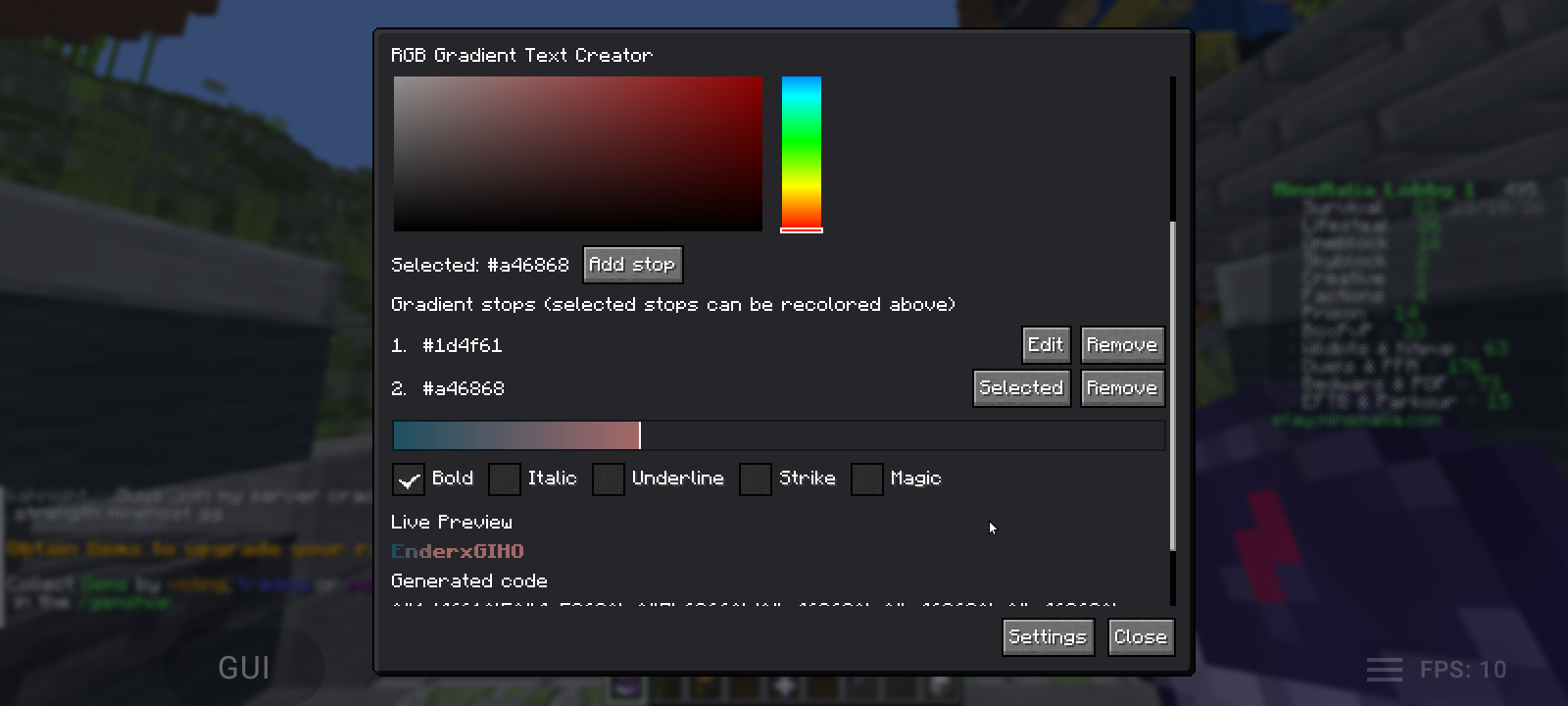
Keep the gradient strip fully filled when stops don’t reach either edge, including after adding a stop to a one-color gradient.
Fixed the blank sections: the gradient strip now extends the first and last stop colors to the edges, so adding a stop to a one-color gradient keeps the entire strip filled.
also add in the right of the dot gradient picker theres should be a color palette. and also the stops should show little dots on gradient slip and theres also a problem the magic just makes everything obfuscated it doesnt add it on the side so in the setting we can change how many obfuscated can there be on the sides and it should be &kllll and mixed evenly with the color also u can change the preview instead of the code just being to be read u can also change it and also can import a premade text to edit it
Add a clickable preset color palette beside the visual picker.
Show draggable stop markers on the gradient strip and fix magic mode with configurable side-character count and evenly colored framing.
Make the preview/code editable and add import-to-edit support.
Added the requested editor improvements:
Added a clickable preset color palette beside the color picker.
Added colored dot markers for gradient stops on the strip.
Magic mode now frames text with configurable
&k-obfuscatedlcharacters on each side; their colors blend across the whole text.Made the generated code editable, with Apply edited code and Import clipboard buttons so you can load formatted text and edit it in the creator.
make it so that u can move the boxes or the stops in the gradient slip
Make the gradient strip host movable stop markers.
Dragging a marker will reposition its stop and refresh the preview/code without adding an extra stop.
Gradient stops can now be dragged along the strip. Dragging a dot moves that stop and updates the preview and generated code; clicking elsewhere on the strip still adds a stop.
wait u can also add another mode in thw creator there should be another button where u can generate color text but not hex it use &l&o&colors without the #
Add a button to switch between RGB hex output and classic
&color codes.In classic mode, map each gradient color to its nearest Minecraft color and preserve formatting codes.
Teach import to recognize classic color codes too.
Added a Color format toggle to the creator. Switch between RGB hex (&#RRGGBB) and classic Minecraft color codes (&0–&f); classic mode uses the nearest matching color for each character and keeps formatting codes like &l and &o. Import also recognizes classic color codes.
what i meant with the classic mode is that the button changes page to the classic mode where u can design and copy it
The button now opens a separate Classic Color Text Creator page instead of only toggling the output format. It keeps your text, stops, and formatting when switching pages; the classic page generates & color codes for you to edit and copy.
alr heres the bugs when u place a made text inside of the black box there is alot of stops even though i made only 3 so is hardly inaccurate
Replace fixed per-character sampling with color-curve simplification, retaining meaningful gradient bends while collapsing redundant RGB samples.
Fixed formatted-text import: it now removes redundant per-character color samples and keeps only significant gradient changes, so a gradient made with three stops imports as approximately three stops instead of filling the editor with many.
the second page is wrong it shouldnt be a dot color picker it should be like &e &f etc
Replace the classic page’s RGB picker with clickable
&0–&fcolor-code buttons.Show classic codes for selected colors and stop labels while keeping RGB mode unchanged.
The Classic Color page now replaces the RGB picker with clickable &0–&f buttons. Selected colors and stop labels show their classic codes; RGB mode is unchanged.
now theres a buttton to save it another gui so ur saved texts could not be gone and u wouldnt have to make the same thing again its optional
Save the current text, gradient stops, formatting, and mode in the existing config file.
Add a separate Presets page to name, load, and delete saved designs.
Added a Saved texts page. Enter a name and save your current design; saved presets persist in config/gradienttext.json and can be loaded or deleted later. Presets retain the text, gradient stops, formatting, obfuscation settings, and creator mode.
what i meant is that there is a button on the gui maybe on the top right saying saved texts and just copy it
Change Saved texts into a button on the creator page that opens the saved list.
Make each saved entry a direct copy action, with no need to load it back into the editor.
Moved Saved texts to the top-right of the creator. On the saved-texts page, each preset now has a Copy button that copies its formatted text—including gradient colors and formatting—to your clipboard, without opening it in the editor.
there is no save button and also the save list shows the preview
Add a clear Save button to the creator that opens the save form.
Show each saved text’s content preview in the list, while keeping Copy and Delete actions.
Added a Save button to the creator that opens the save form. The saved-text list now shows a styled preview of each preset, with Copy and Delete still available.
u totally misunderstood me what i meant is that theres a save button when u made a text which then gets saved in to the save list
The creator’s Save button now immediately adds the current text to Saved texts with a unique name. The saved-texts page no longer has a separate save form; it shows the saved previews with Copy and Delete actions.
package com.kodari.gradienttext;

import net.fabricmc.api.ClientModInitializer;
import net.fabricmc.fabric.api.client.event.lifecycle.v1.ClientTickEvents;
import net.fabricmc.fabric.api.client.keybinding.v1.KeyBindingHelper;
import net.minecraft.client.option.KeyBinding;
import net.minecraft.client.util.InputUtil;
import net.minecraft.util.Identifier;
import org.lwjgl.glfw.GLFW;

public final class GradientTextClient implements ClientModInitializer {
    public static final String MOD_ID = "gradienttext";
    private static final KeyBinding.Category CATEGORY = KeyBinding.Category.create(Identifier.of(MOD_ID, "main"));

    @Override
    public void onInitializeClient() {
        GradientSettings.load();

        KeyBinding editorKey = KeyBindingHelper.registerKeyBinding(new KeyBinding(
                "key.gradienttext.open_editor",
                InputUtil.Type.KEYSYM,
                GLFW.GLFW_KEY_G,
                CATEGORY
        ));
        KeyBinding settingsKey = KeyBindingHelper.registerKeyBinding(new KeyBinding(
                "key.gradienttext.open_settings",
                InputUtil.Type.KEYSYM,
                GLFW.GLFW_KEY_H,
                CATEGORY
        ));

        ClientTickEvents.END_CLIENT_TICK.register(client -> {
            while (editorKey.wasPressed()) {
                client.setScreen(new GradientCreatorScreen());
            }
            while (settingsKey.wasPressed()) {
                client.setScreen(GradientSettings.createScreen(client.currentScreen));
            }
        });
    }
}