XpertNewGen

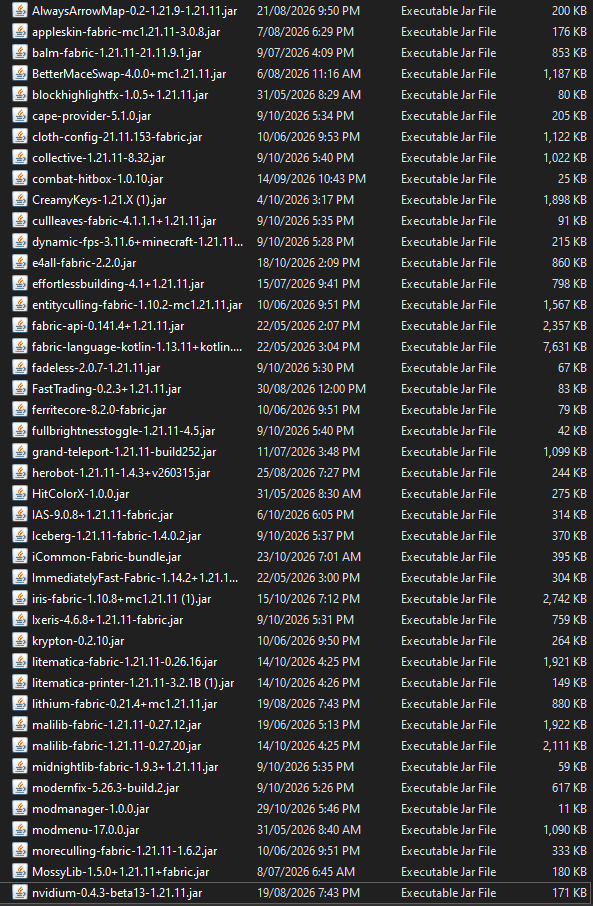
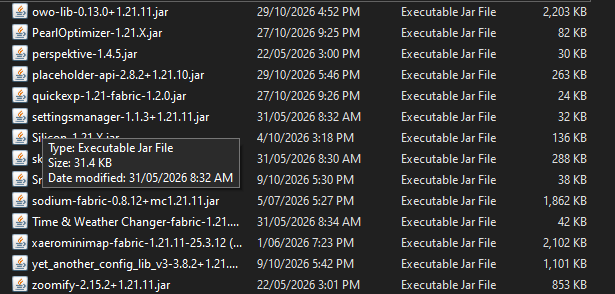
make me a mod that works just like lunar client of where u press the right-shift and a mod gui opens but instead of the black theme make it black and purple it has to be clean af and ill tell u what all mods for the mod gui to have dont add the lunar client mods do the mods i say but use the uis of the lunar client. and it cant be the exact name in the image for like iris-shaders(1) make it clean like Iris Shaders like that

Kodari AI
KodariNov 1 at 8:24 am 2
LunarStyleModMenu
A Fabric mod for Minecraft 1.21.1 that adds a Lunar Client-style mod menu GUI, opened by pressing Right Shift. The menu features a sleek black and purple theme with a clean, modern UI. It includes a customizable mod list with toggleable options, each displayed with polished Lunar Client-inspired icons and labels. The interface supports smooth navigation, mod configuration, and a visually appealing layout with purple accents on a dark background.
  1. Create the Fabric 1.21.11 client mod and Right Shift shortcut.

  2. Build a black-and-purple owo-ui browser for the mods shown in your screenshots, with clean names, search and categories.

  3. Include the required bundled-library manifest and project metadata.

Created Violet Menu, a client-side Fabric 1.21.11 mod. Right Shift opens and closes a black-and-purple owo-ui browser with search, category filters, clean display names such as Iris Shaders, and a details panel. It’s seeded with recognizable entries from your screenshots, not Lunar Client modules.

The entries are a catalog, not controls for the installed mods: Fabric can’t generically enable, disable, or configure third-party mods through one shared interface. Send me the specific features or mod settings you want to build, and I can add those integrations.

Kodari can make mistakes. Review important code before using.
Files
src
build.gradle
gradle.properties
manifest.kod
settings.gradle
Code
7 432
src/client/java/dev/kodari/violetmenu/VioletMenuClient.java
package dev.kodari.violetmenu;

import dev.kodari.violetmenu.client.VioletMenuScreen;
import net.fabricmc.api.ClientModInitializer;
import net.fabricmc.fabric.api.client.event.lifecycle.v1.ClientTickEvents;
import net.fabricmc.fabric.api.client.keybinding.v1.KeyBindingHelper;
import net.minecraft.client.MinecraftClient;
import net.minecraft.client.option.KeyBinding;
import net.minecraft.client.util.InputUtil;
import net.minecraft.util.Identifier;

public final class VioletMenuClient implements ClientModInitializer {
    public static final String MOD_ID = "violetmenu";
    private static KeyBinding openMenuKey;

    @Override
    public void onInitializeClient() {
        KeyBinding.Category category = KeyBinding.Category.create(Identifier.of(MOD_ID, "controls"));
        openMenuKey = KeyBindingHelper.registerKeyBinding(
                new KeyBinding("key.violetmenu.open", InputUtil.GLFW_KEY_RIGHT_SHIFT, category)
        );

        ClientTickEvents.END_CLIENT_TICK.register(VioletMenuClient::onEndTick);
    }

    private static void onEndTick(MinecraftClient client) {
        while (openMenuKey.wasPressed()) {
            if (client.currentScreen instanceof VioletMenuScreen) {
                client.setScreen(null);
            } else {
                client.setScreen(new VioletMenuScreen());
            }
        }
    }
}