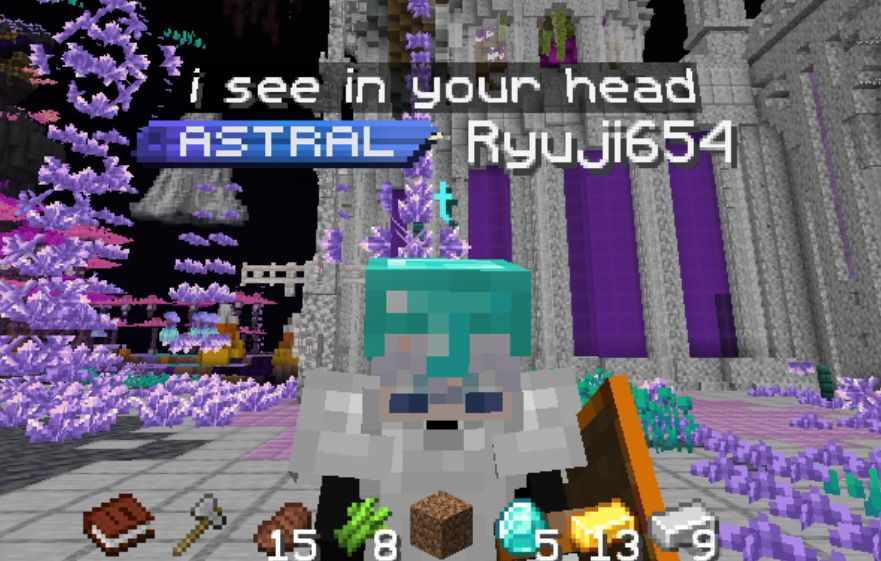
woaiini_

--- 📎 Attached 1 file(s):

File: pasted-code-1792758095152.txt

txt
Create a complete Minecraft plugin called GremoireChatBubbles for my Paper/Leaf 1.21.11 server. Whenever someone chats, show an animated floating chat bubble above their head that only players within 32 blocks can see. Make it compatible with both Java and Bedrock players using GeyserMC and Floodgate, without requiring client-side mods. Ensure bubbles disappear after 3 seconds and support simultaneous messages.

Add "/chatbubbles" to toggle visibility, "/chatbubbles on", "/chatbubbles off", and "/chatbubbles status". Save each player's preference after reconnecting or restarting. Include configurable radius, duration, colors, and animations.

Make it lightweight, secure, and fully functional. Provide all source files, configuration, dependencies, and build instructions. Verify Bedrock compatibility instead of assuming it works, and provide a fallback if necessary. Do not leave unfinished features or placeholder code.
(Add gradient color and any font support)
Config:

bubble:
  enabled: true
  visibility-radius: 32
  duration-seconds: 3
  max-message-length: 100
  background-color: "#202020"
  text-color: "#FFFFFF"
  hide-own-bubble: true
  hide-through-walls: false

compatibility:
  geyser-support: true
  floodgate-support: true
  bedrock-fallback: true

messages:
  enabled: "&aChat bubbles enabled."
  disabled: "&cChat bubbles disabled."
  status-enabled: "&aChat bubbles are currently enabled."
  status-disabled: "&cChat bubbles are currently disabled."
  no-permission: "&cYou don't have permission to use this command."
Kodari AI
KodariOct 23 at 12:29 pm 2
GremoireChatBubbles
Animated floating chat bubbles above players' heads on Paper/Leaf 1.21.11 servers. Bubbles appear on chat messages, visible only within configurable radius (default 32 blocks), disappear after 3 seconds, support simultaneous messages, and work for both Java and Bedrock players via GeyserMC/Floodgate without client mods. Features per-player toggle commands (/chatbubbles, on, off, status) with persistent preferences, configurable radius, duration, colors, animations, gradients, and font support. Lightweight, secure, with bedrock fallback for cross-compatibility.
  1. Check Geyser’s current handling of text-display entities for Bedrock viewers.

  2. Create the Gradle project, plugin metadata, configurable settings, and player-preference storage.

  3. Implement animated, per-viewer chat bubbles, toggle commands, and the documented compatibility fallback.

Created GremoireChatBubbles with persistent /chatbubbles preferences, configurable range, duration, colors, gradient text, font key, and animated, independently stacked bubbles for simultaneous messages.

Bedrock compatibility: Geyser and Floodgate are detected when installed. With the default fallback enabled, Bedrock players receive the regular chat message instead of a Java TextDisplay bubble; I can’t confirm that display entities render consistently across Geyser and Bedrock versions. Custom fonts require a client resource pack.

To compile in Kodari, click Compile in the top bar, then Compile in the window. Download the jar when the build succeeds, put it in the server’s plugins folder, and restart.

woaiini_

when i meant by animation i meant by a pop in not like animated like up and down make it like a light turning on aniamtion and add like a /reload system

Kodari AI
KodariOct 23 at 12:48 pm 1
  1. Change bubble appearance to a brief light-switch-style pop-in, without vertical bobbing.

  2. Add a /chatbubbles reload subcommand to reload plugin configuration.

  1. The bubble intro now fades in and brightens over a short interval, with its height fixed.

  2. I’ll check command and manager lifecycle so reload refreshes settings and preferences safely.

Updated the bubble intro to fade in while its background brightens over bubble.animation.pop-in-ticks (default: 6 ticks), with no up-and-down movement.

Added /chatbubbles reload. It reloads the config, refreshes bubble settings, removes active bubbles, and clears cached Bedrock detection. Players need the gremoirechatbubbles.reload permission (operators by default); console can also run it.

woaiini_

can you put it on the top of a player gamertag and like can you like anchor it so it doesnt look like ugged glitch moved and like fi the reload lplesae jand add luckperm support and make it like /chatbubble reload for those have perms

Kodari AI
KodariOct 23 at 12:53 pm 1
  1. Anchor bubbles above player name tags to prevent visual drifting.

  2. Fix reload so it refreshes configuration and active bubble state reliably.

  3. Add /chatbubble reload and make its permission work through LuckPerms.

Moved bubbles above the player’s name tag and disabled teleport interpolation so they follow without appearing to drift. Added /chatbubble as an alias, so /chatbubble reload uses the existing reload handler and its gremoirechatbubbles.reload permission check.

The reload handler already reloads the config, refreshes bubble settings, and clears active bubbles; the missing singular command was the issue. LuckPerms honors Bukkit permission nodes, so grant access with /lp group <group> permission set gremoirechatbubbles.reload true.

woaiini_

can you like fully anchor it in like the player upper like like up in the gamertag anchor it there and make it behave like an gamer tag but anchord so it doesnt follow the player aroundso it moves smoothly and make the message last for 3 seconds

Kodari AI
KodariOct 23 at 1:03 pm 1
  1. Anchor each bubble to the player’s upper body/name-tag position and smooth its movement with the player.

  2. Set bubble lifetime to 3 seconds.

Bubbles now stay anchored at a consistent height above each player and interpolate their movement over two ticks for smoother tracking. Simultaneous bubbles keep their original stack positions instead of shifting when another message expires.

The configured default lifetime is already 3 seconds (duration-seconds: 3), and the manager uses that setting for expiry.

woaiini_

canyou amke like the out aniamtion to like something that looks likeits fading away

Kodari AI
KodariOct 23 at 1:04 pm 1
  1. Add a configurable fade-out window at the end of each bubble’s lifetime.

  2. Fade both text and background smoothly while keeping the configured 3-second total duration.

Added a fade-out at the end of each bubble’s lifetime. Text and background fade together over the final 8 ticks by default (bubble.animation.fade-out-ticks); the configured 3-second total duration is unchanged.

Kodari can make mistakes. Review important code before using.
Files
src
build.gradle
README.md
settings.gradle
Code
11 679
src/main/java/com/kodari/gremoirechatbubbles/GremoireChatBubbles.java
package com.kodari.gremoirechatbubbles;

import com.kodari.gremoirechatbubbles.command.ChatBubblesCommand;
import com.kodari.gremoirechatbubbles.data.PreferenceStore;
import com.kodari.gremoirechatbubbles.listener.ChatListener;
import com.kodari.gremoirechatbubbles.manager.ChatBubbleManager;
import com.kodari.gremoirechatbubbles.compat.BedrockCompat;
import org.bukkit.Bukkit;
import org.bukkit.plugin.java.JavaPlugin;

public final class GremoireChatBubbles extends JavaPlugin {
    private PreferenceStore preferenceStore;
    private ChatBubbleManager chatBubbleManager;

    @Override
    public void onEnable() {
        saveDefaultConfig();
        preferenceStore = new PreferenceStore(this);
        preferenceStore.load();

        BedrockCompat bedrockCompat = new BedrockCompat(this);
        chatBubbleManager = new ChatBubbleManager(this, preferenceStore, bedrockCompat);
        Bukkit.getPluginManager().registerEvents(new ChatListener(this, chatBubbleManager), this);
        getCommand("chatbubbles").setExecutor(new ChatBubblesCommand(this, preferenceStore));

        getLogger().info("GremoireChatBubbles enabled.");
    }

    @Override
    public void onDisable() {
        if (chatBubbleManager != null) {
            chatBubbleManager.shutdown();
        }
        if (preferenceStore != null) {
            preferenceStore.save();
        }
    }

    public void reloadPluginConfig() {
        reloadConfig();
        if (chatBubbleManager != null) {
            chatBubbleManager.reload();
        }
        getLogger().info("GremoireChatBubbles configuration reloaded.");
    }
}