Implement Stage 1 of the user's Fabric 26.3 Java companion mod in this project. The project was just created and may only contain the Fabric template; inspect its actual Gradle files, mappings, Fabric Loader/API versions, Java level, and source layout first, then use only APIs valid for this exact template. There is no existing fakeplayerchunkloader JAR or source in this workspace: do not claim to inspect, recover, preserve, or depend on it. Build an independent compatible implementation.

Stage 1 scope: establish a working, server-authoritative player-like companion foundation with persistent identity/inventory and management commands. Implement a custom humanoid/player-style companion entity (not a renamed zombie or villager, and not an ordinary hostile/passive mob standing in as the companion). Use a real fake-player implementation only if the exact target APIs and available dependencies support it; otherwise use the closest valid custom humanoid entity and clearly document that it is not a real connected Minecraft player and identify any limitations. Register entity, attributes, renderer/client registration if required, and sensible vanilla/default player-like appearance. Add owner UUID, custom visible name, follow/stay mode, health/damage handling, and an independent persistent inventory including equipment/offhand where the chosen valid entity/inventory model supports it. Persist these correctly through entity/world save/load. Prevent non-owners from controlling the companion; allow server operators/admins under a reasonable permission check. Ensure all mutation is server-side.

Implement functional Brigadier commands under /companion: spawn <name>, dismiss <name>, follow <name>, stay <name>, teleport <name>, and status <name>. Resolve companion names safely, scope ownership/admin authorization correctly, return useful feedback/errors, and avoid ambiguous silent actions. Spawn near the issuing player (support console only if safely implemented). Follow should use real navigation/pathfinding and maintain sensible distance; stay should stop following/navigation; teleport is an explicit command action only. Dismiss must safely remove the entity. Status should report owner, health, mode, and inventory state. Register everything correctly for the exact Fabric 26.3 template.

Keep modules maintainable (e.g. entity, inventory, manager/commands, init/client rendering). Add concise README documentation for installation/build, commands/permissions, the custom-entity-vs-real-player limitation, persistence, and the unavailable external JAR. Do not add tests or claim unimplemented GUI, gathering, combat AI, schematic building, XP transfer, or chunk-loading features. This is intentionally only the first foundation stage; leave the project in a clean state suitable for later stages. Do not ask to run Gradle/build or report build logs; I will compile the project after your changes.

Kodari AI
KodariOct 25 at 9:12 am 1
CompanionFoundation
Server-authoritative Fabric 26.3 mod establishing a persistent player-like companion entity with owner-bound identity, follow/stay modes, health handling, and independent inventory/equipment. Brigadier commands under /companion manage spawn, dismiss, follow, stay, teleport, and status with ownership/admin scoping. All state persists through world saves; non-owners cannot control companions. Custom humanoid entity (not a real Minecraft player) with vanilla player appearance, documented limitations, and clean module separation for future stages.
  1. Establish the 26.3 entity, persistence, registration, command, and rendering APIs from the mounted source.

  2. Build the companion entity with server-side follow/stay behavior and persistent owner/name/inventory state.

  3. Register it, add ownership-aware /companion commands and client rendering, then document scope and limitations.

[Generation stopped]

bal3607

start where we stopped

Kodari AI
KodariOct 25 at 9:28 am 5
  1. Inspect the actual template and confirm its versions and source layout.

  2. Implement the companion entity, persistence, registration, and client rendering using verified 26.3 APIs.

  3. Add ownership-aware management commands and concise README documentation.

Implemented Stage 1 as an independent Fabric 26.3 mod, using the template’s specified Java 25, Loader 0.19.5, Fabric API 0.161.0, and Loom 1.17 versions.

  • Added a custom humanoid companion with a vanilla player-style model and skin, owner UUID, visible name, health, follow/stay mode, pathfinding follow behavior, and persistent 27-slot inventory. Vanilla equipment, including offhand and armor, is also preserved.

  • Added /companion spawn, dismiss, follow, stay, teleport, and status. Management is limited to the owner or a source with moderator permission; spawn and teleport require a player.

  • Added README instructions and documented persistence and scope. This is not a real connected player or fake player; the unavailable fakeplayerchunkloader JAR/source is neither included nor required. No gathering, combat AI, GUI, or chunk loading is implemented.

Companions are obtained with /companion spawn <name> where command access is enabled; no spawn egg or item was added.

bal3607

this mod loads chunk

Kodari AI
KodariOct 25 at 9:28 am 1

No. This mod does not force-load chunks. A companion exists and can follow only while its area is loaded; it won’t keep chunks loaded when players leave.

bal3607

while player online

Kodari AI
KodariOct 25 at 9:28 am 1

Even while the owner is online, the companion does not force-load its chunk. It can follow while its area is loaded; if it’s too far away and the chunk unloads, it stops ticking until that area loads again.

bal3607

if its stays

Kodari AI
KodariOct 25 at 9:29 am 1

If it’s set to stay, it remains at that location only while its chunk is loaded. Being online doesn’t make it load the chunk; if the chunk unloads, the companion won’t tick or act until it loads again.

bal3607

make it do that

Kodari AI
KodariOct 25 at 9:29 am 1

The current mod doesn’t do that. The behavior you’re asking for is to keep a stayed companion’s chunk loaded while its owner is online, then stop force-loading it when the owner logs out, dismisses the companion, or switches it to follow.

bal3607

yes and when player or owner join and appears and start loading chunks

Kodari AI
KodariOct 25 at 9:30 am 1

Understood: while the owner is online, a companion set to stay should keep its location’s chunk loaded. When the owner joins, the mod should find their saved stayed companion, load its chunk, and make the companion active again. When the owner logs out, the companion is dismissed, or it switches to follow, that chunk should stop being force-loaded.

This is only a clarification—no code changes made.

bal3607

i need to add system where i can increase or decrease its chunk loading radius

Kodari AI
KodariOct 25 at 9:31 am 1

You can make the chunk-loading radius adjustable per companion, measured in chunks. For example, /companion radius <name> <chunks> could set it to 0–4; 0 keeps only the companion’s current chunk loaded, while larger values load a square around it.

The radius would apply only while the companion is in stay mode and its owner is online. On owner login, the mod would restore the companion and its chunk tickets; on logout, dismiss, or switching to follow, it would release those tickets. I’d recommend a small configurable maximum because each radius increase can load many chunks and affect server performance.

This is a feature proposal only; no code was changed.

bal3607

from menu

Kodari AI
KodariOct 25 at 9:32 am 1

Got it—you want to adjust the chunk-loading radius from an in-game menu, not with a command. The menu could show the current radius with − / + controls and apply it to the companion while it’s staying and its owner is online. The current mod doesn’t have that menu yet.

bal3607

yes do it

Kodari AI
KodariOct 25 at 9:48 am 4
  1. Check the existing companion implementation and project configuration.

  2. Add owner-online stay chunk loading with an adjustable radius and persistence.

  3. Add an owo-ui menu to change the radius and document how to use it.

Added the in-game radius menu and owner-online chunk loading for companions in stay mode.

  • Press O near a companion to open its settings menu, then use − / + to set radius from 0 to 4.

  • The owner’s stay-mode ticket is restored when they join and released when they disconnect, dismiss the companion, or switch it to follow.

  • Radius 0 is the minimum area required to keep the companion ticking; higher values load a wider area.

  • The menu applies changes through an ownership-checked server command. The server remains authoritative.

  • Added owo-lib as a dependency and updated the README. This uses vanilla chunk tickets; it does not depend on the unavailable external JAR.

No build was run.

bal3607

menu is not opening

Kodari AI
KodariOct 25 at 9:54 am 1

The generation was stopped before any content could be produced.

bal3607

inventory of player is not opening when i click it

Kodari AI
KodariOct 25 at 10:07 am 3

I’ll trace the companion’s click handling and inventory UI, then fix the interaction path that should open it.

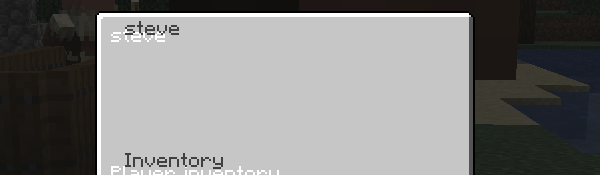
Right-clicking the companion with your main hand now opens an owo-ui inventory screen showing its 27 persistent storage slots and your player inventory. Item transfers are server-managed, and only the owner or a moderator can access it.

bal3607

fix that

Kodari AI
KodariOct 25 at 10:13 am 1

Fixed the inventory screen: vanilla’s built-in title and “Inventory” labels were drawing over the owo layout. I suppressed those duplicate labels and made outside-click detection match the actual panel, so clicks inside it won’t be treated as outside the menu.

Kodari can make mistakes. Review important code before using.
Files
src
build.gradle
gradle.properties
manifest.kod
README.md
settings.gradle
Code
20 1,187
src/client/java/dev/kodari/playercompanion/client/CompanionModClient.java
package dev.kodari.playercompanion.client;

import dev.kodari.playercompanion.CompanionEntityTypes;
import dev.kodari.playercompanion.CompanionEntity;
import dev.kodari.playercompanion.CompanionMenuTypes;
import dev.kodari.playercompanion.client.screen.CompanionSettingsScreen;
import dev.kodari.playercompanion.client.screen.CompanionInventoryScreen;
import dev.kodari.playercompanion.client.render.CompanionRenderer;
import net.fabricmc.api.ClientModInitializer;
import net.fabricmc.fabric.api.client.event.lifecycle.v1.ClientTickEvents;
import net.fabricmc.fabric.api.client.keymapping.v1.KeyMappingHelper;
import net.fabricmc.fabric.api.client.rendering.v1.EntityRendererRegistry;
import net.minecraft.client.KeyMapping;
import net.minecraft.client.Minecraft;
import net.minecraft.client.gui.screens.MenuScreens;
import net.minecraft.world.entity.EntityType;
import net.minecraft.world.level.entity.EntityTypeTest;
import net.minecraft.world.phys.AABB;
import com.mojang.blaze3d.platform.InputConstants;

public final class CompanionModClient implements ClientModInitializer {
	private static final KeyMapping OPEN_COMPANION_MENU = KeyMappingHelper.registerKeyMapping(new KeyMapping(
		"key.playercompanion.open_settings",
		InputConstants.Type.KEYBOARD,
		InputConstants.KEY_O,
		KeyMapping.Category.MISC
	));

	@Override
	public void onInitializeClient() {
		EntityRendererRegistry.register(CompanionEntityTypes.COMPANION, CompanionRenderer::new);
		MenuScreens.register(CompanionMenuTypes.COMPANION_INVENTORY, CompanionInventoryScreen::new);
		ClientTickEvents.END_CLIENT_TICK.register(CompanionModClient::handleMenuKey);
	}

	private static void handleMenuKey(Minecraft client) {
		if (!OPEN_COMPANION_MENU.consumeClick() || client.player == null) {
			return;
		}
		var player = client.player;
		var nearbyCompanions = player.level().getEntities(
			EntityTypeTest.forClass(CompanionEntity.class),
			player.getBoundingBox().inflate(8.0),
			entity -> true
		);
		CompanionEntity nearest = null;
		double nearestDistance = Double.POSITIVE_INFINITY;
		for (CompanionEntity companion : nearbyCompanions) {
			double distance = player.distanceToSqr(companion);
			if (distance < nearestDistance) {
				nearest = companion;
				nearestDistance = distance;
			}
		}
		if (nearest == null) {
			return;
		}
		String visibleName = nearest.getCustomName() == null ? nearest.getCompanionName() : nearest.getCustomName().getString();
		client.gui.setScreen(new CompanionSettingsScreen(visibleName, nearest.getLoadingRadius()));
	}
}