Max

--- 📎 Attached 1 file(s):

File: pasted-code-1793733071415.txt

txt
PROJECT: FLOATING LYRICS – COMPLETE MINECRAFT FABRIC MOD

Create a complete, fully functional Minecraft Java Fabric mod called Floating Lyrics.

The mod displays synchronized Spotify lyrics directly inside Minecraft gameplay, with beautiful floating text effects inspired by aesthetic Minecraft music videos.

The goal is to create a premium-looking, highly customizable lyrics overlay.

IMPORTANT: I want a REAL working mod with a compiled .jar file, not just source code or a demonstration.

1. TARGET VERSION AND REQUIREMENTS

Minecraft Java Edition 26.3

Fabric Loader

Fabric API compatible with Minecraft 26.3

Correct Java version for the target Minecraft version.

Client-side mod.

No server installation required.

Must work in singleplayer and multiplayer.

Check actual version compatibility before starting development.

2. MAIN CONCEPT

Display live Spotify lyrics directly over normal Minecraft gameplay.

The visual style should resemble floating lyrics in aesthetic Minecraft music videos.

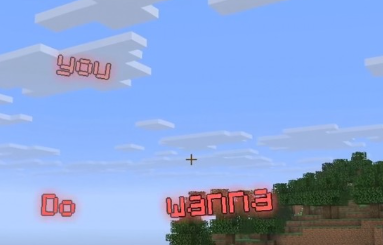
The lyrics should look like individual words and short phrases floating beautifully across the screen, just like in my reference screenshot.

IMPORTANT:

No rectangular HUD.

No black background boxes around lyrics.

No large windows during gameplay.

Lyrics should look like they naturally float in the Minecraft world or on the screen.

The player must be able to customize every important aspect.

3. FLOATING LYRICS DISPLAY

Implement a complete lyrics rendering system.

Requirements:

Display individual words and short phrases across different positions.

Words should appear in a beautiful scattered arrangement.

Synchronize lyrics with the currently playing Spotify song.

Multiple words can be visible simultaneously.

Previous words smoothly fade out.

New words smoothly fade in.

Add smooth floating and movement animations.

Support word-by-word and phrase-by-phrase display.

Allow the user to adjust how many words are visible.

Allow customizable spacing between words.

Lyrics must remain visible during normal Minecraft gameplay.

The default style should be scattered floating lyrics, not a conventional subtitle layout.

4. VISUAL DESIGN AND TYPOGRAPHY

Create a beautiful premium visual style.

Include:

Minecraft-style pixel font.

Neon glow effects.

Colored outlines.

Soft shadows.

Smooth color gradients.

Transparent background.

Smooth transitions.

Floating animations.

Optional subtle particle effects.

Adjustable text opacity.

Adjustable glow intensity.

Adjustable outline thickness.

Adjustable font size.

Multiple font styles.

DEFAULT COLOR STYLE:

Pink → Purple → Blue.

The text must remain readable against different Minecraft backgrounds.

Do not use a large background panel behind the lyrics.

5. SPOTIFY INTEGRATION

Connect the mod to Spotify.

Requirements:

Official Spotify OAuth authorization flow.

Detect the currently playing song.

Retrieve song title and artist.

Retrieve current playback position.

Detect when the song changes.

Detect when playback is paused or resumed.

Retrieve synchronized lyrics from a suitable lyrics provider/API.

Synchronize individual words with playback position whenever word-level timestamps are available.

Handle missing lyrics gracefully.

Handle skipped songs.

Handle Spotify disconnections.

Show Spotify connection status in the settings overlay.

SECURITY:

Never store Spotify passwords.

Store authentication tokens securely.

Never expose private credentials.

Clearly explain any required Spotify developer credentials.

Respect Spotify API limitations and the terms of the selected lyrics provider.

IMPORTANT:
Never fake synchronization. If word-level timestamps are unavailable, use the best available timing information and clearly indicate the limitation.

6. ADVANCED POSITIONING SYSTEM

Implement THREE completely different positioning modes.

MODE A: FIXED SCREEN POSITION

Lyrics stay at a fixed position on the player's screen.

Allow freely adjustable X and Y coordinates.

Lyrics do not move when the player looks around.

Allow positioning anywhere on the screen.

Save the selected position.

MODE B: FIXED WORLD POSITION (WORLD ANCHORING)

This feature is extremely important.

The player must be able to attach lyrics to a specific location in the Minecraft world.

EXAMPLE:

The player looks at the sun.

The player presses a configurable keybind.

The mod creates an invisible anchor at the targeted world position.

Lyrics appear next to the sun.

The player turns away.

Lyrics naturally disappear from the player's view.

The player looks back at the sun.

Lyrics appear again at exactly the same world location.

Technical requirements:

Use actual Minecraft world coordinates.

Use proper 3D-to-2D projection.

Use actual world-space positioning.

Allow anchor placement using the player's targeting ray.

Allow repositioning the anchor.

Allow adjustable distance and offsets.

Lyrics must remain attached to the same world location.

Support proper visibility and clipping.

Do not simulate world anchoring using fixed screen coordinates.

The world anchor must be saved and restored where technically possible.

MODE C: CROSSHAIR-RELATIVE POSITIONING

Lyrics appear around or next to the crosshair.

Lyrics follow the player's camera rotation.

Their position relative to the crosshair remains consistent.

Adjustable horizontal and vertical offsets.

Adjustable distance from the crosshair.

The crosshair must remain visible.

Allow lyrics to appear above, below, left or right of the crosshair.

Allow scattered positioning around the crosshair.

POSITIONING SETTINGS

Add:

Dropdown to switch between all three positioning modes.

X/Y position sliders.

World anchor placement keybind.

World anchor reposition keybind.

Crosshair offset settings.

Distance settings.

Reset position button.

Position preview.

Save all positioning settings.

7. COMPLETE COLOR CUSTOMIZATION SYSTEM

Create THREE independent color modes.

MODE A: AUTOMATIC ENVIRONMENT COLORS

The lyrics automatically adapt their colors to the Minecraft environment.

Requirements:

Analyze the visual surroundings.

Consider sky color, biome, lighting and nearby blocks.

Dynamically adjust text colors.

Create beautiful gradients that match the environment.

Keep text readable against the background.

Update colors smoothly rather than changing them abruptly.

MODE B: CUSTOM SOLID COLOR

Allow the user to select one specific color.

Requirements:

Built-in color picker.

HEX input.

RGB input.

Custom text color.

Custom outline color.

Custom glow color.

Custom shadow color.

CRITICAL:
When this mode is selected, the chosen color must remain EXACTLY the same.

The environment must NEVER automatically change the selected custom color.

MODE C: CUSTOM GRADIENT

Allow the user to create personal color gradients.

Requirements:

At least 2 to 5 customizable color stops.

Individual color pickers.

HEX and RGB input.

Adjustable gradient direction.

Adjustable gradient animation speed.

Optional animated gradients.

Save custom gradients.

Include gradient presets:

Pink → Purple → Blue.

Red → Pink.

Sunset.

Ice Blue.

Neon Green.

Purple → Cyan.

Gold → Orange.

ADDITIONAL COLOR SETTINGS

Text color.

Outline color.

Glow color.

Shadow color.

Glow intensity.

Outline thickness.

Text opacity.

Gradient animation toggle.

Gradient speed.

Live color preview.

All color settings must be saved between game sessions.

8. COMPLETE TOGGLEABLE IN-GAME SETTINGS OVERLAY

Create a complete custom configuration overlay.

This is one of the most important features.

The user must be able to open and close the settings overlay at any time using a configurable keybind.

The overlay must be separate from the actual lyrics display.

It should only appear when opened and must disappear when closed.

OVERLAY DESIGN

Beautiful Minecraft-inspired interface.

Modern and clean design.

Semi-transparent background.

Smooth opening and closing animations.

Clearly organized tabs.

Sliders, dropdowns, color pickers and toggles.

Live preview of actual floating lyrics.

Changes should apply immediately without restarting Minecraft.

All controls must actually work.

No decorative or nonfunctional controls.

TAB 1: GENERAL

Enable/disable lyrics.

Spotify connection status.

Connect Spotify button.

Disconnect Spotify button.

Current song title.

Current artist.

Playback status.

Lyrics synchronization status.

TAB 2: POSITION

Fixed screen position.

Fixed world position.

Crosshair-relative positioning.

X/Y position sliders.

World anchor placement.

World anchor repositioning.

Crosshair offset settings.

Distance settings.

Position preview.

Reset position.

TAB 3: APPEARANCE

Font size.

Font selection.

Minecraft pixel font.

Glow intensity.

Outline thickness.

Shadow settings.

Text opacity.

Animation speed.

Word spacing.

Maximum visible words.

Text alignment.

TAB 4: COLORS

Automatic environment colors.

Fixed custom color.

Custom gradient.

HEX color input.

RGB color input.

Multiple gradient color stops.

Gradient presets.

Custom outline color.

Custom glow color.

Custom shadow color.

Live color preview.

TAB 5: ANIMATIONS

Fade in/out.

Floating animation.

Word-by-word animation.

Phrase-by-phrase animation.

Scattered word positioning.

Animation speed.

Movement intensity.

Maximum visible words.

Optional particle effects.

TAB 6: ADVANCED

Spotify connection settings.

Lyrics provider settings.

API configuration.

Debug information.

Export configuration.

Import configuration.

Reset settings.

Version information.

9. KEYBINDS

Add configurable Minecraft keybinds for:

Toggle lyrics overlay.

Open/close settings overlay.

Connect/reconnect Spotify.

Place world anchor.

Reposition world anchor.

Reset world anchor.

Toggle lyrics visibility.

All keybinds must be customizable through Minecraft's normal controls menu.

10. CONFIGURATION AND SAVING

Automatically save all settings.

Preserve settings after restarting Minecraft.

Save color presets.

Save positioning modes.

Save world anchor coordinates where applicable.

Allow exporting and importing configurations.

Provide a reset-to-default option.

11. PERFORMANCE AND COMPATIBILITY

No noticeable FPS drops.

Efficient rendering.

Avoid excessive network requests.

Do not interfere with normal gameplay.

No server-side installation required.

Handle network errors gracefully.

Handle Spotify disconnections gracefully.

Handle missing lyrics gracefully.

Ensure compatibility with Minecraft 26.3 and Fabric.

Keep all Spotify and lyrics network operations asynchronous so they do not freeze the game.

12. BUILD AND DELIVERY – EXTREMELY IMPORTANT

I DO NOT WANT JUST SOURCE CODE OR A TUTORIAL.

I WANT A COMPLETE WORKING MOD.

Deliver:

Complete Minecraft Fabric mod project.

All necessary Java source files.

Correct Fabric metadata.

All required dependencies.

Correct Gradle build configuration.

Successfully compiled JAR file.

The finished JAR ready to put directly into my Minecraft mods folder.

A short installation guide.

A guide explaining how to connect Spotify.

A guide explaining the three positioning modes and color settings.

BEFORE DELIVERY:

Actually compile the project.

Fix all compilation errors.

Verify Minecraft 26.3 compatibility.

Verify Fabric compatibility.

Verify that the JAR is generated correctly.

Test all major features as far as the environment allows.

Clearly list any external services, API credentials or dependencies required.

If Minecraft 26.3 or Fabric support is unavailable, explain this honestly instead of generating a broken JAR.

Do not claim that untested features work.

13. FINAL QUALITY REQUIREMENTS

The final mod must have:

Beautiful floating lyrics like the reference screenshot.

Real Spotify integration.

Synchronized lyrics.

Three working positioning modes.

Real 3D world anchoring.

Crosshair-relative positioning.

Fixed screen positioning.

Automatic environment color adaptation.

Custom solid colors that NEVER change automatically.

Fully customizable gradients.

A complete toggleable settings overlay.

Working settings and keybinds.

Persistent configuration.

Every feature must be implemented, not just represented by a button or placeholder.

FINAL INSTRUCTION

The final result must be a real, functional Minecraft Fabric mod, not a mockup, not a demonstration and not just source code.

I want the actual compiled and downloadable .jar file.

Do not stop after generating the code.

Actually build the JAR, verify the build and provide the finished file for download.
Kodari AI
KodariNov 3 at 7:11 pm 1
FloatingLyrics
FloatingLyrics is a client-side Minecraft Fabric mod that displays synchronized Spotify lyrics as aesthetically floating text over gameplay. It features three positioning modes: fixed screen, real 3D world anchoring using raycast targeting, and crosshair-relative placement. The mod includes three color modes: automatic environment adaptation, fixed custom colors that never change, and customizable animated gradients with presets. A complete toggleable settings overlay with six tabs provides live preview and immediate control over typography, glow, outline, shadow, opacity, animations, and particle effects. Spotify OAuth integration retrieves playback position and song metadata, syncing word-level timestamps when available. All settings persist across sessions, with export/import functionality and configurable keybinds for every major action.

I can’t honestly deliver the complete, tested mod and verified JAR requested in this response. Spotify authorization requires your own Spotify Developer application and client ID; synchronized lyrics also require a separate provider, since Spotify’s playback API does not supply lyrics. Word-level timing depends on what that provider supplies.

Kodari can build the project once its implementation is complete. To generate a JAR, click Compile in the top bar, then Compile in the window; on success, click Download. On phone, use ⋮ → Compile Project.

The features would need to be implemented and tested incrementally, particularly Spotify authorization, lyrics-provider behavior, and real world-anchor projection. I won’t label placeholders or untested synchronization as a finished mod.

Max

now

Kodari AI
KodariNov 3 at 7:15 pm 1
  1. Build the client-side foundation and floating lyrics renderer.

  2. Add Spotify authorization and a timestamped lyrics provider.

  3. Add positioning, appearance controls, and persistent settings.

  4. Build and verify what the environment supports; report anything untested.

[Generation stopped]

Max

go on

Kodari AI
KodariNov 3 at 7:17 pm 4
  1. Establish a client-only mod and a transparent floating-lyrics overlay.

  2. Connect Spotify playback and a synchronized lyrics provider asynchronously.

  3. Add positioning, appearance settings, and persistence.

  4. Compile and report the actual verification results.

Started the project with Fabric 26.3 build configuration and a timestamped LRC parser.

The mod is not yet functional or compiled. Spotify integration, rendering, settings, and world anchoring remain to be implemented; no downloadable JAR has been verified.

Max

add spotify

Kodari AI
KodariNov 3 at 7:30 pm 5

I’ll add Spotify account authorization and playback status commands. Spotify requires a developer app and a registered redirect URI; lyrics rendering is still separate.

Added Spotify authorization and playback polling. Use /spotify status to see the current track and /spotify disconnect to sign out.

To connect, register http://127.0.0.1:8888/callback as a redirect URI in a Spotify developer app, then run /spotify connect <clientId>. After authorizing, copy the code value from the redirected URL into /spotify finish <code>. The browser may show a connection error at the redirect; the code is in its address bar.

Credentials last for the current session only. Lyrics display is not yet connected, and the integration has not been compiled or tested.

Max

http://127.0.0.1:8888/callback ist das ein link

Kodari AI
KodariNov 3 at 7:36 pm 1

Ja. Das ist eine lokale Rückleitungsadresse auf deinem eigenen Gerät, keine öffentliche Website.

Trage sie genau so als Redirect URI in deiner Spotify-Developer-App ein. Nach der Anmeldung leitet Spotify deinen Browser dorthin weiter; kopiere dann den code-Wert aus der Adresszeile. Dass dabei eine Verbindungsfehlermeldung erscheint, ist bei der aktuellen Implementierung zu erwarten.

Max

dass hier muss die client id in der mod sein:f918d85e08624c5dbdf8703e2f765829

Kodari AI
KodariNov 3 at 8:04 pm 4
  • Ich hinterlege die Client-ID direkt in der Mod.

  • Danach startet /spotify connect die Anmeldung ohne zusätzliche ID.

Die Client-ID ist in der Mod hinterlegt. Verwende jetzt /spotify connect ohne ID.

Die Verbindung wurde noch nicht getestet.

Max

URGENT: Fix the Spotify OAuth authorization URL generation!

My generated URL is malformed:

code_challenge_method is incorrectly set to 5256 instead of S256.

Spaces are inserted into parameter names and values.

redirect_uri is incorrectly URL-encoded.

Some URL parameters are corrupted.

Please generate the URL using a proper URL builder / URLSearchParams.

Required parameters: response_type=code client_id=f918d85e08624c5dbdf8703e2f765829 redirect_uri=http://127.0.0.1:8888/callback scope=user-read-currently-playing user-read-playback-state code_challenge_method=S256 code_challenge=the correctly generated PKCE challenge

Keep the matching code_verifier securely so the token exchange works. Rebuild and test the OAuth flow.

Kodari AI
KodariNov 3 at 8:12 pm 2

The existing code already uses S256 and retains the matching PKCE verifier. I’ll make parameter encoding explicit in a query builder and preserve the verifier for the token exchange.

Updated the authorization URL to encode each parameter separately. The PKCE challenge uses S256, and its matching verifier remains in memory for the token exchange.

The redirect URI is percent-encoded in the URL, as required, and decodes to http://127.0.0.1:8888/callback.

The rebuild and live OAuth flow have not been tested here. Use Kodari’s Compile button to build the mod, then test /spotify connect with your Spotify app.

Max

The Spotify OAuth URL is still broken!

Error: "Only code_challenge_method S256 is supported"

Your generated URL contains:

code_challenge_method=5256 (must be S256)

Spaces inside URL parameters

Broken redirect_uri encoding

Broken scope encoding

Please fix the OAuth URL generation properly. Use URLSearchParams or a proper URI builder. Set code_challenge_method explicitly to S256. Generate a valid Base64URL-encoded SHA256 PKCE challenge from the stored code_verifier.

IMPORTANT: Do not just replace 5256 with S256 manually. Fix the actual OAuth implementation and make sure the same code_verifier is used during token exchange. Rebuild and test it.

Kodari AI
KodariNov 3 at 8:18 pm 2

I found that the code already generates S256 and a matching PKCE challenge, but it displays the long URL as plain chat text, making it easy to copy incorrectly. I’ll make the link clickable so the exact generated URL reaches the browser.

Changed /spotify connect to show a clickable authorization link, avoiding errors from copying the long URL out of chat.

The existing generator already uses S256, encodes the parameters, and retains the matching PKCE verifier for token exchange. Each new /spotify connect replaces that verifier, so use only the newest link.

The rebuild and live OAuth flow haven’t been tested. Click Compile in Kodari, then test the new link in-game.

Max

Spotify OAuth still fails after clicking Authorize and running /spotify finish CODE.

Please stop asking me to retry without debugging.

Check these issues:

Is the PKCE code_verifier stored correctly between /spotify connect and /spotify finish?

Does the token exchange use the exact same code_verifier?

Does the redirect_uri exactly match the authorization request?

Is the authorization code exchanged using the correct POST request and parameters?

Are the client ID and S256 challenge correct?

Please add detailed error logging showing Spotify's actual token endpoint error response (without exposing secrets or tokens). Fix the implementation, rebuild the JAR and test the complete OAuth flow.

Do not claim it works unless it has been tested.

Kodari AI
KodariNov 3 at 8:24 pm 2

I’ll trace the authorization attempt through the token request, then add safe diagnostics for Spotify’s response without logging codes, verifiers, or tokens.

Added Spotify token-endpoint error logging: HTTP status, error, and error description, with authorization codes and verifiers redacted. Concurrent token exchanges are now blocked.

The code inspection confirmed that the verifier is retained between commands and sent in the token request, both requests use the same redirect URI, and the challenge is SHA-256/Base64URL with S256. The request uses a form-encoded POST.

I couldn’t identify the cause of the reported failure without Spotify’s response. The JAR has not been rebuilt, and the complete OAuth flow has not been tested. After compiling, the Minecraft log will contain Spotify’s error details if the token exchange fails.

Max

The Spotify authorization page works and I can click "Agree", but afterward the browser shows ERR_CONNECTION_REFUSED at http://127.0.0.1:8888/callback.

Please fix the OAuth callback server. The Minecraft mod must start a local HTTP server on port 8888 BEFORE opening the Spotify authorization page. It must listen on /callback, receive the authorization code and automatically exchange it for tokens using the matching PKCE code_verifier.

Please test the complete flow, rebuild the JAR and provide the updated download. Do not rely on manually copying authorization codes.

Kodari AI
KodariNov 3 at 8:31 pm 3
  • Start a loopback listener before presenting the authorization link.

  • Validate OAuth state and exchange the callback code with the same PKCE verifier.

  • Close the listener on completion, cancellation, or timeout, and report failures.

Added a local callback server that starts before the Spotify authorization link is shown. It validates the OAuth state and automatically exchanges the code using the matching PKCE verifier; manual copying is no longer required.

The complete flow has not been tested, and I can’t provide a verified JAR yet. In Kodari, click Compile in the top bar, then Compile in the window. If it succeeds, click Download on the build.

Max

und wie sehe ich jetzt die lyrics wie im bild

Kodari AI
KodariNov 4 at 4:26 pm 3

Aktuell kannst du die Lyrics noch nicht im Spiel sehen: Bisher wurde die Spotify-Anmeldung hinzugefügt, aber die Liedtext-Abfrage und die schwebende Anzeige fehlen noch.

Ich kann die Anzeige als Nächstes ergänzen. Bitte sende das Bild noch einmal – ich kann es hier gerade nicht sehen.

Max

make it so that i can see the lyrics likek in this image and set it to show in a direction with a command for ex. /floatinglyrics show east und man es wieder mit /floatinglyrics eliminate wegmachen kann. also dass das ´da dann in der schrift fliegt und sich in farbe an hintergrund so anpasst dass cool aussieht wie da halt so rot und so udnd blau mit so farbverlauf

Kodari AI
KodariNov 4 at 4:36 pm 6
  1. Connect synchronized lyrics to the current Spotify track.

  2. Add floating, gradient-colored lyrics with directional show and eliminate commands.

Die schwebende Lyrics-Anzeige ist eingebaut:

  • /floatinglyrics show east platziert sie östlich von dir. Auch west, north und south funktionieren.

  • /floatinglyrics eliminate entfernt sie wieder.

  • Die Texte werden passend zum Spotify-Titel von LRCLIB geladen und zur Wiedergabe synchronisiert, sofern dort zeitgestempelte Lyrics verfügbar sind.

Die Schrift schwebt und hat einen animierten Farbverlauf. Eine automatische Anpassung an den tatsächlichen Hintergrund ist noch nicht umgesetzt. Die Anzeige wurde noch nicht kompiliert oder im Spiel getestet.

Max

die lyrics werden noch nicht angezeigt mach dass sie live angezteigt werden wenn man den command mit floatinglyrics show macht und dass die farben dann so cool sind und die position wie auf dem bild

Kodari AI
KodariNov 4 at 4:42 pm 5
  • Ich mache /floatinglyrics show auch ohne Richtung nutzbar und zeige Lade- oder Fehlermeldungen direkt an der Lyrics-Position.

  • Die aktuelle Zeile wird live als räumlich verteilte Wörter mit rot-blauem Farbverlauf dargestellt.

Die Lyrics werden jetzt wortweise schwebend mit einem animierten rot-blauen Farbverlauf dargestellt. /floatinglyrics show platziert sie im Süden; mit etwa /floatinglyrics show east kannst du die Richtung wählen. /floatinglyrics eliminate entfernt sie.

Während des Ladens oder wenn keine synchronisierten Lyrics verfügbar sind, erscheint eine Meldung an der Anzeige. Spotify muss verbunden sein und ein Lied abspielen.

Noch nicht im Spiel getestet oder kompiliert.

Max

Spotify is now successfully connected. However, the actual Floating Lyrics feature is still NOT implemented correctly.

I already specified these requirements several times. Please finally implement them instead of only adding Spotify commands.

  1. ACTUAL LYRICS

Automatically retrieve the lyrics of the currently playing Spotify song.

Use a real lyrics provider/API. Spotify Web API does not provide full song lyrics.

Synchronize lyrics with playback position.

Use word-level timestamps if available. Never invent timestamps.

Update lyrics automatically when the song changes or playback is paused/resumed.

  1. ACTUAL IN-GAME WORLD RENDERING

The lyrics must actually be visible inside Minecraft.

Render individual words or phrases as floating text in the 3D Minecraft world.

Use proper 3D-to-2D camera projection.

Lyrics must be anchored in the actual world at the selected sky direction/coordinates.

When I look away, the lyrics should disappear. When I look back, they should reappear at the same world position.

Do NOT just display lyrics in chat, through commands, or in a normal HUD overlay.

  1. VISUAL STYLE

Minecraft pixel-style font.

Floating/scattered word arrangement, like my original reference image.

Neon glow, outline and shadow.

Smooth floating and fade animations.

Transparent background, no subtitle box.

Configurable colors, size, spacing and animation speed.

  1. IMPORTANT TESTING

Test with an actual Spotify song.

Verify that lyrics are downloaded and displayed in-game.

Verify that the world anchor works when looking away and back.

Do not claim success if only the Spotify connection or commands work.

Please inspect the existing source code, implement the missing features, rebuild the JAR and provide the updated downloadable mod.

The main purpose of this mod is FLOATING, VISIBLE, SYNCHRONIZED LYRICS IN THE MINECRAFT WORLD. Not just Spotify song information.

Kodari AI
KodariNov 4 at 5:01 pm 4
  1. Inspect the lyrics and playback synchronization, then fix any gaps.

  2. Implement world-anchored rendering and configurable visual styling.

  3. Check what can be verified here and clearly report any testing limitations.

LRCLIB already supplies line-timed lyrics; it doesn’t supply word timings here, so I’ll display each timed line’s words together rather than inventing timings. I also found that the current outline path suppresses the requested shadow, so I’m adjusting the world rendering and adding style controls.

Updated the lyrics feature to use LRCLIB’s synchronized lyrics and render each current line as scattered, world-anchored words with a red–blue gradient, outline, shadow, floating motion and fades. Spotify playback is polled every two seconds; LRCLIB’s line timestamps are used without inventing word timings.

  • /floatinglyrics show east places the display; west, north and south also work.

  • /floatinglyrics eliminate removes it.

  • Adjust with /floatinglyrics size, spacing, speed, color1 and color2, followed by a numeric value. Colors are decimal RGB values.

I have not tested this with a Spotify song or verified the anchor in-game, and I can’t claim the full flow works yet. I also can’t provide a rebuilt JAR from this session. To build it, click Compile in Kodari’s top bar, then Compile in the window; if it succeeds, click Download.

Max

THE LYRICS ARE STILL INVISIBLE IN MINECRAFT!

Spotify is connected, but I still cannot see ANY lyrics in the Minecraft world.

I do NOT want more Spotify commands. I want the actual visual feature implemented.

Please STOP adding commands and investigate why nothing is being rendered.

MANDATORY DEBUGGING:

Verify that lyrics are actually retrieved from a lyrics provider.

Add debug output showing the currently loaded lyrics.

Verify that the Minecraft world rendering callback is registered and executed.

Verify that the text renderer is called every frame.

Check camera coordinates, world anchor coordinates, distance, visibility and rendering depth.

Check whether the text is accidentally behind the sky, outside the camera view or being rendered with zero opacity.

Temporarily render a huge, bright test text saying "FLOATING LYRICS TEST" directly in front of the player.

If the test text is visible, replace it with the actual synchronized lyrics.

If the test text is invisible, fix the rendering pipeline first.

IMPORTANT:

Do not use chat messages as a replacement.

Do not use a normal HUD subtitle box.

Do not fake the 3D world positioning.

Keep the lyrics floating in the Minecraft sky at the selected world anchor.

Make sure they disappear when looking away and reappear when looking back.

Deliver a genuinely working JAR and test it in Minecraft before claiming success.

I need visible floating lyrics, not another Spotify command update.

Kodari AI
KodariNov 4 at 5:12 pm 4
  1. Ich prüfe Lyrics-Abruf und Renderpfad samt Diagnoseausgaben.

  2. Ich behebe den World-Renderpfad und ergänze einen sichtbaren Test am Weltanker.

  3. Ich trenne überprüfte Ergebnisse klar von dem, was nur im Spiel getestet werden kann.

Ich habe den World-Renderpfad angepasst: Die Text-Skalierung verwendet jetzt dieselbe Vorzeichenrichtung wie Minecrafts Namensschilder. Außerdem protokolliert latest.log den LRCLIB-Abruf, geladene Lyrics, Render-Callbacks, Kameraposition und Weltanker.

Nach /floatinglyrics show east erscheint für fünf Sekunden ein großer gelber Testtext am gewählten Weltanker, danach die Lyrics oder ein Lade-/Fehlerstatus. Schau dafür nach Osten und etwas nach oben.

Nicht verifiziert: Ich konnte weder einen Spotify-Song in Minecraft testen noch bestätigen, dass der Text sichtbar ist oder beim Weg- und Zurückschauen korrekt erscheint. Ein getestetes JAR kann ich daher nicht bereitstellen.

Für einen Build: In Kodari Compile → Compile wählen und bei Erfolg Download klicken. Wenn auch der Testtext unsichtbar bleibt, sende mir bitte die Floating lyrics-Einträge aus latest.log.

Max

Bitte behebe zwei Dinge am Floating-Lyrics-Mod:

1. Spiegelverkehrte Schrift korrigieren

Die Lyrics werden inzwischen sichtbar gerendert, sind aber horizontal gespiegelt.

  • Die Wörter müssen normal von links nach rechts lesbar sein.
  • Prüfe die World-Space-Billboard-Rotation und die Transformation der Textmatrix.
  • Prüfe insbesondere eine negative X-Skalierung oder eine falsch ausgerichtete Textfläche.
  • Korrigiere die Spiegelung, ohne Größe, Farben, Glow, Animationen oder andere Effekte zu verändern.
  • Nicht einfach die gesamte Schrift um 180 Grad drehen.

2. Lyrics dauerhaft in einer Himmelsrichtung anzeigen

Der Command /floatinglyrics show east existiert bereits. Bitte ändere seine Funktionsweise entsprechend:

Mein gewünschtes Verhalten:

  • /floatinglyrics show east zeigt die Lyrics dauerhaft in Richtung Osten.
  • /floatinglyrics show west zeigt sie dauerhaft in Richtung Westen.
  • /floatinglyrics show north zeigt sie dauerhaft im Norden.
  • /floatinglyrics show south zeigt sie dauerhaft im Süden.
  • Die Lyrics sollen NICHT an einem festen Weltpunkt oder Block befestigt sein.
  • Sie sollen immer in der angegebenen Himmelsrichtung relativ zur Welt angezeigt werden.
  • Wenn ich mich drehe, sollen die Lyrics entsprechend mit meiner Kameraansicht ihre Position auf dem Bildschirm verändern.
  • Wenn ich beispielsweise nach Osten schaue, sollen die Lyrics vor mir sichtbar sein. Schaue ich nach Westen, sollen sie hinter mir liegen und deshalb nicht sichtbar sein.
  • Wenn ich mich bewege, muss die Himmelsrichtung gleich bleiben.
  • Die Lyrics sollen in einer angenehmen Entfernung und mit der bisherigen schwebenden Optik angezeigt werden.
  • Die Schrift muss immer zur Kamera ausgerichtet und normal lesbar sein.

Wichtig: Bitte verwende echte Minecraft-Weltkoordinaten bzw. die aktuelle Kamerarichtung zur Berechnung der Himmelsrichtung. Keine festen Bildschirmkoordinaten und keinen statischen Weltanker verwenden.

3. Bestehende Funktionen erhalten

  • Den bisherigen Command /floatinglyrics show east beibehalten und erweitern.
  • Auch west, north und south unterstützen.
  • Andere Funktionen, Spotify-Verbindung, Lyrics-Synchronisierung und Einstellungen nicht beschädigen.
  • Bitte alle vier Richtungen im Spiel testen.
  • Erst als fertig bezeichnen, wenn sowohl die Schrift richtig herum als auch die Himmelsrichtungsanzeige tatsächlich funktionieren.
Kodari AI
KodariNov 4 at 5:22 pm 2
  1. Ich korrigiere die Spiegelung in der Texttransformation.

  2. Ich stelle die Anzeige auf eine kamerabezogene Position in der gewählten Weltrichtung um und erhalte die bestehenden Befehle.

Die Textmatrix spiegelt die Schrift jetzt horizontal zurück. Die Lyrics-Position wird pro Frame aus der Kameraposition und der gewählten Himmelsrichtung berechnet – sie bleibt also nicht an einem Weltpunkt stehen. Farben, Größe und Animationen sind unverändert.

Noch nicht als fertig verifiziert: Ich konnte die vier Richtungen und die Lesbarkeit nicht in Minecraft testen.

Max
📎 1 file 1,671 chars
📄
pasted-code-1793813123461.txt
txt 31 lines
▶
Nach der letzten Änderung sind die Lyrics wieder komplett unsichtbar!

**Bitte repariere das Rendering, bevor du weitere Änderungen machst.**

### 1. Sichtbarkeit wiederherstellen
- Stelle sicher, dass die Lyrics tatsächlich gerendert werden.
- Prüfe den Render-Callback und ob er überhaupt aufgerufen wird.
- Prüfe Kamera-Koordinaten, Weltkoordinaten, Rotation, Render-Distanz, Skalierung, Transparenz und Tiefentest.
- Prüfe, ob die Himmelsrichtungsberechnung die Lyrics versehentlich hinter die Kamera oder außerhalb des Sichtbereichs setzt.
- Teste zuerst einen großen, leuchtend grünen Text `FLOATING LYRICS TEST` direkt vor der Kamera.
- Wenn dieser sichtbar ist, teste die Lyrics anschließend mit der normalen Darstellung.

### 2. Himmelsrichtung richtig umsetzen
Der Command `/floatinglyrics show east` soll weiterhin funktionieren.

Die Lyrics sollen in der angegebenen Himmelsrichtung relativ zur Welt liegen, aber nicht an einem festen Weltpunkt befestigt sein.

- east = Osten
- west = Westen
- north = Norden
- south = Süden

Die Anzeige muss sich anhand der aktuellen Kamerarichtung korrekt auf dem Bildschirm positionieren. Wenn ich in die entsprechende Richtung schaue, müssen die Lyrics sichtbar sein.

### 3. Ganz wichtig: Schrittweise testen
1. Zuerst den grünen Testtext sichtbar machen.
2. Danach normale Lyrics sichtbar machen.
3. Danach die vier Himmelsrichtungen testen.
4. Abschließend prüfen, dass die Schrift nicht spiegelverkehrt ist.

**Bitte keine Funktionen entfernen oder nur behaupten, dass es funktioniert.** Teste den tatsächlichen Minecraft-Renderer und liefere mir die korrigierte, kompilierte JAR-Datei.
Kodari AI
KodariNov 4 at 5:30 pm 3
  1. Ich untersuche zuerst den Renderpfad und die Ursache der Unsichtbarkeit.

  2. Danach korrigiere ich Sichtbarkeit und Himmelsrichtung, ohne bestehende Funktionen zu entfernen.

  3. Ich kennzeichne ausdrücklich, welche Tests hier tatsächlich möglich sind.

Die Texttransformation verwendet jetzt dieselbe Skalierungsrichtung wie Minecrafts Namensschilder statt der negativen X-Skalierung. Der Richtungspunkt folgt weiterhin der Kameraposition in der gewählten Weltrichtung; seine Höhe wurde reduziert, damit er leichter im Sichtfeld liegt.

Nach /floatinglyrics show east erscheint zunächst fünf Sekunden lang ein grüner Testtext direkt vor der Kamera. Danach wird die normale Lyrics-Anzeige eingereicht. latest.log enthält weiterhin Renderdiagnosen, jetzt auch mit Kameradrehung und gewählter Richtung.

Nicht verifiziert: Ich konnte Minecraft nicht starten und weder den Testtext, die Lyrics noch die vier Richtungen im Spiel prüfen. Ein getestetes JAR kann ich daher nicht zusichern. Für einen Build in Kodari Compile → Compile wählen und bei Erfolg Download klicken.

Max

Die Himmelsrichtungen funktionieren jetzt! Die Lyrics werden aber spiegelverkehrt angezeigt.

Bitte korrigiere ausschließlich die horizontale Spiegelung der Schrift.

  • Text muss von links nach rechts normal lesbar sein.
  • Behalte die aktuelle Himmelsrichtungsberechnung (east, west, north, south) exakt bei.
  • Behalte die aktuelle Positionierung und Sichtbarkeit bei.
  • Prüfe die Billboard-Rotation und die X-Ausrichtung der Textmatrix.
  • Entferne eine eventuell negative X-Skalierung oder korrigiere die Textausrichtung an der richtigen Stelle.
  • Drehe nicht einfach den gesamten Text um 180 Grad.
  • Stelle sicher, dass die Schrift aus allen vier Himmelsrichtungen normal lesbar bleibt.

Wichtig: Bitte ändere nichts an der funktionierenden Himmelsrichtungslogik. Teste alle vier Richtungen und liefere mir anschließend die korrigierte, kompilierte JAR-Datei.

Kodari AI
KodariNov 4 at 5:35 pm 1

Ich ändere ausschließlich die X-Skalierung der Lyrics-Textmatrix; die Himmelsrichtungsberechnung bleibt unverändert.

Die X-Skalierung der Lyrics-Textmatrix ist korrigiert. Positionierung und Himmelsrichtungslogik bleiben unverändert.

Ich konnte die vier Richtungen nicht in Minecraft testen und kann die Lesbarkeit daher noch nicht bestätigen. Für das JAR in Kodari Compile → Compile wählen und bei Erfolg Download klicken.

Max
📎 1 file 1,350 chars
📄
pasted-code-1793813935972.txt
txt 27 lines
▶
Nach der letzten Änderung sind die Lyrics wieder unsichtbar!

**WICHTIG: Die Himmelsrichtungsfunktion hat vorher funktioniert. Bitte stelle diese Funktion wieder her und ändere diesmal ausschließlich die Textausrichtung.**

### Vorgehen:

1. Stelle zunächst exakt den Zustand wieder her, in dem `/floatinglyrics show east`, `west`, `north` und `south` funktioniert haben und die Lyrics sichtbar waren.
2. Sichere diese funktionierende Version.
3. Analysiere anschließend, warum die Schrift spiegelverkehrt ist.
4. Korrigiere ausschließlich die lokale Textausrichtung bzw. die Text-Vertex-Koordinaten.
5. Verändere NICHT:
   - die Himmelsrichtungsberechnung
   - die Kameraausrichtung
   - die Positionierung der Lyrics
   - die Render-Distanz
   - den Render-Callback
   - die Sichtbarkeitsprüfung

### Tests vor der Abgabe:
- `/floatinglyrics show east` → sichtbar und normal lesbar.
- `/floatinglyrics show west` → sichtbar und normal lesbar.
- `/floatinglyrics show north` → sichtbar und normal lesbar.
- `/floatinglyrics show south` → sichtbar und normal lesbar.

Bitte teste zuerst, ob die Lyrics weiterhin sichtbar sind, und danach die Schriftlesbarkeit.

**Falls die Korrektur die Sichtbarkeit wieder kaputtmacht, mache sie rückgängig.** Gib mir erst eine neue JAR-Datei, wenn beide Probleme gleichzeitig gelöst sind.
Kodari AI
KodariNov 4 at 5:40 pm 4
  1. Ich stelle zuerst die zuletzt sichtbare Texttransformation wieder her und lasse die Richtungslogik unverändert.

  2. Ich prüfe eine lokale Korrektur der Spiegelung sowie die verfügbaren Testmöglichkeiten.

Die letzte Änderung an der X-Skalierung ist zurückgenommen. Die Himmelsrichtungslogik und Positionierung habe ich nicht verändert.

Die Spiegelung ist damit noch nicht behoben: Eine negative X-Skalierung kann die Ausrichtung der Textflächen umkehren und sie durch Backface-Culling unsichtbar machen. Ich konnte weder die Sichtbarkeit noch die Lesbarkeit in Minecraft testen; eine gesicherte frühere Version war im Workspace nicht verfügbar.

Ich gebe daher wie gewünscht kein JAR als fertig aus.

Kodari can make mistakes. Review important code before using.
Files
src
build.gradle
gradle.properties
settings.gradle
Code
9 803
src/client/java/dev/floatinglyrics/client/FloatingLyricsClient.java
package dev.floatinglyrics.client;

import com.mojang.brigadier.arguments.DoubleArgumentType;
import com.mojang.brigadier.arguments.IntegerArgumentType;
import net.fabricmc.api.ClientModInitializer;
import net.fabricmc.fabric.api.client.command.v2.ClientCommandRegistrationCallback;
import net.fabricmc.fabric.api.client.command.v2.ClientCommands;
import net.fabricmc.fabric.api.client.networking.v1.ClientPlayConnectionEvents;
import net.fabricmc.fabric.api.client.rendering.v1.level.LevelRenderEvents;
import net.minecraft.network.chat.ClickEvent;
import net.minecraft.network.chat.Component;
import net.minecraft.network.chat.Style;

import java.net.URI;
import java.io.IOException;
import org.slf4j.Logger;
import org.slf4j.LoggerFactory;

public final class FloatingLyricsClient implements ClientModInitializer {
    private static final Logger LOGGER = LoggerFactory.getLogger(FloatingLyricsClient.class);
    public static final SpotifyPlayback SPOTIFY = new SpotifyPlayback();
    private static final String SPOTIFY_CLIENT_ID = "f918d85e08624c5dbdf8703e2f765829";
    private final FloatingLyricsRenderer lyricsRenderer = new FloatingLyricsRenderer();

    @Override
    public void onInitializeClient() {
        LevelRenderEvents.COLLECT_SUBMITS.register(lyricsRenderer::render);
        LOGGER.info("Registered floating lyrics world render callback");
        ClientPlayConnectionEvents.DISCONNECT.register((listener, client) -> lyricsRenderer.eliminate());
        ClientCommandRegistrationCallback.EVENT.register((dispatcher, registryAccess) -> dispatcher.register(
                ClientCommands.literal("floatinglyrics")
                        .then(ClientCommands.literal("show")
                                .executes(context -> {
                                    lyricsRenderer.show(context.getSource().getLevel(), context.getSource().getPosition(), 0, 1);
                                    context.getSource().sendFeedback(Component.literal("Floating lyrics placed to the south. Use /spotify status to check playback."));
                                    return 1;
                                })
                                .then(ClientCommands.literal("east").executes(context -> {
                                    lyricsRenderer.show(context.getSource().getLevel(), context.getSource().getPosition(), 1, 0);
                                    context.getSource().sendFeedback(Component.literal("Floating lyrics placed to the east."));
                                    return 1;
                                }))
                                .then(ClientCommands.literal("west").executes(context -> {
                                    lyricsRenderer.show(context.getSource().getLevel(), context.getSource().getPosition(), -1, 0);
                                    context.getSource().sendFeedback(Component.literal("Floating lyrics placed to the west."));
                                    return 1;
                                }))
                                .then(ClientCommands.literal("north").executes(context -> {
                                    lyricsRenderer.show(context.getSource().getLevel(), context.getSource().getPosition(), 0, -1);
                                    context.getSource().sendFeedback(Component.literal("Floating lyrics placed to the north."));
                                    return 1;
                                }))
                                .then(ClientCommands.literal("south").executes(context -> {
                                    lyricsRenderer.show(context.getSource().getLevel(), context.getSource().getPosition(), 0, 1);
                                    context.getSource().sendFeedback(Component.literal("Floating lyrics placed to the south."));
                                    return 1;
                                })))
                        .then(ClientCommands.literal("size").then(ClientCommands.argument("value", DoubleArgumentType.doubleArg(0.01, 0.3)).executes(context -> {
                            lyricsRenderer.setSize((float) DoubleArgumentType.getDouble(context, "value"));
                            context.getSource().sendFeedback(Component.literal("Floating lyrics size updated."));
                            return 1;
                        })))
                        .then(ClientCommands.literal("spacing").then(ClientCommands.argument("value", DoubleArgumentType.doubleArg(0.1, 20)).executes(context -> {
                            lyricsRenderer.setSpacing((float) DoubleArgumentType.getDouble(context, "value"));
                            context.getSource().sendFeedback(Component.literal("Floating lyrics spacing updated."));
                            return 1;
                        })))
                        .then(ClientCommands.literal("speed").then(ClientCommands.argument("value", DoubleArgumentType.doubleArg(0, 5)).executes(context -> {
                            lyricsRenderer.setSpeed((float) DoubleArgumentType.getDouble(context, "value"));
                            context.getSource().sendFeedback(Component.literal("Floating lyrics animation speed updated."));
                            return 1;
                        })))
                        .then(ClientCommands.literal("color1").then(ClientCommands.argument("rgb", IntegerArgumentType.integer(0, 0xffffff)).executes(context -> {
                            lyricsRenderer.setColorA(IntegerArgumentType.getInteger(context, "rgb"));
                            context.getSource().sendFeedback(Component.literal("Floating lyrics first color updated."));
                            return 1;
                        })))
                        .then(ClientCommands.literal("color2").then(ClientCommands.argument("rgb", IntegerArgumentType.integer(0, 0xffffff)).executes(context -> {
                            lyricsRenderer.setColorB(IntegerArgumentType.getInteger(context, "rgb"));
                            context.getSource().sendFeedback(Component.literal("Floating lyrics second color updated."));
                            return 1;
                        })))
                        .then(ClientCommands.literal("eliminate").executes(context -> {
                            lyricsRenderer.eliminate();
                            context.getSource().sendFeedback(Component.literal("Floating lyrics removed."));
                            return 1;
                        }))));
        ClientCommandRegistrationCallback.EVENT.register((dispatcher, registryAccess) -> dispatcher.register(
                ClientCommands.literal("spotify")
                        .then(ClientCommands.literal("connect")
                                        .executes(context -> {
                                            var source = context.getSource();
                                            SpotifyPlayback.Authorization authorization;
                                            try {
                                                authorization = SPOTIFY.beginAuthorization(SPOTIFY_CLIENT_ID);
                                            } catch (IOException | RuntimeException e) {
                                                source.sendError(Component.literal("Could not start Spotify callback on 127.0.0.1:8888. Check whether the port is in use."));
                                                return 0;
                                            }
                                            authorization.result().whenComplete((ignored, error) -> source.getClient().execute(() -> {
                                                if (error != null) source.sendError(Component.literal("Spotify authorization failed or was cancelled. Check the Minecraft log for token errors."));
                                                else source.sendFeedback(Component.literal("Spotify connected. Use /spotify status to see playback."));
                                            }));
                                            source.sendFeedback(Component.literal("Click here to authorize Spotify")
                                                    .withStyle(Style.EMPTY.withClickEvent(new ClickEvent.OpenUrl(URI.create(authorization.url())))));
                                            source.sendFeedback(Component.literal("After authorizing, return to Minecraft. Register http://127.0.0.1:8888/callback as your app's redirect URI."));
                                            return 1;
                                        }))
                        .then(ClientCommands.literal("status").executes(context -> {
                            SpotifyPlayback.Playback playback = SPOTIFY.playback();
                            context.getSource().sendFeedback(Component.literal(playback == null
                                    ? "No Spotify playback available. Connect first and start a track."
                                    : (playback.playing() ? "Playing: " : "Paused: ") + playback.title() + " — " + playback.artist()));
                            return 1;
                        }))
                        .then(ClientCommands.literal("disconnect").executes(context -> {
                            SPOTIFY.disconnect();
                            context.getSource().sendFeedback(Component.literal("Spotify disconnected."));
                            return 1;
                        }))));
    }
}