
make no restrictions to the mod and work on every world and server multiplayrer and effecient working .S
📄
pasted-code-1793491882229.txt
txt
311 lines
▶
# Minecraft Java Mod – Advanced Freecam / Out-of-Body Camera

Act as an expert Minecraft Java mod developer. Create a complete, polished, production-ready **Freecam mod** that allows a player to leave their character's body and control a separate camera freely throughout the Minecraft world.

Suggested mod name: **FreeCam Pro**

The mod must work in singleplayer and multiplayer, including normal vanilla, Paper, Spigot, and other compatible servers without requiring server-side plugin installation.

I want an actual working mod, not a basic proof of concept.

## 1. Core Freecam System

Create a separate camera entity/controller that is independent of the player's actual character.

When the player presses the configured keybind:

1. Activate Freecam.
2. Leave the player's real character at its original position.
3. Detach the player's camera from their character.
4. Allow the camera to move independently.
5. Allow the camera to fly through solid blocks, walls, ceilings, floors, and terrain.
6. Allow unrestricted vertical and horizontal movement.
7. Keep the real player stationary and safe.
8. Press the same keybind again to return the camera to the player's actual body.

The camera must not be restricted by normal player collision.

The player must return to the exact original position, orientation, and state when Freecam is disabled.

## 2. Camera Movement

Movement must feel smooth and responsive.

Controls:

- W: Move forward.
- S: Move backward.
- A: Move left.
- D: Move right.
- Space: Move upward.
- Left Shift: Move downward.
- Mouse: Look around.
- Mouse wheel: Adjust movement speed.
- Sprint: Temporary speed boost.
- Configurable slow movement mode.

The camera must support:

- Full 360-degree rotation.
- Smooth vertical and horizontal movement.
- Diagonal movement normalization.
- Adjustable acceleration.
- Adjustable deceleration.
- Smooth camera transitions.
- No sudden camera jumps.
- No unnecessary camera shaking.
- No collision with blocks.
- No artificial distance restriction.

Allow the user to configure movement speed from very slow to extremely fast.

Suggested speed presets:

- Slow: 0.5 blocks/second.
- Normal: 4 blocks/second.
- Fast: 12 blocks/second.
- Very Fast: 30 blocks/second.
- Insane: 60 blocks/second.

Allow custom speed values.

## 3. Camera Interactions

I want the camera to support interactions where technically possible.

Add configurable interaction controls:

- Left-click: Attempt the configured interaction.
- Right-click: Attempt the configured interaction.
- Middle-click: Pick block where supported.
- Scroll wheel: Change camera speed when not interacting.

Provide two interaction modes:

**Mode A – Camera-only interaction**

The camera can inspect blocks, entities, and nearby objects without changing the actual player position.

**Mode B – Player-authorized interaction**

When an interaction is requested, temporarily perform it through the real player using normal server-authorized interaction rules.

Important multiplayer restrictions:

- Do not fake server-side player positions.
- Do not send invalid or spoofed packets.
- Do not bypass server permissions, anticheat, protection plugins, or server-side interaction validation.
- Do not claim that a camera can break or place blocks at arbitrary distances on every server.
- If an action is not permitted by the server, show a clear message.
- Interactions must never accidentally move the real player.

In singleplayer, support the fullest practical interaction functionality.

## 4. Multiplayer Compatibility

The mod must be client-side wherever possible.

It should work on multiplayer servers without requiring administrators to install a corresponding plugin.

The player body must remain at its original server-side position while the camera moves independently.

Important:

- Do not send fake movement packets to make the server believe the player is elsewhere.
- Do not exploit server movement validation.
- Do not attempt to bypass anti-cheat.
- Do not crash when joining servers.
- Do not desynchronize the camera and player.
- Restore the normal camera immediately when disconnecting.
- Handle dimension changes and death safely.
- Handle server teleportation safely.
- Handle reconnecting safely.

If a server has restrictions that prevent a feature, gracefully disable that feature instead of crashing.

## 5. Keybinds

Provide configurable keybinds through Minecraft's Controls menu.

Default keybinds:

| Action | Key |
|---|---|
| Toggle Freecam | F6 |
| Move upward | Space |
| Move downward | Left Shift |
| Increase speed | Mouse wheel up |
| Decrease speed | Mouse wheel down |
| Speed boost | Left Ctrl |
| Reset camera position | R |
| Exit Freecam | F6 |

Make sure keybinds can be changed and do not conflict with existing Minecraft controls.

The main toggle must work with one keypress.

## 6. Camera HUD

While Freecam is active, optionally display a minimal HUD showing:

- FREECAM ACTIVE
- Camera coordinates (X, Y, Z)
- Current movement speed
- Current dimension
- Camera direction
- Distance from original player position
- Interaction mode

Provide an option to hide the HUD completely.

The HUD should be clean, lightweight, and customizable.

## 7. Configuration Menu

Add a dedicated configuration screen accessible through the mod menu or Mod Menu integration.

Settings:

- Enable/disable Freecam.
- Movement speed.
- Maximum speed setting (unlimited configurable speed).
- Acceleration.
- Deceleration.
- Speed boost multiplier.
- Smooth camera movement.
- Camera sensitivity.
- HUD visibility.
- HUD position.
- Interaction mode.
- Keybind configuration.
- Camera transition duration.

Save settings between game sessions.

## 8. Safety and State Management

This is extremely important.

The mod must correctly preserve the player's state.

When Freecam starts, store:

- Original player position.
- Original yaw and pitch.
- Original camera state.
- Original movement state.

While Freecam is active:

- The actual player must remain in place.
- The camera must move independently.
- The player must not accidentally walk or fall.
- Normal player movement inputs must not interfere with the free camera.

When Freecam ends:

- Restore the original camera.
- Restore normal movement.
- Restore the correct player position and orientation.
- Clear temporary camera state.

Also handle:
- Player death.
- Respawning.
- Dimension changes.
- Server disconnect.
- World unload.
- Game shutdown.
- Teleports initiated by the server.

Never leave the game stuck in a detached camera state.

## 9. Performance

The mod must be extremely lightweight.

Requirements:

- Stable FPS.
- No unnecessary entity creation every frame.
- No memory leaks.
- No excessive packet traffic.
- No unnecessary world scanning.
- Smooth movement at high FPS.
- Proper cleanup when disabled.

It should work smoothly on both low-end and high-end PCs.

## 10. Technical Requirements

Use **Fabric** as the primary mod loader.

Use:
- Java.
- Fabric Loader.
- Fabric API.
- Gradle.
- Minecraft client rendering and camera APIs.
- Proper mixins only where required.

Create a clean architecture with separate classes for:

- FreecamController
- FreecamCamera
- FreecamMovement
- FreecamKeybinds
- FreecamConfig
- FreecamHUD
- FreecamInteractions
- FreecamStateManager

Do not use unnecessary mixins if a normal Fabric API solution exists.

Use the correct APIs for the selected Minecraft version. Do not blindly copy old camera code from outdated Minecraft versions.

## 11. Compatibility

Before development, establish the target Minecraft version and use matching Fabric Loader, Fabric API, Yarn mappings, and Java versions.

Support the selected version properly.

The mod must work in:
- Singleplayer.
- LAN multiplayer.
- Vanilla-compatible multiplayer.
- Paper servers.
- Spigot servers.
- Multiplayer servers that permit normal client-side mods.

No server installation should be required for the basic camera movement functionality.

Do not promise unrestricted server-side interactions where the server does not authorize them.

## 12. Deliverables

Create a complete, buildable project containing:

- All Java source files.
- Fabric metadata (`fabric.mod.json`).
- `build.gradle`.
- `settings.gradle`.
- Required mixins configuration, if needed.
- Default configuration.
- Keybind implementation.
- HUD implementation.
- README.
- Complete installation instructions.

Build the mod and resolve all compilation errors.

Deliver:
1. Complete source-code project.
2. Compiled Fabric `.jar`.
3. Exact Minecraft version compatibility.
4. Fabric Loader and Fabric API requirements.
5. Installation instructions.
6. Complete controls and settings documentation.

Do not provide pseudocode, incomplete classes, or placeholder implementations.

**Final goal:** Press F6, leave the player standing in their original location, and freely fly the camera through the entire Minecraft world in any direction and at configurable speeds. Press F6 again and return to the original body smoothly. This core functionality must be reliable in both singleplayer and multiplayer.
Create a Fabric 1.21.11 client-side freecam with safe body freezing, keybinds, movement, HUD, and cleanup.
Add persistent configuration and a YACL settings screen with Mod Menu integration.
Add project metadata, build files, resources, and installation/controls documentation.
Created the FreeCam Pro Fabric project for Minecraft 1.21.11. It includes F6 toggle, independent camera movement and mouse look, speed-wheel adjustment, acceleration and speed controls, HUD, saved settings, and a Mod Menu configuration screen.
Controls: W/A/S/D to move, Space/Left Shift to rise or descend, Left Ctrl to boost, C for slow movement, R to reset the camera, and the mouse wheel to adjust speed.
It is client-only and does not spoof movement packets or teleport the player. Remote interactions are blocked; player-authorized interactions are allowed only when the camera is at the player’s body and aligned with its view. A client-only mod cannot guarantee the server will keep a player stationary against server-side forces or teleports; Freecam exits if the player moves from the saved position, dies, changes world, or disconnects.
Compatibility: Minecraft 1.21.11, Fabric Loader 0.19.2+, Fabric API 0.141.4+1.21.11, Java 21. YACL and Mod Menu are included via manifest.kod. Install the downloaded mod package and its bundled library JARs in the client’s mods folder; no server installation is required.
Get the JAR in Kodari: On desktop, click Compile in the top bar; on phone, tap ⋮ → Compile Project. Click Compile in the window, then Download on the successful build.
can i configure its keybind in setttings of minecraft keybind or directly in mod meny?
Yes. The keybind can appear in Minecraft’s Options → Controls → Key Binds, where you can change it like any other keybind. A separate setting in Mod Menu is also possible, but that requires adding a config screen; it doesn’t happen automatically.
See what happens when i toggle it on so can u fix it ?
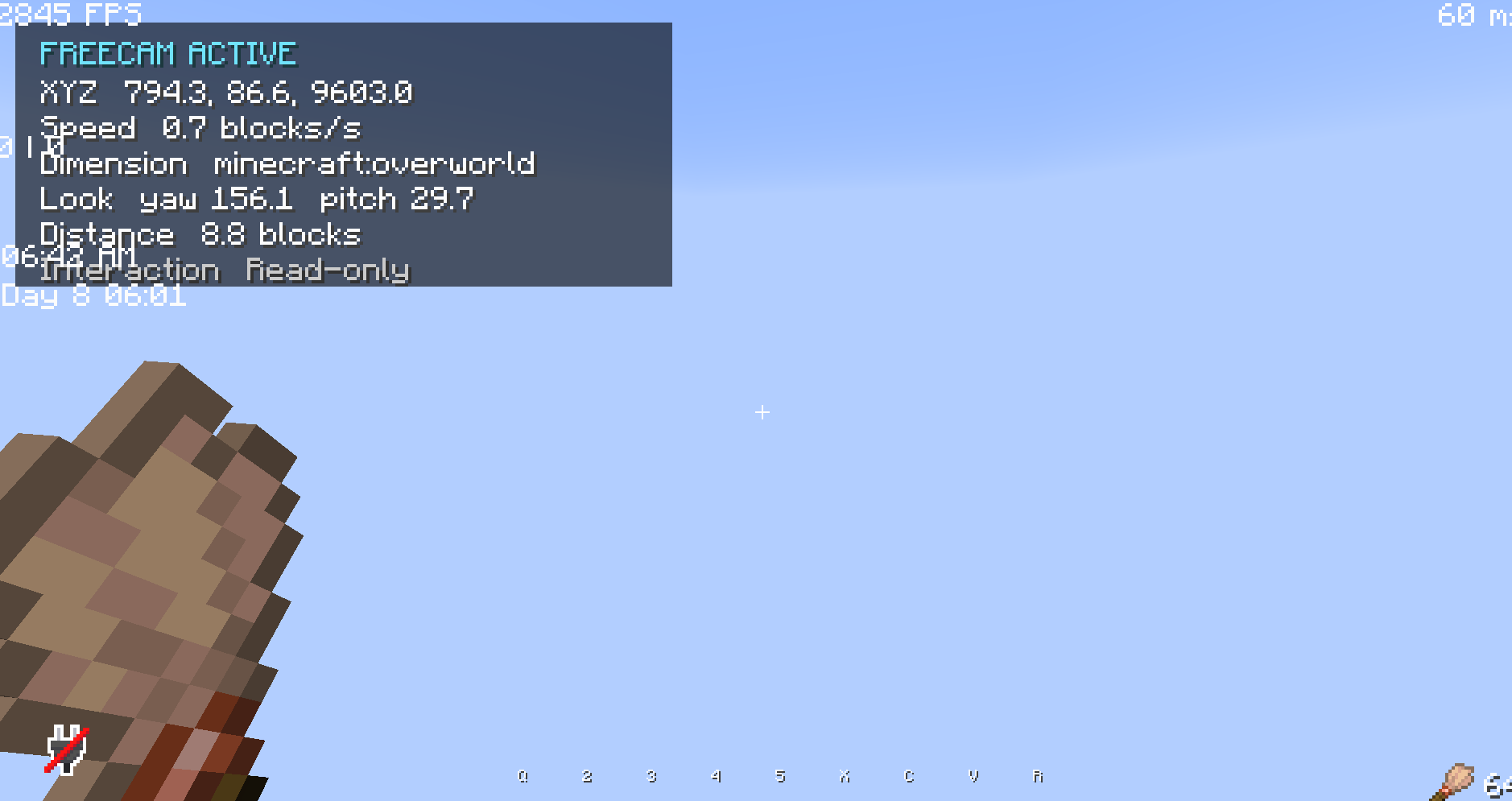
Trace the Freecam toggle and HUD overlay layout.
Fix the overlapping/clipped text, then verify the relevant source.
[Generation stopped]
package com.kodari.freecam;

import net.fabricmc.api.ClientModInitializer;
import net.fabricmc.fabric.api.client.event.lifecycle.v1.ClientLifecycleEvents;
import net.fabricmc.fabric.api.client.event.lifecycle.v1.ClientTickEvents;
import net.fabricmc.fabric.api.client.event.lifecycle.v1.ClientWorldEvents;
import net.fabricmc.fabric.api.client.networking.v1.ClientPlayConnectionEvents;
import net.fabricmc.fabric.api.client.rendering.v1.hud.HudElementRegistry;
import net.minecraft.util.Identifier;
import org.slf4j.Logger;
import org.slf4j.LoggerFactory;

public class FreecamClient implements ClientModInitializer {
    public static final String MOD_ID = "freecampro";
    public static final Logger LOGGER = LoggerFactory.getLogger(MOD_ID);

    @Override
    public void onInitializeClient() {
        FreecamConfig.load();
        FreecamKeybinds.initialize();

        ClientTickEvents.END_CLIENT_TICK.register(FreecamController::tick);
        ClientWorldEvents.AFTER_CLIENT_WORLD_CHANGE.register((client, world) -> FreecamController.stop(client));
        ClientPlayConnectionEvents.DISCONNECT.register((handler, client) -> FreecamController.stop(client));
        ClientLifecycleEvents.CLIENT_STOPPING.register(FreecamController::stop);
        HudElementRegistry.addLast(Identifier.of(MOD_ID, "freecam_hud"), FreecamHud::render);
    }
}