Implement the user's full “SMP Portal | Beta — Complete Discord Bot Specification” in this Python Discord bot project. The feature requirements are reproduced below; inspect the project scaffold and existing code first, then implement the bot feature code only. Do not write tests, test files, test scripts, notebooks, or a /help command. Use the project's existing conventions and library. Use persistent storage (SQLite with safe parameterized transactions is acceptable) for all configuration, submissions, evidence and verification records, decisions/audits, warnings, demotion history, leaderboard message IDs, welcome config, and per-user DM cooldowns. Never store or log the bot token. Make the implementation runnable/deployable in this Kodari Discord bot project, and provide concise setup instructions and disclose any requirements that cannot be fulfilled by bot code or without partner-server access.

BOT PROFILE: Runtime presence DND and custom activity “Listening to SMP Portal”; apply on startup and reconnect. Set bot's guild nickname to “SMP Portal | Beta” where permissions allow. Do not attempt unsupported global username/about-me changes via bot API; disclose these must be configured in Discord Developer Portal if available. Do not alter unrelated pre-existing features.

INSTALLATION SECURITY: Do not create or output an invite/install link, and do not add any command that produces one. Do not claim code can disable installation. The Developer Portal owner must disable Guild Install and User Install in Installation settings and verify OAuth2 settings; explain this limitation in setup notes. Restrict sensitive commands/actions as specified.

COMMANDS: Create /psetup (Discord application command names are lowercase; user requested /PSetup) for authorized administrators to select a partnership submission text channel and one or more review/admin roles; validate channel type, bot permissions and roles, persist settings. /welcome for authorized Admissitors to select a valid channel and persist config. /leaderboard for Admissitors only; configure a single persistent interactive message and save its channel/message IDs. Do NOT register /help.

PARTNERSHIP SUBMISSIONS: Only configured channel. Ignore bot authors and webhook messages. Detect Discord invite links. Create private review thread linked to original message, invite submitter where Discord allows, notify submitter and configured admin roles with minimal allowed mentions, fetch invite/server name/member count only if Discord API actually provides verifiable data; otherwise label unknown/manual review (never invent counts). Store submission, thread, invite, submitter, timestamp and status. Explain Discord private-thread role visibility constraints and handle them safely. Mandatory tiers: members 0–30: SMP Portal no ping / partner @everyone; 31–150: SMP Portal role ID 1560768575088758884 / partner @everyone; 151–170: both @here; 171–219: SMP Portal @everyone / partner @here; 220+: SMP Portal @everyone / partner no ping. No stores; no cheating/hacking-related servers. Show applicable requirements in review. Verify real Discord mentions only when actual message data is accessible; do not treat mention text as proof. Use allowed_mentions to prevent accidental notifications. Unknown count or required ping => manual review.

EVIDENCE: Before decision controls appear, post a request in review thread for screenshot evidence of SMP Portal advertisement in partner server. No decision buttons until evidence exists and initial checks have run. Persist attachment/reference and verification report. Include report fields exactly: Screenshot submitted Yes/No; Advertisement detected Yes/No/Uncertain; Required ping detected Yes/No/Uncertain; Actual mentions list; Message edited Yes/No/Unknown; Screenshot matches live message Yes/No/Unverified; Final verification status Verified/Failed/Manual Review Required. Be truthful: unless project has actual computer-vision capability, do not claim to inspect image content; mark screenshot content checks Uncertain and require moderator review. If bot has no access to partner server, report live-message/edit verification unavailable and Unverified. If actual live message is accessible, store message/channel/author/timestamp, actual mentions, edit metadata if possible; recheck edits and flag changed/deleted/unverifiable messages. Present the formatted “sᴍᴘ ᴘᴏʀᴛᴀʟ” review message requested by user, separating required vs actual verified mentions, all rules, evidence reference and report. Never auto-approve based only on screenshot.

DECISIONS: After evidence submission and initial checks, show four buttons Accept, Deny, Deny With Warning, Deny With Verbal Warning. Only configured partnership admin roles can use; recheck on every interaction; unauthorized gets ephemeral denial. Prevent races/duplicates. Accept persists acceptance, moderator and timestamp, included in partnerships leaderboard. Deny saves rejection and moderator without warning. Formal/verbal warning opens modal requiring nonempty reason; separately persist warning type, user ID, reason, issuing moderator ID, related submission, timestamp, demotion info. Never duplicate decisions/warnings. Notify submitter when possible; failed DMs logged without undoing decisions/warnings. Archive thread after decision; handle missing perms/deleted users/API failures.

LEADERBOARD/WARNINGS: Only Admissitor role ID/name (determine via config, preferably configurable env variable with role name fallback) can invoke and use controls; recheck every interaction. Persistent single message with Warnings and Partnerships views, manual switch buttons, edit existing message, safe recovery if deleted, and only one refresh task. Refresh/alternate every 30 seconds; manual selection remains through next scheduled refresh then auto-rotation resumes. Update immediately on warning, decision, demotion. Warnings view includes user mention+ID, separate formal/verbal counts, warning reasons/dates, current demotion and who applied/removed it and when. Add authorized demotion mark/remove controls; persist current state and full history; moderation status only, do not modify Discord roles. Partnerships view shows ACCEPTED only, partner/submitter, server name if available, date, approver, status. Paginate or otherwise stay within Discord message/embed limits.

WELCOME: On member join post exactly with Markdown/subtext formatting:

sᴍᴘ ᴘᴏʀᴛᴀʟ

Welcome to SMP Portal

A place where you can promote and find the server of your choice.

-# Welcome @MEMBER Replace with actual new member mention. Mention only that user using allowed_mentions; no roles/everyone. Enable required member intent in code and document Developer Portal intent setting. Validate channel and send permissions; handle failures.

DM AUTO AD: For non-bot user DMs, respond with exactly the advertisement below, preserve all headings/emojis/invite/subtext. Persist configurable per-user cooldown, no reply loops, graceful blocked-DM errors. Keep values/config safe.

sᴍᴘ ᴘᴏʀᴛᴀʟ | Staff Needed

SMP Portal is the ultimate partnership network built to help Minecraft server owners grow and connect.

What We Offer:

🤝 Partner Trades — Cross-promote with active server owners.

🤝 Channel Partnerships — Cross-promote each other's servers in channels.

🌐 Server Directory — Get featured in high-visibility channels.

📈 Player Reach — Easy access to discover new SMPs as a player.

✨ Self Promo — Promote your server for free.

✨ Staff Self Promo — Apply for staff and get access to promote your server more.

Partnerships & Tickets Are Open!

Join now to feature your server.

🔗 https://discord.gg/PskZcbgAwC

---

Giveaway

Join our server and go to the Pixelraidhosting channel.

Join their server, then return to the channel and enter the giveaway to get 50 percent off lifetime Minecraft hosting if you win.

-# Disclaimer: If you are not in the Discord server, you cannot win the prize.

-# Looking for Main Operators | DM @elifold

SECURITY/RELIABILITY: Request only required intents/permissions and document them. Need message content for invite detection and DMs, members intent for welcome. Recheck permissions for all sensitive interactions. Validate inputs and handle deleted channel/role/thread, rate limits, and API errors gracefully. Clear safe error logging. Avoid duplicate tasks, messages, decisions and automated replies. Preserve all user requirements above; do not claim inaccessible facts are verified. Deliver implementation and setup notes, and clearly flag unavoidable Developer Portal manual settings and honest limits around screenshot/live partner-server verification.

Kodari AI
KodariOct 18 at 5:23 pm 2
SMPPortalBot
A Discord bot for SMP Portal partnership management. Handles partnership submissions with tier-based ping requirements, evidence verification with screenshots, accept/deny decisions with warnings, persistent leaderboard with warnings and partnerships views, welcome messages, DM auto-advertisements, and configurable settings. Uses SQLite for persistent storage of all configurations, submissions, evidence, decisions, warnings, and cooldowns. Implements role-based access control, private review threads, and automated verification checks with honest reporting of limitations.
  1. Create the deployable discord.py entry point, intents, commands, welcome, and DM behavior.

  2. Implement SQLite-backed submissions, evidence checks, decisions, warnings, and demotion history.

  3. Add the persistent leaderboard and dependency/environment setup files.

Implemented the Discord bot with SQLite persistence for configuration, submissions, evidence reports, decisions, warnings, demotion history, leaderboard state, and DM cooldowns. It registers /psetup, /welcome, and /leaderboard—no /help command.

Setup

  1. Install dependencies from requirements.txt; copy .env.example to .env and set DISCORD_TOKEN. Optional settings include ADMISSITOR_ROLE_ID (with ADMISSITOR_ROLE_NAME fallback), DM_COOLDOWN_SECONDS, and DATABASE_PATH.

  2. In the Developer Portal’s Bot → Privileged Gateway Intents, enable Server Members Intent and Message Content Intent. The bot needs message content for invite detection and DMs, and the members intent for welcome messages.

  3. Grant the bot the needed channel and thread permissions: View Channel, Send Messages, Embed Links, Create Private Threads, Send Messages in Threads, and Manage Threads. Mention Everyone may also be needed to notify non-mentionable review roles; Manage Nicknames is optional.

  4. Run /psetup as a server administrator, then configure the welcome channel with /welcome and create the leaderboard with /leaderboard. Those latter commands and leaderboard controls require the configured Admissitor role.

Manual setup and limits

  • The Developer Portal owner must disable Guild Install and User Install in Installation settings and verify OAuth2 settings. Bot code cannot disable installation. Global username or About Me changes, if available, must also be made in the Developer Portal.

  • Private-thread role pings do not grant roles access to the thread. Reviewers need Manage Threads or must be added individually; the bot sends the review-thread link in the submission channel.

  • Screenshot contents are not machine-verified: reports mark advertisement detection uncertain and screenshot matching unverified, so screenshots alone never auto-approve. Live-message checks require an accessible partner-server message link; otherwise those checks remain manual. Invite member counts are shown only when Discord’s invite API provides an approximate count.

Elijah Acosta

how do i add the token

Kodari AI
KodariOct 18 at 5:28 pm 1

Create a file named .env in the project’s root—the same folder as bot.py—and add:

Env
DISCORD_TOKEN=paste_your_bot_token_here

Replace the placeholder with your bot token, save the file, then restart the bot. Don’t share or commit the token; if it’s been exposed, reset it in the Discord Developer Portal.

Elijah Acosta

i cant access files or where is it

Kodari AI
KodariOct 18 at 5:29 pm 1

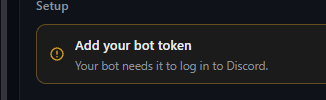
You don’t need to access project files. In Kodari, click Add your bot token on the Setup screen shown, then paste your Discord bot token and save it.

If you still need to get the token: open your app in the Discord Developer Portal → Bot → Reset Token (or View Token if available), then copy it into Kodari’s token field. Keep it secret—anyone with the token can control your bot.

Elijah Acosta

can i just give it to you in this chat

Kodari AI
KodariOct 18 at 5:30 pm 1

Please don’t send your bot token here. Add it through Kodari’s Add your bot token setup field instead; that keeps the secret out of chat.

Elijah Acosta

it dont let me when i try clicking it yo what if i clear the history after

Kodari AI
KodariOct 18 at 5:30 pm 1

I get why that’s frustrating, but don’t paste the token here—even if you plan to clear the chat afterward. Clearing history may not remove all copies, and the token gives access to your bot.

Try refreshing Kodari, then click the whole Add your bot token box. If it still doesn’t open, try another browser or a private window with extensions disabled. If it remains stuck, contact Kodari support and include the screenshot—but not the token.

Elijah Acosta
Kodari AI
KodariOct 18 at 5:31 pm 1

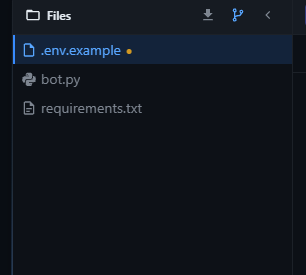
That’s the project file list. .env.example is only a template; the bot loads secrets from a file named .env.

Create a new file named .env in the same folder as bot.py, then put this in it:

Env
DISCORD_TOKEN=your_bot_token_here

Replace the placeholder with your token and save. Don’t paste the token into chat. If the file panel doesn’t let you create or rename files, tell me what happens when you click .env.example and I’ll guide you from there.

Elijah Acosta
Kodari AI
KodariOct 18 at 5:32 pm 1

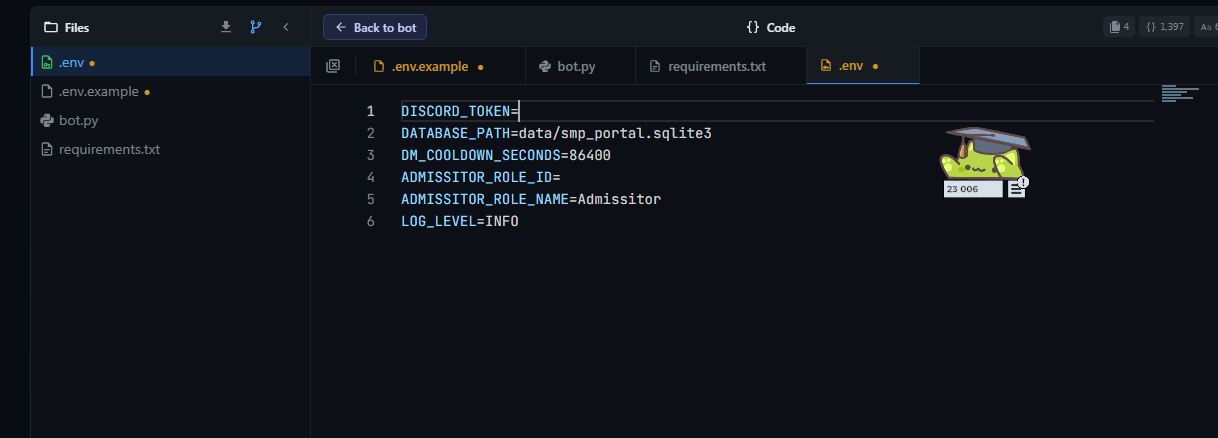
You’ve got the right file open. Paste your token after DISCORD_TOKEN= on line 1, like this:

Env
DISCORD_TOKEN=your_actual_token

Replace your_actual_token with the token from Discord Developer Portal → your app → Bot. Don’t add quotes or spaces. Then save with Ctrl+S and restart the bot. Make sure the orange unsaved dot disappears.

Elijah Acosta
Kodari AI
KodariOct 18 at 5:36 pm 1

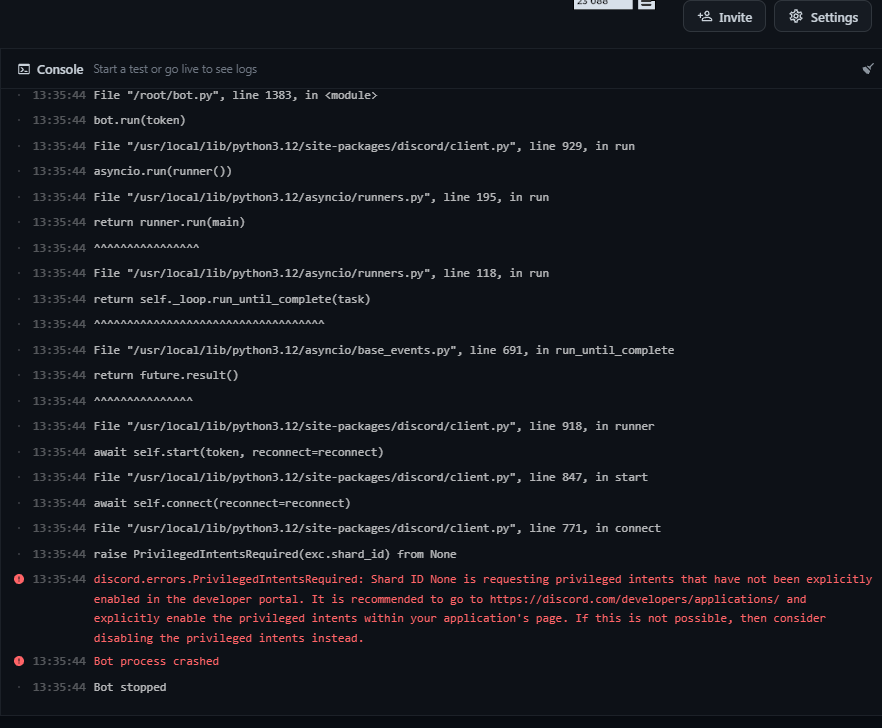
The bot is requesting a privileged intent that’s disabled in Discord.

  1. Open the Discord Developer Portal → select your application → Bot.

  2. Under Privileged Gateway Intents, enable the intent(s) your bot uses—commonly Message Content Intent and Server Members Intent.

  3. Save changes, then restart the bot in Kodari.

You don’t need to enable Presence Intent unless the bot tracks users’ online status. If it still crashes, share the intents= line from bot.py (but not your token).

Elijah Acosta

can you change this to the bot logo

Kodari AI
KodariOct 18 at 5:39 pm 1

To use this as your Discord bot’s logo, save the image to your device, then open the Discord Developer Portal and select your bot application. Go to Bot, click the bot’s current avatar, upload this image, and choose Save Changes. It may take a little while for Discord to show the updated avatar.

Elijah Acosta

its saying it doesnt have permission but it has a role with admin

Kodari AI
KodariOct 18 at 5:42 pm 1

A server Admin role only gives the bot permissions inside that server—it doesn’t let it change its Discord bot logo.

To change the bot’s global avatar, sign in to the Discord Developer Portal with the account that owns the application (or has the necessary access to its developer team), open the app → Bot, upload the image, and save. If you’re changing a server-specific profile image instead, that’s separate from the bot’s global logo.

Elijah Acosta

no i am talking about perms

Kodari AI
KodariOct 18 at 5:43 pm 1

Ah, you mean the bot gets a “missing permissions” error in the server. Having an Administrator role usually gives it broad server permissions, but Discord still enforces role hierarchy for actions like managing roles, kicking, or banning: the bot’s highest role must be above the role or member it’s trying to affect.

Move the bot’s role higher in Server Settings → Roles. If it still fails, tell me which command/action triggers the error and share the exact error text—don’t include your token.

Kodari can make mistakes. Review important code before using.
Files
bot.py
requirements.txt
Code
2 1,385
bot.py
import asyncio
import json
import logging
import os
import re
import sqlite3
from datetime import datetime, timezone
from pathlib import Path
from typing import Optional

import discord
from discord import app_commands
from discord.ext import commands
from dotenv import load_dotenv

load_dotenv()

logging.basicConfig(
    level=os.getenv("LOG_LEVEL", "INFO").upper(),
    format="%(asctime)s %(levelname)s %(name)s: %(message)s",
)
logger = logging.getLogger("smp_portal")

DM_ADVERTISEMENT = """# sᴍᴘ ᴘᴏʀᴛᴀʟ | Staff Needed

SMP Portal is the ultimate partnership network built to help Minecraft server owners grow and connect.

# What We Offer:

🤝 Partner Trades — Cross-promote with active server owners.

🤝 Channel Partnerships — Cross-promote each other's servers in channels.

🌐 Server Directory — Get featured in high-visibility channels.

📈 Player Reach — Easy access to discover new SMPs as a player.

✨ Self Promo — Promote your server for free.

✨ Staff Self Promo — Apply for staff and get access to promote your server more.

# Partnerships & Tickets Are Open!

Join now to feature your server.

🔗 https://discord.gg/PskZcbgAwC

---

# Giveaway

Join our server and go to the Pixelraidhosting channel.

Join their server, then return to the channel and enter the giveaway to get **50 percent off lifetime Minecraft hosting** if you win.

-# Disclaimer: If you are not in the Discord server, you cannot win the prize.

-# Looking for Main Operators | DM @elifold"""

INVITE_PATTERN = re.compile(
    r"(?:https?://)?(?:www\.)?(?:discord\.gg|discord(?:app)?\.com/invite)/([A-Za-z0-9-]+)",
    re.IGNORECASE,
)
MESSAGE_LINK_PATTERN = re.compile(
    r"https?://(?:www\.)?discord(?:app)?\.com/channels/(\d+|@me)/(\d+)/(\d+)"
)
IMAGE_EXTENSIONS = (".png", ".jpg", ".jpeg", ".gif", ".webp", ".bmp")
PORTAL_ROLE_ID = 1560768575088758884


def utc_now() -> datetime:
    return datetime.now(timezone.utc)


def iso_now() -> str:
    return utc_now().isoformat()


def parse_datetime(value: Optional[str]) -> Optional[datetime]:
    if not value:
        return None
    try:
        return datetime.fromisoformat(value)
    except ValueError:
        return None


def clip(value: str, limit: int) -> str:
    return value if len(value) <= limit else value[: limit - 1] + "…"


def default_allowed_mentions() -> discord.AllowedMentions:
    return discord.AllowedMentions.none()


class Database:
    def __init__(self, path: str):
        db_path = Path(path)
        db_path.parent.mkdir(parents=True, exist_ok=True)
        self.connection = sqlite3.connect(str(db_path), isolation_level=None)
        self.connection.row_factory = sqlite3.Row
        self.connection.execute("PRAGMA foreign_keys = ON")
        self.connection.execute("PRAGMA journal_mode = WAL")
        self.connection.executescript(
            """
            CREATE TABLE IF NOT EXISTS partnership_settings (
                guild_id INTEGER PRIMARY KEY,
                submission_channel_id INTEGER NOT NULL,
                review_role_ids TEXT NOT NULL
            );
            CREATE TABLE IF NOT EXISTS welcome_settings (
                guild_id INTEGER PRIMARY KEY,
                channel_id INTEGER NOT NULL
            );
            CREATE TABLE IF NOT EXISTS submissions (
                id INTEGER PRIMARY KEY AUTOINCREMENT,
                guild_id INTEGER NOT NULL,
                source_message_id INTEGER NOT NULL UNIQUE,
                source_channel_id INTEGER NOT NULL,
                submitter_id INTEGER NOT NULL,
                submitted_at TEXT NOT NULL,
                invite_url TEXT NOT NULL,
                invite_code TEXT NOT NULL,
                server_name TEXT,
                member_count INTEGER,
                requirements_json TEXT NOT NULL,
                status TEXT NOT NULL DEFAULT 'pending',
                thread_id INTEGER,
                created_at TEXT NOT NULL
            );
            CREATE TABLE IF NOT EXISTS evidence (
                id INTEGER PRIMARY KEY AUTOINCREMENT,
                submission_id INTEGER NOT NULL REFERENCES submissions(id),
                message_id INTEGER NOT NULL UNIQUE,
                submitter_id INTEGER NOT NULL,
                attachments_json TEXT NOT NULL,
                reference_url TEXT,
                submitted_at TEXT NOT NULL,
                report_json TEXT NOT NULL,
                live_message_id INTEGER,
                live_channel_id INTEGER,
                live_author_id INTEGER,
                live_created_at TEXT,
                live_edited_at TEXT,
                actual_mentions_json TEXT NOT NULL,
                review_message_id INTEGER,
                UNIQUE(submission_id)
            );
            CREATE TABLE IF NOT EXISTS decisions (
                id INTEGER PRIMARY KEY AUTOINCREMENT,
                submission_id INTEGER NOT NULL UNIQUE REFERENCES submissions(id),
                decision_type TEXT NOT NULL,
                moderator_id INTEGER NOT NULL,
                reason TEXT,
                decided_at TEXT NOT NULL
            );
            CREATE TABLE IF NOT EXISTS warnings (
                id INTEGER PRIMARY KEY AUTOINCREMENT,
                guild_id INTEGER NOT NULL,
                user_id INTEGER NOT NULL,
                warning_type TEXT NOT NULL,
                reason TEXT NOT NULL,
                moderator_id INTEGER NOT NULL,
                related_submission_id INTEGER NOT NULL UNIQUE REFERENCES submissions(id),
                created_at TEXT NOT NULL,
                demotion_info_json TEXT NOT NULL
            );
            CREATE TABLE IF NOT EXISTS audit_log (
                id INTEGER PRIMARY KEY AUTOINCREMENT,
                guild_id INTEGER NOT NULL,
                actor_id INTEGER NOT NULL,
                action TEXT NOT NULL,
                subject_id INTEGER,
                related_submission_id INTEGER,
                details_json TEXT NOT NULL,
                created_at TEXT NOT NULL
            );
            CREATE TABLE IF NOT EXISTS demotions (
                guild_id INTEGER NOT NULL,
                user_id INTEGER NOT NULL,
                is_demoted INTEGER NOT NULL,
                reason TEXT NOT NULL,
                applied_by INTEGER,
                applied_at TEXT,
                removed_by INTEGER,
                removed_at TEXT,
                PRIMARY KEY (guild_id, user_id)
            );
            CREATE TABLE IF NOT EXISTS demotion_history (
                id INTEGER PRIMARY KEY AUTOINCREMENT,
                guild_id INTEGER NOT NULL,
                user_id INTEGER NOT NULL,
                action TEXT NOT NULL,
                reason TEXT NOT NULL,
                moderator_id INTEGER NOT NULL,
                created_at TEXT NOT NULL
            );
            CREATE TABLE IF NOT EXISTS leaderboards (
                guild_id INTEGER PRIMARY KEY,
                channel_id INTEGER NOT NULL,