
Dragon City channel

can u make like sourcode this https://github.com/kabiiQ/FBK but run python

Kodari AI
KodariTue at 8:34 pm 5
FBKPythonPort
A Python Discord bot that recreates the functionality of the FBK (Femboy Killer) bot. It provides moderation commands, fun interactions, leveling systems, and customizable server settings. The bot uses discord.py library and includes features like user warnings, mute/unmute, kick/ban, role management, and a points-based economy system. It also offers meme commands, image manipulation, and automated welcome messages. The bot is designed to be easily configurable through a JSON config file and supports multiple servers simultaneously with per-server settings storage.

I’ll build a Python bot inspired by FBK, starting with feed notifications, reminders, welcome messages, custom commands, and utility commands.

Built a Python bot inspired by FBK with YouTube and Bluesky notifications, reminders, welcome messages, join roles, custom responses, utilities, and rock-paper-scissors. It’s not a full port of every FBK feature.

Add your bot token to .env and enable Server Members Intent in the Discord Developer Portal for welcome messages and join roles.

Dragon City channel

but this bot can run music or post youtube video and stream?

Kodari AI
KodariTue at 8:36 pm 1

Right now:

  • Music: No, it can’t play music in voice channels yet.

  • YouTube videos: Yes, /feed add can post new videos from a YouTube channel. It checks roughly every five minutes.

  • Streams: It doesn’t specifically detect when a stream goes live. A stream may appear in the YouTube feed, but live notifications aren’t guaranteed.

I can add music playback and proper livestream notifications.

Dragon City channel

so its full command in this code right?

Kodari AI
KodariTue at 8:41 pm 1

Not all commands from the original FBK bot—this is a smaller Python bot inspired by it. Its commands are:

  • /help

  • /feed add, /feed list, /feed remove

  • /remind, /reminders, /cancel_reminder

  • /welcome set, /welcome disable

  • /custom set, /custom run, /custom remove, /custom list

  • /avatar, /server, /rps, /purge

It can post YouTube feed updates, but it doesn’t have music playback or dedicated livestream alerts yet.

Dragon City channel

can u add music playback and proper livestream notifications.

Kodari AI
KodariTue at 8:50 pm 4
  1. Add voice-channel music playback controls.

  2. Add YouTube livestream notifications that detect when a stream goes live.

Added:

  • /music play, /music skip, /music stop, and /music queue

  • /live add, /live list, and /live remove for YouTube livestream alerts

For music, the host needs FFmpeg installed, and the bot needs permission to connect and speak in voice channels. YouTube playback can be affected by YouTube restrictions.

For livestream alerts, add YOUTUBE_API_KEY=your_key to .env and enable the YouTube Data API v3. Alerts check every 15 minutes; YouTube’s default API quota may only support approximately one tracked channel. Existing video-feed notifications can also announce the same stream.

Dragon City channel

i use pterodactyl panel linux

Kodari AI
KodariTue at 8:54 pm 1

On Pterodactyl, the server’s Docker image needs Python, FFmpeg, and voice support. Install the packages in requirements.txt, then start the bot with:

Shell
python bot.py

Add DISCORD_TOKEN and YOUTUBE_API_KEY to your environment settings or .env. FFmpeg must be available inside the server container, not just on the Linux host.

Dragon City channel

yes this console is python

Kodari AI
KodariTue at 8:54 pm 1

The Python console is suitable. Make sure the server container also has FFmpeg installed—music playback needs it—and install the dependencies in requirements.txt.

You’ll also need your Discord token and YouTube API key in .env for the bot and livestream alerts.

Dragon City channel

can u add this?

Kodari AI
KodariTue at 8:55 pm 1
  • Add an FFmpeg fallback for Linux containers.

  • Add the YouTube API key setting; you’ll need to supply the key.

Added an FFmpeg fallback for music playback and a YOUTUBE_API_KEY setting in .env.

In Pterodactyl, install the updated dependencies with pip install -r requirements.txt, add your token and API key to .env, then restart the bot. The bundled FFmpeg fallback depends on your container’s Linux architecture being supported.

Dragon City channel

download ffmpeg in console crash for not enouge ram

Kodari AI
KodariTue at 9:07 pm 1

The FFmpeg download may be exhausting your Pterodactyl server’s memory. Don’t keep retrying it yet.

Ask your server administrator to use a Python Docker image with FFmpeg already installed, or increase the server’s RAM limit. Then restart the bot.

Can you paste the console error and tell me how much RAM your server has? I can check whether the crash happens while installing dependencies or when starting the bot.

Dragon City channel
Kodari AI
KodariTue at 9:12 pm 1

Your friend suggests downloading FFmpeg in chunks and writing each chunk to disk instead of holding the whole file in RAM. That’s a good approach if the download script is buffering it.

I checked the bot: it doesn’t download FFmpeg itself; it uses the imageio-ffmpeg package as a fallback. Can you paste the console output from the crash? That will show whether the problem is during package installation or bot startup.

Dragon City channel

here

Kodari AI
KodariTue at 9:13 pm 1

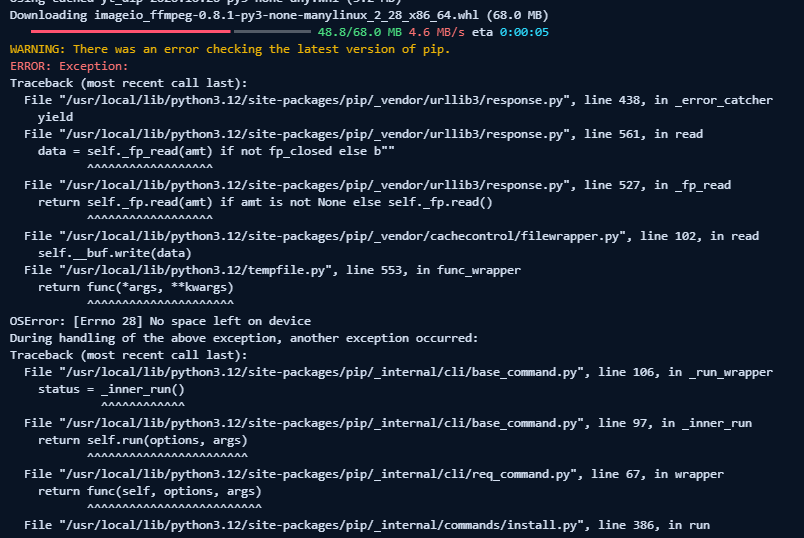
The error is No space left on device while pip downloads the 68 MB imageio-ffmpeg package. That points to storage or temporary-file space, not necessarily a RAM shortage. Downloading in chunks won’t fix a full disk.

Ask your Pterodactyl administrator to check the server’s disk quota and temporary storage. The easiest alternative is a Python image with FFmpeg already installed; then the bundled FFmpeg dependency can be removed.

Dragon City channel

can i download this manual?

Kodari AI
KodariTue at 9:14 pm 1

Yes. If your server has enough disk space, you can manually upload an FFmpeg binary:

  1. Download a Linux FFmpeg build matching your server’s architecture (the screenshot suggests x86-64).

  2. Upload and extract it in your Pterodactyl server files.

  3. Make the ffmpeg binary executable, for example: chmod +x ffmpeg.

  4. Make sure it’s available on the container’s PATH.

You’ll still need enough space for the download and extracted binary. If the container’s temporary storage is full, ask your host to clear or increase it. Also, the bot’s imageio-ffmpeg dependency may still try to install unless it’s removed from requirements.txt.

Dragon City channel

can u fix this i download manual

Kodari AI
KodariTue at 9:15 pm 2
  • Remove the automatic FFmpeg package download.

  • Use your manually uploaded binary or a system-installed FFmpeg.

Removed the automatic FFmpeg download. Upload your extracted Linux binary named ffmpeg next to bot.py, then run:

Shell
chmod +x ffmpeg
pip install -r requirements.txt

Restart the bot afterward. If FFmpeg is already installed on the container’s PATH, you don’t need to upload it.

Dragon City channel

pterodactyl panel console cant type

Kodari AI
KodariTue at 9:15 pm 1

Pterodactyl’s Console usually sends input to the running bot, not to a Linux shell, so chmod and pip won’t work there.

Upload ffmpeg next to bot.py using Files. Then ask your host to make it executable (chmod +x ffmpeg) and ensure the Python startup installs requirements.txt, or provide an image with FFmpeg already installed. Restart the server afterward.

Dragon City channel

where put this ffmpeg?

Kodari AI
KodariTue at 9:16 pm 1

Upload the extracted ffmpeg executable into your Pterodactyl server’s main folder, next to bot.py:

Plain Text
/home/container/
├── bot.py
├── requirements.txt
├── .env
└── ffmpeg

Use Files → Upload in the panel. Upload the executable, not the .tar.xz archive or its enclosing folder. Your host may also need to make it executable.

Dragon City channel

need set 755?

Kodari AI
KodariTue at 9:17 pm 1

Yes. Set the ffmpeg file’s permissions to 755 in Pterodactyl’s file manager, then restart the bot. This makes it executable.

Dragon City channel

i cant hear the song

Kodari AI
KodariTue at 9:22 pm 2

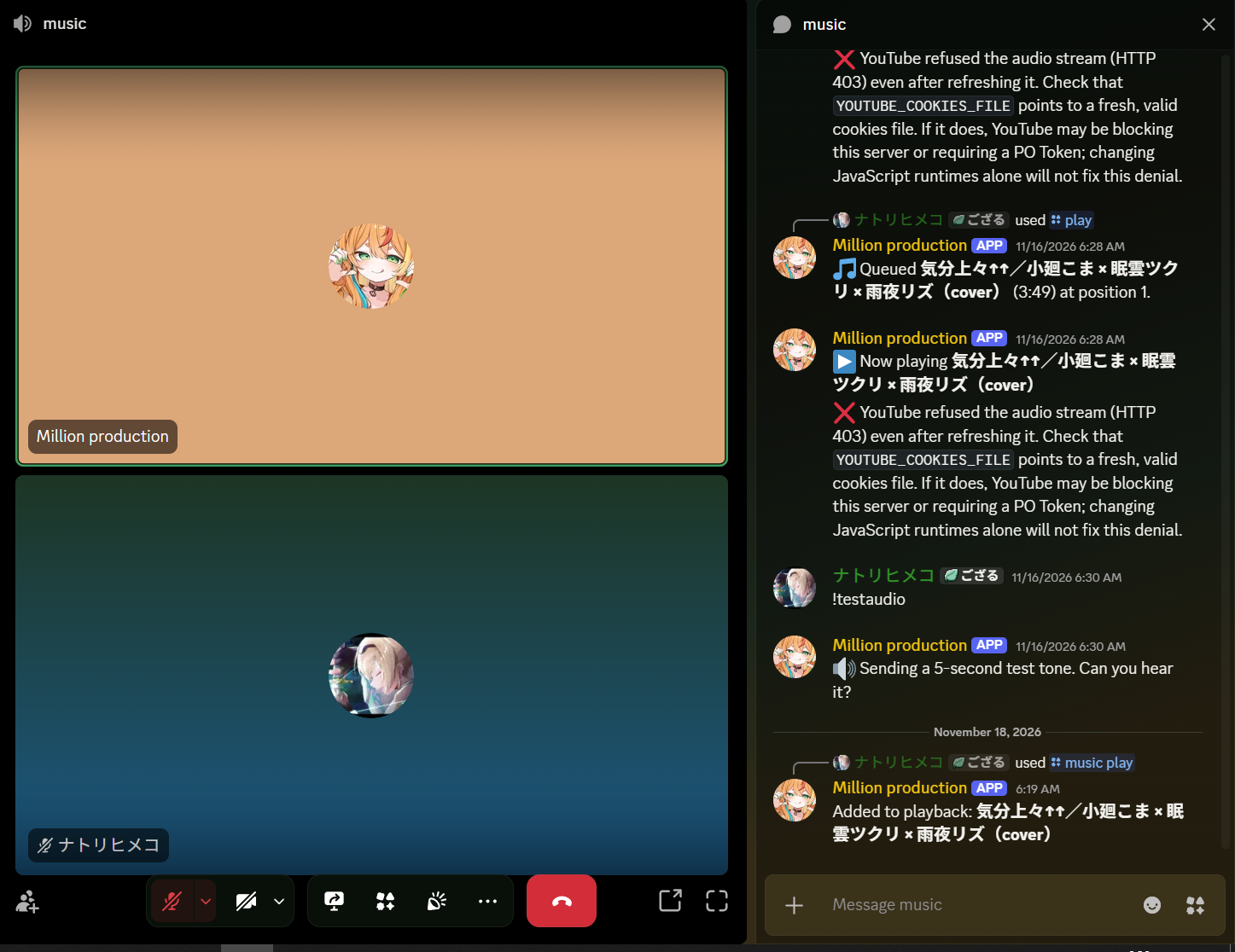
I updated playback to pass YouTube’s user agent to FFmpeg and support an optional YouTube cookies file.

Your screenshot shows an earlier HTTP 403 from YouTube, but the latest attempt doesn’t show the cause. Restart the bot and try again. If it’s still silent, send the Pterodactyl console output from that attempt, and tell me whether you could hear the test tone.

If you use a cookies file, set YOUTUBE_COOKIES_FILE in .env. Keep the file private—it can grant access to your YouTube account.

Dragon City channel

not error 403

Kodari AI
KodariTue at 9:23 pm 1

The generation was stopped before any content could be produced.

Dragon City channel

not error 403 i mean i see this Added to playback: 気分上々↑↑/小廻こま × 眠雲ツクリ × 雨夜リズ(cover)but cant hear the song

Kodari AI
KodariTue at 9:25 pm 1

“Added to playback” means the bot queued the song—it doesn’t confirm that audio reached Discord.

Please check:

  1. The bot has Connect and Speak permissions and isn’t server-muted.

  2. The bot’s volume isn’t muted or set to zero in your Discord client.

  3. Try another song, then paste the Pterodactyl console output from that attempt, especially any lines mentioning FFmpeg.

Could you hear the test tone shown in your screenshot? That will help distinguish a voice connection issue from a song-streaming issue.

Dragon City channel

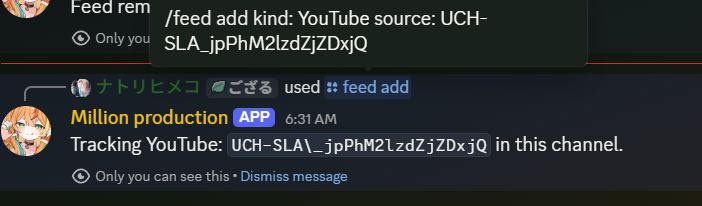
what i add id channel is mean @fbk or UC?

Kodari AI
KodariTue at 9:28 pm 1

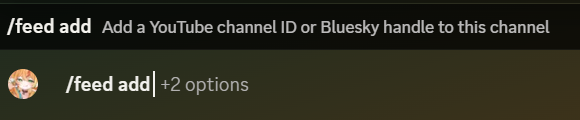
For YouTube, use the channel ID starting with UC, not the @handle.

For example: /feed add → select YouTube → enter UC.... The bot will post updates in the Discord channel where you run the command.

Dragon City channel

like this?

Kodari AI
KodariTue at 9:30 pm 1

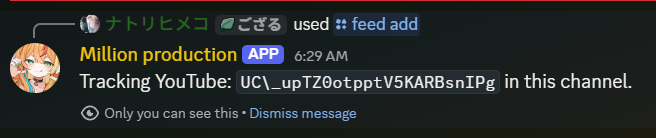
Yes, that’s the right kind of ID! The bot says it’s tracking the YouTube channel in this Discord channel.

One thing to check: the message appears to show UC\_.... If you entered a backslash (\), remove it—the ID should start with UC_.... If you didn’t enter one, it may just be how the bot displays the underscore.

Dragon City channel

is bot type this

Kodari AI
KodariTue at 9:32 pm 1

The generation was stopped before any content could be produced.

Dragon City channel
Kodari AI
KodariTue at 9:32 pm 1

Yes—the bot added the \ when displaying your ID. Your command input shows UCH-SLA_jpPhM2lzdZjZDxjQ without it, so you entered it correctly. You don’t need to change it.

Dragon City channel

feed is cmd youtube video right?

Kodari AI
KodariTue at 9:33 pm 1

Yes. /feed add tracks a YouTube channel and posts new uploads in the Discord channel where you ran it.

For alerts when a livestream goes live, use /live add instead.

Dragon City channel

live end count in this sourcode i send u add this?

Kodari AI
KodariTue at 9:34 pm 1

Do you mean the bot should post a message when a livestream ends, showing how long it lasted? Or do you mean a different count, such as the number of viewers?

Kodari can make mistakes. Review important code before using.
Files
bot.py
requirements.txt
Code
2 598
bot.py
import asyncio
import json
import logging
import os
import random
import shlex
import shutil
import sqlite3
import time
from collections import deque
from datetime import datetime, timezone
from urllib.parse import urlparse
from xml.etree import ElementTree

import aiohttp
import discord
import yt_dlp
from discord import app_commands
from discord.ext import commands, tasks
from dotenv import load_dotenv

load_dotenv()
logging.basicConfig(level=logging.INFO)
log = logging.getLogger("fbk_python")

db = sqlite3.connect("bot_data.sqlite3")
db.row_factory = sqlite3.Row
db.executescript("""
CREATE TABLE IF NOT EXISTS feeds (
    id INTEGER PRIMARY KEY, guild_id INTEGER NOT NULL, channel_id INTEGER NOT NULL,
    kind TEXT NOT NULL, source TEXT NOT NULL, last_item TEXT,
    UNIQUE(guild_id, channel_id, kind, source)
);
CREATE TABLE IF NOT EXISTS reminders (
    id INTEGER PRIMARY KEY, user_id INTEGER NOT NULL, channel_id INTEGER NOT NULL,
    due REAL NOT NULL, message TEXT NOT NULL
);
CREATE TABLE IF NOT EXISTS custom_commands (
    guild_id INTEGER NOT NULL, name TEXT NOT NULL, response TEXT NOT NULL,
    PRIMARY KEY(guild_id, name)
);
CREATE TABLE IF NOT EXISTS welcome (
    guild_id INTEGER PRIMARY KEY, channel_id INTEGER NOT NULL, message TEXT NOT NULL,
    role_id INTEGER
);
CREATE TABLE IF NOT EXISTS livestreams (
    id INTEGER PRIMARY KEY, guild_id INTEGER NOT NULL, channel_id INTEGER NOT NULL,
    youtube_channel_id TEXT NOT NULL,
    UNIQUE(guild_id, channel_id, youtube_channel_id)
);
CREATE TABLE IF NOT EXISTS livestream_announcements (
    subscription_id INTEGER NOT NULL, video_id TEXT NOT NULL,
    PRIMARY KEY(subscription_id, video_id)
);
""")
db.commit()


class Bot(commands.Bot):
    def __init__(self):
        intents = discord.Intents.default()
        intents.members = True
        super().__init__(command_prefix=commands.when_mentioned, intents=intents)
        self.http_session = None
        self.music_queues = {}
        self.music_locks = {}

    async def setup_hook(self):
        self.http_session = aiohttp.ClientSession(timeout=aiohttp.ClientTimeout(total=20))
        await self.tree.sync()
        check_reminders.start()
        check_feeds.start()
        check_livestreams.start()

    async def close(self):
        check_reminders.cancel()
        check_feeds.cancel()
        check_livestreams.cancel()
        if self.http_session:
            await self.http_session.close()
        await super().close()
        db.close()


bot = Bot()


@bot.event
async def on_ready():
    log.info("Connected as %s", bot.user)
    print("KODARI_READY", flush=True)


@bot.event
async def on_member_join(member: discord.Member):
    row = db.execute("SELECT * FROM welcome WHERE guild_id = ?", (member.guild.id,)).fetchone()
    if not row:
        return
    if row["role_id"]:
        role = member.guild.get_role(row["role_id"])
        if role:
            try:
                await member.add_roles(role, reason="Configured join role")
            except discord.HTTPException:
                log.exception("Could not add join role in guild %s", member.guild.id)
    channel = member.guild.get_channel(row["channel_id"])
    if channel:
        try:
            text = row["message"].replace("{user}", member.mention).replace("{server}", member.guild.name)
            await channel.send(text, allowed_mentions=discord.AllowedMentions(users=[member]))
        except discord.HTTPException:
            log.exception("Could not send welcome in guild %s", member.guild.id)


@bot.tree.error
async def on_app_error(interaction: discord.Interaction, error: app_commands.AppCommandError):
    if isinstance(error, app_commands.MissingPermissions):
        message = "You don't have permission to use this command."
    elif isinstance(error, app_commands.CommandOnCooldown):
        message = f"Try again in {error.retry_after:.1f} seconds."
    else:
        log.error("Command failed", exc_info=(type(error), error, error.__traceback__))
        message = "Something went wrong while running that command."
    try:
        if interaction.response.is_done():
            await interaction.followup.send(message, ephemeral=True)
        else:
            await interaction.response.send_message(message, ephemeral=True)
    except discord.HTTPException:
        log.exception("Could not report command error")


@bot.tree.command(name="help", description="Show available commands")
async def help_command(interaction: discord.Interaction):
    embed = discord.Embed(title="Bot commands", color=discord.Color.blurple())
    embed.description = (
        "`/feed add`, `/feed list`, `/feed remove` — YouTube and Bluesky notifications\n"
        "`/live add`, `/live list`, `/live remove` — YouTube livestream alerts\n"
        "`/music play`, `/music skip`, `/music stop`, `/music queue` — voice playback\n"
        "`/remind`, `/reminders`, `/cancel_reminder` — personal reminders\n"
        "`/welcome set`, `/welcome disable` — welcome messages and optional join role\n"
        "`/custom set`, `/custom run`, `/custom remove`, `/custom list` — custom responses\n"
        "`/avatar`, `/server`, `/rps`, `/purge` — utilities and games"
    )
    await interaction.response.send_message(embed=embed, ephemeral=True)


feed = app_commands.Group(name="feed", description="Manage notification feeds", guild_only=True)
bot.tree.add_command(feed)


async def latest_feed_item(kind: str, source: str):
    if kind == "youtube":
        url = "https://www.youtube.com/feeds/videos.xml"
        async with bot.http_session.get(url, params={"channel_id": source}) as response:
            response.raise_for_status()
            root = ElementTree.fromstring(await response.text())
        entry = root.find("{http://www.w3.org/2005/Atom}entry")
        if entry is None:
            return None
        video_id = entry.findtext("{http://www.youtube.com/xml/schemas/2015}videoId")
        title = entry.findtext("{http://www.w3.org/2005/Atom}title") or "New video"
        if not video_id:
            return None
        return video_id, f"**{discord.utils.escape_markdown(title)}**\nhttps://www.youtube.com/watch?v={video_id}"
    url = "https://public.api.bsky.app/xrpc/app.bsky.feed.getAuthorFeed"
    async with bot.http_session.get(url, params={"actor": source, "limit": 10, "filter": "posts_no_replies"}) as response:
        response.raise_for_status()
        data = await response.json()
    for item in data.get("feed", []):
        post = item.get("post", {})
        if item.get("reason") or post.get("author", {}).get("did") != data.get("feed", [{}])[0].get("post", {}).get("author", {}).get("did"):
            continue
        uri = post.get("uri", "")
        author = post.get("author", {}).get("handle", source)
        if uri.startswith("at://"):
            text = post.get("record", {}).get("text", "")[:300]
            return uri, f"New Bluesky post from **{discord.utils.escape_markdown(author)}**:\n{discord.utils.escape_mentions(text)}\nhttps://bsky.app/profile/{author}/post/{uri.rsplit('/', 1)[-1]}"
    return None


@feed.command(name="add", description="Add a YouTube channel ID or Bluesky handle to this channel")
@app_commands.checks.has_permissions(manage_guild=True)
@app_commands.choices(kind=[app_commands.Choice(name="YouTube", value="youtube"), app_commands.Choice(name="Bluesky", value="bluesky")])
async def feed_add(interaction: discord.Interaction, kind: app_commands.Choice[str], source: str):
    source = source.strip().lstrip("@")
    if not source or len(source) > 200 or any(c.isspace() for c in source):
        return await interaction.response.send_message("Enter a valid YouTube channel ID or Bluesky handle.", ephemeral=True)
    await interaction.response.defer(ephemeral=True, thinking=True)
    try:
        item = await latest_feed_item(kind.value, source)
    except (aiohttp.ClientError, asyncio.TimeoutError, ElementTree.ParseError, ValueError):
        log.exception("Could not fetch feed %s", source)
        return await interaction.followup.send("Could not fetch that feed. Check the channel ID or handle and try again.", ephemeral=True)
    if item is None:
        return await interaction.followup.send("No posts found; the feed may be empty or the account invalid. Try again after its first post.", ephemeral=True)
    try:
        db.execute("INSERT INTO feeds (guild_id, channel_id, kind, source, last_item) VALUES (?, ?, ?, ?, ?)",
                   (interaction.guild_id, interaction.channel_id, kind.value, source, item[0]))
        db.commit()