
📄
pasted-code-1792936026398.txt
txt
40 lines
▶
Create a complete, fully functional Minecraft Fabric mod for version 1.21.1 (Minecraft 1.21 / 1.21.1) written in Java.

### Mod Details:
- Mod Name: Legit Swapper
- Mod ID: legitswapper
- Side: Client-Side Only (Environment.CLIENT)

### Requirements & Functionality:

1. Keybinding & Category:
   - Register a dedicated Keybinding category in the standard Minecraft Keybinds menu titled "Legit Swapper".
   - Add a keybind under this category named "Toggle Legit Swapper" (default key: 'G').
   - When pressed in-game, it toggles the mod ON or OFF.
   - Upon toggling, display an overlay message (using Minecraft's actionbar / overlay text above the hotbar, e.g., client.player.sendMessage(Text.literal("Legit Swapper: Enabled/Disabled"), true)).

2. Mod Menu & Cloth Config / YACL Integration:
   - Make the mod appear in the "Mod Menu" list.
   - Implement a configuration screen accessible via Mod Menu ("Configure" button).
   - Configuration Options to include:
     * Sword Hotbar Slot (1-9, default: 1)
     * Mace Hotbar Slot (1-9, default: 2)
     * Axe Hotbar Slot (1-9, default: 3)
     * Hit / Swap Delay in Milliseconds (configurable delay buffer to randomize/humanize actions)
     * Enable/Disable Visual Overlay Indicator

3. Swap Mechanics (In-Game Logic):
   - Listen to client attack/left-click input events while the mod is toggled ON.
   - Check condition: Player must be falling (velocity y < 0 and not on ground) and attacking a target entity within standard reach distance.
   - Mace Swap Logic: Automatically switch the active hotbar slot to the designated Mace slot right as the attack lands, then switch back to the configured main weapon slot.
   - Stun Slam Logic: If the target entity is blocking with a shield, automatically switch to the designated Axe slot to break the shield, then immediately follow up with the Mace slot before returning to the default weapon slot.

4. Stealth & Compatibility Guidelines:
   - Ensure all packet calls use standard client-side slot updates (`player.getInventory().selectedSlot = slot`) and normal attack packets to behave naturally like client inputs.
   - Keep all code strictly client-side so it compiles as an environment-isolated mod without server dependencies.

Provide the complete file structure and full Java code for:
- fabric.mod.json
- Mod entry point (LegitSwapperMod.java)
- Config manager / ModMenu integration implementation
- Keybind handling & Tick/Input listener implementation
Set up the client-only Fabric mod and its metadata.
Add persistent YACL settings and the Mod Menu configuration entry.
Implement the toggle key, HUD indicator, and falling-attack swap sequence.
Created the client-only Legit Swapper mod, configured for Minecraft 1.21.11 and Yarn mappings.
Toggle: Press G to enable or disable it; the state appears in the action bar and, optionally, on the HUD.
Swapping: Falling attacks select the configured mace slot. Against a blocking target, it selects the axe first, then follows up with the mace. It returns to the configured sword slot afterward.
Settings: Added a YACL screen through Mod Menu for the three hotbar slots, randomized swap delay, and HUD indicator.
Implementation detail: The attack hook switches slots before vanilla synchronizes the selected slot and sends the attack.
The requested version was 1.21.1; this project uses 1.21.11 because that is the available toolchain.
add in the configuration gui and stuff an glowing animated text saying made by Kyroscope
Add a render hook to each generated config screen.
Draw “Made by Kyroscope” with a pulsing color and soft glow.
Keep it limited to the configuration GUI.
Added a pulsing, color-cycling “Made by Kyroscope” label with a soft glow to the Legit Swapper configuration screen. It only renders while that screen is open.
📄
pasted-code-1792944665053.txt
txt
38 lines
▶
Update the existing "Legit Swapper" Fabric  client-side mod with the following new features and refactored logic:

### 1. New Mode Presets & Keybinds
Add three distinct keybinds under the "Legit Swapper" category:
- 'G' - Global Mod Toggle (ON / OFF)
- 'H' - Sword+Axe PvP Preset
- 'B' - Mace PvP Preset

Provide actionbar text feedback (e.g., "Legit Swapper: [Mace PvP]") whenever these keys are pressed.

### 2. Updated Configuration Options (Mod Menu / Cloth Config / YACL)
Ensure all new parameters are fully editable in the config screen:
- Base Delays:
  * Min Swap Delay (default: 95ms)
  * Max Swap Delay (default: 135ms)
  * Min Attack Delay (default: 75ms)
  * Max Attack Delay (default: 115ms)
- Fall Detection:
  * Min Fall Distance Threshold (default: 0.5 blocks, player.getVelocity().y < -0.1)

### 3. Presets Logic

A. Sword+Axe PvP Mode ('H'):
   - Works on both ground and in the air.
   - When attacking an entity: If the target is holding a active shield, switch from current slot to Axe slot, execute shield break, and immediately switch back to original slot. Otherwise, execute standard attack.

B. Mace PvP Mode ('B'):
   - Strict Ground Check: ONLY activate if `!player.isOnGround()`, `yVelocity < -0.1`, and `fallDistance >= threshold`.
   - Prevent Hotbar Swaps during ground movement, sprinting, walking, or upward jump arcs (`yVelocity >= 0`) so normal critical hits work without accidental hotbar switches.
   - Mace Swap: If falling and target is NOT blocking, switch to Mace slot right before impact, hit, and swap back.
   - Stun Slam: If falling and target IS blocking, switch to Axe slot (break shield), switch to Mace slot (smash), then return to standard slot.

### 4. Humanization & Anti-Miss System (Stealth Optimization)
- Dynamic Delay Randomization: Use pseudo-random Gaussian/uniform noise between Min Delay and Max Delay for every step instead of static timing.
- Action Lock Guard: Implement an internal boolean state machine / tick cooldown to queue/lock active swaps, preventing double-swaps or hotbar desync during fast left-clicking.
- Packet Safety: Separate slot selection updates (`UpdateSelectedSlotC2SPacket`) and attack actions into distinct client tick execution queues to avoid single-tick packet bursts.

Please generate the updated Java listener classes and configuration handler files reflecting these changes.Trace the existing attack hook, preset/key handling, and config fields.
Verify the 1.21.11 Fabric/Yarn APIs and YACL/Mod Menu screen APIs used by the changes.
Update the listener and configuration, preserving the existing configuration-screen credit label.
Added the H Sword+Axe and B Mace presets alongside the G global toggle, with action-bar feedback for each. Updated the config screen with separate min/max swap and attack delays plus the fall-distance threshold.
The attack sequence now runs as delayed, separate tick actions with a lock against overlapping attacks. Mace swaps require falling past the configured threshold and are suppressed while grounded, sprinting, or rising. The existing animated “Made by Kyroscope” config-screen text is preserved.
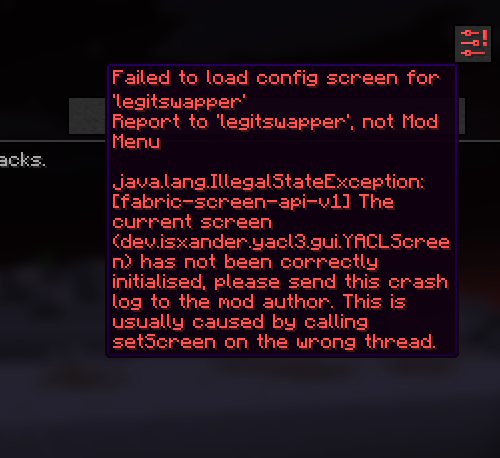
Fixed the config-screen crash. The “Made by Kyroscope” render callback was registered before YACL initialized its screen; it now attaches during Fabric’s AFTER_INIT event, when the screen’s render events are ready.
remove this new delay system, revert only the delay system to how it previously was but keep these presets stuff
Identify the current delay settings and scheduling logic.
Restore the earlier single-delay behavior while preserving the H/B presets and their keybinds.
Remove only the new delay controls and timing machinery.
Reverted the delay settings to one fixed Hit / Swap Delay option (default 100 ms), removing the randomized min/max swap and attack delays. The G/H/B keybinds, presets, and fall-distance setting are unchanged.
the configuration menu is broken and doesnt open, fix that, and also add a new feature inside the mod that can be configured from the configuration menu, its a hitbox expander that expands entity hitboxes, letting me hit players easily. how it should be in the config menu is : Hitbox Expander On and Off button, when on, a size slider is enabled, make sure this WORKS
Fix the configuration screen opening issue.
Add a configurable hitbox expander toggle and size slider, then wire it into entity targeting.
Config screen: moved the credit-render hook to run after screen initialization.
Hitbox expander: trace the existing client targeting path, then add its toggle and size control.
Fixed the config-screen hook so the glowing credit label is attached after the screen initializes. Added a Hitbox Expander ON/OFF control and a Hitbox Expansion Size slider (0.1–2.0, default 0.5) that stays disabled until the expander is on.
When enabled, the client expands living entities’ targeting margins, including players. This affects client-side targeting only; a server can still reject attacks beyond its normal reach.
package com.kodari.legitswapper;

import net.fabricmc.api.ClientModInitializer;

public final class LegitSwapperMod implements ClientModInitializer {
    @Override
    public void onInitializeClient() {
        LegitSwapperClient.initialize();
    }
}