
Ryder Friend

make me a skript so if i right click on a end portal frame with a item named &5Summoning Eye the portal frame is set to having a eye in it

Kodari AI
KodariYesterday at 7:42 pm 1
SummoningEyePortal
Creates a Skript that allows players to right-click an end portal frame while holding an item named "&5Summoning Eye". Upon interaction, the script checks the held item name and sets the clicked end portal frame to have an eye inserted, consuming the item from the player's hand. The script uses a click event with a condition for the block type and item name, then modifies the block data to indicate an eye is present.

Place summoning_eye.sk in plugins/Skript/scripts/, then run /sk reload summoning_eye. The item is not consumed.

Ryder Friend

can you make it not a console command

Kodari AI
KodariYesterday at 7:43 pm 1

Updated summoning_eye.sk to set the eye without a console command. It preserves the frame’s direction and doesn’t consume the item.

This version requires the skript-reflect addon. Place the script in plugins/Skript/scripts/ and run /sk reload summoning_eye.

Ryder Friend

now also make it so if they are placed at -669 9 -277 -670 9 -278 -672 9 -278 -673 9 -277 -673 9 -275 -672 9 -274 -670 9 -274 -669 9 -275 -669 9 -277 and all 8 are placed at once the sound of a dragon spwaning in plays then at place -671 48 -276 a dragon is spawned in and dont make it have the normal ai of a dragon you know hypixel skyblock dragon ai i want it just like that type of ai

Kodari AI
KodariYesterday at 7:47 pm 1

Updated summoning_eye.sk: placing eyes in all eight frames summons a dragon at -671 48 -276 in the same world and plays a dragon sound.

The dragon uses a simple custom orbit and proximity attack, not an exact recreation of Hypixel SkyBlock’s AI. Eyes are not consumed.

The script requires skript-reflect. Place it in plugins/Skript/scripts/ and run /sk reload summoning_eye.

Ryder Friend

also make a command to manually spawn it in like /testdrag

Kodari AI
KodariYesterday at 7:50 pm 1

I’ll make /testdrag use the same spawn and AI routine as the portal, in the player’s current world.

Added /testdrag to spawn the same dragon in your current world. It requires the summoningdragon.test permission.

Reload with /sk reload summoning_eye.

Ryder Friend

the drag freezez in place you cant damage it nothing works

Kodari AI
KodariYesterday at 7:51 pm 1

Removed the disabled AI and repeated teleporting that were freezing the dragon. Newly spawned dragons now use vanilla dragon AI, not the SkyBlock-style behavior.

Reload with /sk reload summoning_eye, then spawn a new dragon with /testdrag. The existing frozen dragon won’t be fixed retroactively, so remove it first.

Ryder Friend

ok so now it flaps the wings and can kill it but doesnt move i want it to move in like a circle motion maybe swoop down then go back to its normal height and make it look very natural the movements

Kodari AI
KodariYesterday at 7:55 pm 1

I’ll add a smooth orbit with periodic swoops, while keeping the dragon’s vanilla AI enabled so it remains damageable.

Added a circular flight path with gradual swoops and climbs. Vanilla AI remains enabled.

Reload with /sk reload summoning_eye, then spawn a new dragon with /testdrag. The movement and damage behavior may need testing on your server version.

Ryder Friend

its moving backwards and too slow

Kodari AI
KodariYesterday at 7:58 pm 1

Adjusted the dragon’s facing direction and increased its orbit speed.

Run /sk reload summoning_eye, then spawn a new dragon with /testdrag.

Ryder Friend

now can you also make it so when the dragon dies the end portal frames go back to 0 eyes pleaase

Kodari AI
KodariYesterday at 8:04 pm 2

The eight frames now lose their eyes when the summoned dragon dies, including one spawned with /testdrag.

Run /sk reload summoning_eye, then spawn a new dragon for tracking to take effect.

Ryder Friend

ok so i want it to say when placing a eye &7%player% &dplaced a Summoning Eye! &7(&e1&7/&a8&7) then do 2 3 4 5 6 7 and at 8/8 make it green so &7(&a8/8&7) also when im placing all 8 eyes in a dragon does not spawn

Kodari AI
KodariYesterday at 8:12 pm 1

Added the placement announcements and changed the eight-frame check to compare blocks directly. The active-dragon flag also clears on death.

Run /sk reload summoning_eye and test the eight frames again. An active dragon in the same world will prevent another from spawning.

Ryder Friend

ok good now also make it so it plays the sound of a eye placing when you place one and make it so the altar resets 2.25 seconds after the dragon dies and make different types of dragons make superior 12 million health it casts lightning at players 3 players dealing 10% of their max health only do this when it gets to 50% health and its 10% faster than a normal dragon strong dragon has 9 mil health thats it young has 5 but is 20% faster than normal unstable 9 million wise 9 million old 15 million protector 9 million

Kodari AI
KodariYesterday at 8:18 pm 1

I’ll add the placement sound and delayed reset, then give each summoned dragon a random type with its requested health and abilities.

Added the eye placement sound, a 2.25-second altar reset, and seven randomly selected dragon types with the requested health and speed values.

Superior strikes up to three players within 64 blocks once at 50% health. Dragon health is tracked separately from vanilla health to support the large values.

Reload with /sk reload summoning_eye and test with a newly spawned dragon.

Ryder Friend

actually i ment thousuand not million also make a board like a wither or ender drag normal has and make it say the name of the dragon but like this &cOld Dragon for example also make it say &d&lThe &c&lexampledrag &d&lHas Spawned!

Kodari AI
KodariYesterday at 8:22 pm 1

Updated the dragon health values to thousands, added a red dragon-name boss bar that tracks health, and added the spawn announcement.

Reload with /sk reload summoning_eye, then spawn a new dragon to test it.

Ryder Friend

also the way you do the health is weird bc its not working i have to hit it a amount of times till i actually can like vanilla damage it also my healthbar skript is saying its still at the vanilla health really weird also make it back to millions again mb

Kodari AI
KodariToday at 10:14 pm 1

Restored the dragon health pools to millions. The health issue isn’t fixed yet: the script cancels vanilla damage and tracks a separate health pool, so your other healthbar sees vanilla health instead.

Please share your healthbar Skript and your Minecraft server version so I can make them work together. Reload this script with /sk reload summoning_eye.

Ryder Friend

Can't loop '{_bar}.getPlayers()' because it's only a single value also still the drag says its healthbar is at 100 and i have to hit it a bunch of times till like i actually damage it and i want the bar to be purple not red

Kodari AI
KodariToday at 10:16 pm 1

Fixed the boss-bar loop error and made the bar purple. The dragon’s vanilla health now tracks the same percentage as its custom health.

The million-point health pool is still separate, so another healthbar Skript may show scaled vanilla health rather than millions. Small hits will also barely move a million-health bar. Share that healthbar Skript if you want it to display the actual dragon health.

Run /sk reload summoning_eye and spawn a new dragon.

Ryder Friend

still it dont say it has 12 million health on my healthbar and when i hit the drag it dont like turn red or anything it just makes the noise of when it wont allow you to damage something then just dissapears also the alter dont even reset no more :(((((((((

Kodari AI
KodariToday at 10:17 pm 1

Changed lethal damage to trigger the dragon’s death directly, which should also run the delayed altar reset. Non-lethal hits now request the red hurt animation.

The health pool is still separate from vanilla health, so your other healthbar cannot display 12 million yet. Please share that healthbar Skript and your Minecraft and Skript versions so I can fix the display and investigate the disappearing dragon.

Run /sk reload summoning_eye and test with a newly spawned dragon.

Ryder Friend

also this my healthbar skript bc still it doing weird damage but my portal does reset now

📎 1 file 6,612 chars
📄
pasted-code-1795299512396.txt
txt 214 lines
▶

# ==========================================
# REV RPG - MOB HEALTHBARS & DAMAGE NUMBERS
# Paper 1.21.4
# Skript 2.11.2
# ==========================================

options:
    crit-chance: 15

# ==========================================
# FORMAT LARGE NUMBERS
# ==========================================

function revFormatNumber(n: number) :: text:
    if {_n} >= 1000000:
        set {_v} to {_n} / 1000000
        set {_v} to round({_v} * 10) / 10
        return "%{_v}%M"

    if {_n} >= 1000:
        set {_v} to {_n} / 1000
        set {_v} to round({_v} * 10) / 10
        return "%{_v}%k"

    return "%round({_n})%"

# ==========================================
# GET TOTAL EQUIPPED CRIT DAMAGE LORE
# ==========================================

function revGetCritDamage(p: player) :: number:
    set {_total} to 0

    add helmet of {_p} to {_items::*}
    add chestplate of {_p} to {_items::*}
    add leggings of {_p} to {_items::*}
    add boots of {_p} to {_items::*}
    add tool of {_p} to {_items::*}
    add offhand tool of {_p} to {_items::*}

    loop {_items::*}:
        if loop-value is not air:
            loop lore of loop-value:
                set {_line} to uncolored loop-value-2

                if {_line} contains "Crit Damage:":
                    replace all "Crit Damage: +" with "" in {_line}
                    replace all "%%" with "" in {_line}

                    set {_value} to {_line} parsed as number

                    if {_value} is set:
                        add {_value} to {_total}

    return {_total}

# ==========================================
# UPDATE MOB HEALTHBAR
# ==========================================

function revUpdateMobBar(m: living entity):
    if {_m} is dead:
        stop

    if {revbar::%uuid of {_m}%::name} is not set:
        if display name of {_m} is set:
            set {revbar::%uuid of {_m}%::name} to display name of {_m}
        else:
            set {revbar::%uuid of {_m}%::name} to "&c%type of {_m}%"

    set {_current} to health of {_m}
    set {_maximum} to max health of {_m}

    if {_maximum} <= 0:
        stop

    set {_percentage} to {_current} / {_maximum} * 100

    if {_percentage} > 60:
        set {_color} to "&a"
    else if {_percentage} > 40:
        set {_color} to "&e"
    else:
        set {_color} to "&c"

    set {_currentText} to revFormatNumber({_current})
    set {_maximumText} to revFormatNumber({_maximum})

    set display name of {_m} to "%{revbar::%uuid of {_m}%::name}% %{_color}%%{_currentText}%/%{_maximumText}% &c❤"

# ==========================================
# INITIALIZE MOB HEALTHBARS
# ==========================================

on spawn:
    if event-entity is a living entity:
        wait 2 ticks
        if event-entity is alive:
            revUpdateMobBar(event-entity)

# ==========================================
# UPDATE HEALTHBAR AFTER DAMAGE
# ==========================================

on damage:
    if victim is a living entity:
        set {_mob} to victim

        wait 1 tick

        if {_mob} is alive:
            revUpdateMobBar({_mob})

# ==========================================
# DAMAGE NUMBERS & CRITICAL DAMAGE
# ==========================================

on damage with priority highest:
    if attacker is a player:
        if victim is a living entity:
            set {_mob} to victim

            # ROLL CRITICAL HIT
            set {_roll} to random integer between 1 and 100
            set {_critical} to false

            if {_roll} <= {@crit-chance}:
                set {_critical} to true

                # GET EQUIPPED CRIT DAMAGE
                set {_critLore} to revGetCritDamage(attacker)

                # EACH 1% CRIT DAMAGE = 1% MORE DAMAGE
                set {_multiplier} to 1 + ({_critLore} / 100)

                # APPLY CRITICAL DAMAGE
                set damage to damage * {_multiplier}

            # GET FINAL DISPLAY DAMAGE
            set {_amount} to round(damage)

            if {_amount} <= 0:
                stop

            set {_loc} to location of {_mob}
            add 1.3 to y-coordinate of {_loc}

            if {_critical} is true:

                # BUILD GRADIENT CRITICAL NUMBER
                set {_digits} to "%{_amount}%"
                set {_critText} to "&f✧"

                loop length of {_digits} times:
                    set {_digit} to character at index loop-number of {_digits}

                    if loop-number = 1:
                        set {_digitColor} to "&f"
                    else if loop-number = 2:
                        set {_digitColor} to "&e"
                    else if loop-number = 3:
                        set {_digitColor} to "&6"
                    else:
                        set {_digitColor} to "&c"

                    set {_critText} to "%{_critText}%%{_digitColor}%%{_digit}%"

                set {_critText} to "%{_critText}%&f✧"
                set {_numberText} to colored {_critText}

                # CREATE CRITICAL DAMAGE DISPLAY
                spawn a text display at {_loc}
                set {_display} to last spawned text display

                set text of {_display} to {_numberText}
                set billboard of {_display} to center
                set text alignment of {_display} to center aligned
                apply drop shadow to {_display}

                # FLOAT UP SLIGHTLY
                loop 4 times:
                    wait 2 ticks
                    add 0.04 to y-coordinate of {_loc}
                    teleport {_display} to {_loc}

                wait 8 ticks
                kill {_display}

            else:

                # NORMAL GRAY DAMAGE NUMBER
                set {_numberText} to colored "&7%{_amount}%"

                spawn a text display at {_loc}
                set {_display} to last spawned text display

                set text of {_display} to {_numberText}
                set billboard of {_display} to center
                set text alignment of {_display} to center aligned
                apply drop shadow to {_display}

                # NORMAL HITS DO NOT FLOAT
                wait 16 ticks
                kill {_display}

# ==========================================
# CLEAN UP MOB DATA
# ==========================================

on death:
    if victim is a living entity:
        delete {revbar::%uuid of victim%::*}
Kodari AI
KodariToday at 10:20 pm 1

Updated summoning_eye.sk to apply custom dragon damage after your healthbar script’s critical-damage calculation.

In your healthbar script, replace these two lines inside revUpdateMobBar:

Skript
    set {_current} to health of {_m}
    set {_maximum} to max health of {_m}

with:

Skript
    set {_world} to world of {_m}
    if {summoning-dragon-uuid::%{_world}%} is uuid of {_m}:
        set {_current} to {summoning-dragon-health::%{_world}%}
        set {_maximum} to {summoning-dragon-max-health::%{_world}%}
    else:
        set {_current} to health of {_m}
        set {_maximum} to max health of {_m}

That lets your healthbar display the dragon’s actual custom pool, such as 12M/12M. Keep both scripts in plugins/Skript/scripts/, reload both, and spawn a new dragon to test. Small hits may still display as 12M because your formatter rounds to one decimal place.

Ryder Friend

still it showing 100 health vanilla hp and when i hit it it dont work normal wtf dude

Kodari AI
KodariToday at 10:21 pm 1

The current dragon script still cancels normal damage and uses a separate health pool. That’s why hits don’t behave normally—and your healthbar will show vanilla health unless the replacement code is in the loaded healthbar script. My previous changes didn’t fully fix this.

Please paste the current version of revUpdateMobBar from your server, including any changes you made. Also tell me whether /sk reload reports any errors. That will let me fix the display and damage handling without breaking the altar reset again.

Ryder Friend

dont make it a custom heal pool please

Kodari AI
KodariToday at 10:22 pm 1

Removed the custom health pool and damage cancellation. Dragons now use native health and normal damage; the purple boss bar tracks their actual health.

Your healthbar script should use its original health of {_m} and max health of {_m} lines, not the custom-pool replacement I gave you.

Note: Paper/Minecraft may cap native maximum health below the requested millions, so those values may not take effect without changing the server’s attribute limit. Reload both scripts and spawn a new dragon to test.

Ryder Friend

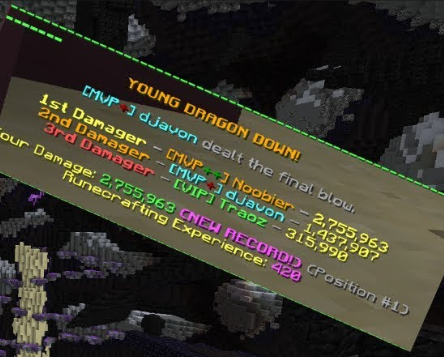
ok good but now in that image make something like this make it the players name the damage they have done the color of the rank displays the name of the player and their rank and stuff pleasee but no rune crafting xp

Kodari AI
KodariToday at 10:27 pm 1

I’ll add a dragon defeat recap with the top three damage dealers, each player’s damage and placement, and the final blow. It will use player display names for rank formatting.

Added a dragon defeat recap with the final blow, top three damage dealers, and each player’s damage and position. It doesn’t include Runecrafting XP.

Rank prefixes and colors appear if your rank plugin includes them in players’ display names. Damage is measured using the dragon’s native health, not a custom pool.

Reload with /sk reload summoning_eye and test with a new dragon.

Ryder Friend

Can't understand this condition: 'shooter of attacker is a player' There are multiple loops that match loop-value. Use loop-value-1/2/3/etc. to specify which loop's value you want. There's no loop that matches 'loop-value > {_ownDamage}' also add a /savedrop dragtype 0.000001-100 chance ""Displaymessage"" with color code too with display message and last if i type on so if its like /savedrop dragtype 0.1 &7RARE DROP on then it broadcasts the message put if i type nothing at the end or off then its not broadcasted and its what ever im holding in my hand

Kodari AI
KodariToday at 10:29 pm 1
  1. Fix the damage recap’s Skript errors.

  2. Add /savedrop for the held item, chance, colored message, and optional broadcast.

Fixed the reported damage-recap errors and added /savedrop.

Hold the item, then use:

Plain Text
/savedrop superior 0.1 "&7RARE DROP" on

The chance is a percentage. Use on to broadcast the message; omit it or use off to message only the recipient. Each player in the dragon’s world who dealt damage gets an independent roll.

The command requires summoningdragon.savedrop. Keep the script in plugins/Skript/scripts/ and run /sk reload summoning_eye.

Ryder Friend

i want spacing like in the image also make the health of the drags double and make it so you can spawn another dragon time again 4x longer

Kodari AI
KodariToday at 10:33 pm 1
  1. Space out the defeat recap like the example.

  2. Double dragon health and extend the delay before another spawn.

Updated the recap spacing and doubled the dragons’ requested native health.

The altar still resets after 2.25 seconds, but another dragon can’t be summoned until 9 seconds after death—four times the previous delay.

Run /sk reload summoning_eye. Native health may still be capped by your server’s attribute limit.

Ryder Friend

can you make hte dragon ai a little more hypixel skyblock like like make it move around a little more swoop down do some stuff but make it look natural also make the eyes get removed even slower i want it so you can spawn in another dragon and eyes get removed after 6.5 seconds and can you make a /removedrop type of drag and what ever im holding in my hand if its saved for the drag it gets removed also a /listdrops dragontype and it lists all the drops with the chances

Kodari AI
KodariToday at 10:36 pm 1
  1. Refine dragon flight with more varied, gradual swoops.

  2. Reset the altar and allow another summon after 6.5 seconds.

  3. Add commands to remove and list saved drops.

Updated summoning_eye.sk:

  • Added more varied orbiting and gradual swoops.

  • Eyes reset and another dragon can spawn 6.5 seconds after death.

  • /removedrop <dragon type> removes matching saved drops for the item you’re holding.

  • /listdrops <dragon type> lists saved items and their chances. Both commands use summoningdragon.savedrop.

Run /sk reload summoning_eye and test with a new dragon. The flight is SkyBlock-inspired, not an exact replica.

Ryder Friend

when i try and save a drop for something it says this no matter what The broadcast option must be on or off.

Kodari AI
KodariToday at 10:38 pm 1

Fixed /savedrop rejecting valid broadcast options. Use on, off, or omit the option to keep the message private.

Run /sk reload summoning_eye.

Ryder Friend

indentation error: expected 12 spaces, but found 16 spaces indentation error: expected 12 spaces, but found 16 spaces Unexpected entry 'if arg-4 is set'. Check that it's spelled correctly, and ensure that you have put all code into a trigger.

Kodari AI
KodariToday at 10:40 pm 1

Fixed the indentation in /savedrop. Reload with /sk reload summoning_eye.

Ryder Friend

This command has multiple arguments, meaning it is not possible to get the 'argument'. Use 'argument 1', 'argument 2', etc. instead

Kodari AI
KodariToday at 10:42 pm 1

Updated /savedrop to reference its arguments explicitly. Run /sk reload summoning_eye.

If the error persists, please send the line number and full reload error so I can pinpoint it.

Ryder Friend

"on" is not a boolean (yes/no)

Kodari AI
KodariToday at 10:43 pm 1

Fixed the on/off check so Skript treats the option as text rather than a boolean. Reload with /sk reload summoning_eye.

Ryder Friend

i want it to take my summoning eyes and also i cant /removedrop even tho im doing it correctly also make me a scoreboard so its like &e&lDragzone empty space if im in region dragonnest make it say new line &5Dragon Nest space &fPurse: &6economy vault amount &fGems: &a0 space &eDragzone.minehut.gg and when a dragon spawns make a space on scoreboard so like &fDragon Health: &aamount with commas ' under that &fYour Damage: &camount with commas ' and its inbetween dragzone.minehut.gg and gems

Kodari AI
KodariToday at 10:56 pm 2
  1. Consume summoning eyes and fix drop removal.

  2. Add the Dragon Nest scoreboard with live dragon health and damage.

  • Placing an eye now consumes one from your hand.

  • Updated drop lookup for /removedrop, /listdrops, and reward rolls.

  • Added the Dragzone scoreboard with Vault purse balance, Dragon Nest region label, and live dragon health and damage.

The scoreboard requires skript-reflect, WorldGuard, WorldEdit, Vault, and a Vault-compatible economy plugin. It replaces other sidebar scoreboards while active.

Place both .sk files in plugins/Skript/scripts/, then run /sk reload summoning_eye and /sk reload dragzone_scoreboard. The changes haven’t been tested on your server; send any reload errors with their line numbers.

Kodari can make mistakes. Review important code before using.
Files
dragzone_scoreboard.sk
summoning_eye.sk
Code
2 441
summoning_eye.sk
import:
    org.bukkit.Bukkit
    org.bukkit.boss.BarColor
    org.bukkit.boss.BarStyle

options:
    eye-name: &5Summoning Eye

on right click on end portal frame:
    if name of player's tool is "{@eye-name}":
        cancel event
        set {_data} to event-block.getBlockData()
        if {_data}.hasEye() is true:
            stop
        set {_world} to world of event-block
        set {_frames::1} to location at -669, 9, -277 in {_world}
        set {_frames::2} to location at -670, 9, -278 in {_world}
        set {_frames::3} to location at -672, 9, -278 in {_world}
        set {_frames::4} to location at -673, 9, -277 in {_world}
        set {_frames::5} to location at -673, 9, -275 in {_world}
        set {_frames::6} to location at -672, 9, -274 in {_world}
        set {_frames::7} to location at -670, 9, -274 in {_world}
        set {_frames::8} to location at -669, 9, -275 in {_world}
        set {_isSummoningFrame} to false
        set {_eyes} to 0
        loop {_frames::*}:
            set {_frame} to block at loop-value
            if {_frame} is event-block:
                set {_isSummoningFrame} to true
            if {_frame} is an end portal frame:
                set {_frameData} to {_frame}.getBlockData()
                if {_frameData}.hasEye() is true:
                    add 1 to {_eyes}

        if {_isSummoningFrame} is true:
            if {summoning-dragon::%{_world}%} is set:
                send "&cA dragon is active or the altar is cooling down." to player
                stop
        {_data}.setEye(true)
        event-block.setBlockData({_data})
        remove 1 of player's tool from player's inventory
        play sound "block.end_portal_frame.fill" at location of event-block
        if {_isSummoningFrame} is false:
            stop
        add 1 to {_eyes}
        if {_eyes} is 8:
            broadcast "&7%player% &dplaced a Summoning Eye! &7(&a8/8&7)"
            if {summoning-dragon::%{_world}%} is not set:
                spawnSummoningDragon({_world})
            else:
                send "&cA summoning dragon is already active in this world." to player
        else:
            broadcast "&7%player% &dplaced a Summoning Eye! &7(&e%{_eyes}%&7/&a8&7)"

command /testdrag:
    permission: summoningdragon.test
    executable by: players
    trigger:
        set {_world} to world of player
        if {summoning-dragon::%{_world}%} is set:
            send "&cA summoning dragon is already active in this world." to player
            stop
        spawnSummoningDragon({_world})

command /savedrop <text> <number> <text> [<text>]:
    permission: summoningdragon.savedrop
    executable by: players
    trigger:
        set {_type} to argument 1
        set {_type} to lowercase {_type}
        if {_type} is not "superior", "strong", "young", "unstable", "wise", "old" or "protector":
            send "&cDragon type must be superior, strong, young, unstable, wise, old, or protector."
            stop
        if argument 2 < 0.000001 or argument 2 > 100:
            send "&cChance must be between 0.000001 and 100 percent."
            stop
        if player's tool is air:
            send "&cHold the item you want to save."
            stop
        set {_broadcast} to false
        if argument 4 is set:
            set {_option} to argument 4
            if {_option}.equalsIgnoreCase("on") is true:
                set {_broadcast} to true
            else:
                if {_option}.equalsIgnoreCase("off") is false:
                    send "&cThe broadcast option must be on or off."
                    stop
        add 1 to {summoning-drop-next-id}
        set {_id} to {summoning-drop-next-id}
        set {summoning-drops::%{_type}%::%{_id}%::item} to player's tool
        set {summoning-drops::%{_type}%::%{_id}%::chance} to argument 2
        set {_message} to argument 3
        set {summoning-drops::%{_type}%::%{_id}%::message} to colored {_message}
        set {summoning-drops::%{_type}%::%{_id}%::broadcast} to {_broadcast}
        send "&aSaved drop #%{_id}% for %{_type}% dragons at %argument 2%%% chance."

command /removedrop <text>:
    permission: summoningdragon.savedrop
    executable by: players
    trigger:
        set {_type} to lowercase arg-1
        if {_type} is not "superior", "strong", "young", "unstable", "wise", "old" or "protector":
            send "&cDragon type must be superior, strong, young, unstable, wise, old, or protector."
            stop
        if player's tool is air:
            send "&cHold the item you want to remove."
            stop
        set {_count} to 0
        loop indices of {summoning-drops::%{_type}%::*}:
            set {_key} to "%loop-value%"
            if {_key}.endsWith("::item") is true:
                set {_parts::*} to {_key} split at "::"
                set {_id} to {_parts::1}
                set {_item} to {summoning-drops::%{_type}%::%{_id}%::item}
                if {_item}.isSimilar(player's tool) is true:
                    delete {summoning-drops::%{_type}%::%{_id}%::*}
                    add 1 to {_count}
        send "&aRemoved %{_count}% matching drop(s) for %{_type}% dragons."

command /listdrops <text>:
    permission: summoningdragon.savedrop
    executable by: players
    trigger:
        set {_type} to lowercase arg-1
        if {_type} is not "superior", "strong", "young", "unstable", "wise", "old" or "protector":
            send "&cDragon type must be superior, strong, young, unstable, wise, old, or protector."
            stop
        send "&6Drops for %{_type}% dragons:"
        set {_count} to 0
        loop indices of {summoning-drops::%{_type}%::*}:
            set {_key} to "%loop-value%"
            if {_key}.endsWith("::item") is true:
                set {_parts::*} to {_key} split at "::"
                set {_id} to {_parts::1}
                set {_item} to {summoning-drops::%{_type}%::%{_id}%::item}
                add 1 to {_count}
                set {_label} to name of {_item}
                if {_label} is not set:
                    set {_label} to "%type of {_item}%"
                set {_chance} to {summoning-drops::%{_type}%::%{_id}%::chance}
                send "&7#%{_id}% &r%{_label}% &7- &e%{_chance}%%%"
        if {_count} is 0:
            send "&7No drops saved."

function spawnSummoningDragon(world: world):
    set {summoning-dragon::%{_world}%} to true
    loop all players in {_world}:
        play sound "entity.ender_dragon.growl" with volume 10 and pitch 1 to loop-player
    spawn an ender dragon at location at -671, 48, -276 in {_world}
    set {_dragon} to last spawned entity
    set {summoning-dragon-uuid::%{_world}%} to uuid of {_dragon}
    set {_type} to random element out of "Superior", "Strong", "Young", "Unstable", "Wise", "Old" and "Protector"
    set {summoning-dragon-type::%uuid of {_dragon}%} to {_type}
    set {_maxHealth} to 18000000
    set {_speed} to 1
    if {_type} is "Superior":
        set {_maxHealth} to 24000000
        set {_speed} to 1.1
    else if {_type} is "Young":
        set {_maxHealth} to 10000000
        set {_speed} to 1.2
    else if {_type} is "Old":
        set {_maxHealth} to 30000000
    {_dragon}.setMaxHealth({_maxHealth})
    {_dragon}.setHealth({_dragon}.getMaxHealth())
    set name of {_dragon} to "&c%{_type}% Dragon"
    set {_nativeBar} to {_dragon}.getBossBar()
    if {_nativeBar} is set:
        {_nativeBar}.setVisible(false)
    set {_bar} to Bukkit.createBossBar("&c%{_type}% Dragon", BarColor.PURPLE, BarStyle.SOLID)
    set {summoning-dragon-bar::%{_world}%} to {_bar}
    broadcast "&d&lThe &c&l%{_type}% Dragon &d&lHas Spawned!"
    set {_tick} to 0
    set {_nextBarUpdate} to 1
    set {_angle} to 0
    set {_lightningUsed} to false
    while {_dragon} is alive:
        add 1 to {_tick}
        {_bar}.setProgress({_dragon}.getHealth() / {_dragon}.getMaxHealth())
        if {_tick} >= {_nextBarUpdate}:
            add 20 to {_nextBarUpdate}
            {_bar}.removeAll()
            loop all players in {_world}:
                {_bar}.addPlayer(loop-player)
        add (1.7 + 0.3 * cos({_tick} * 0.35)) * {_speed} to {_angle}
        set {_radius} to 20 + 4 * sin({_tick} * 0.22)
        if {_tick} < 60:
            set {_radius} to {_radius} * {_tick} / 60
        set {_x} to -671 + {_radius} * cos({_angle})
        set {_z} to -276 + {_radius} * sin({_angle})
        # Combined slow waves give the flight varied, gradual swoops.
        set {_y} to 48 - 11 * (1 - cos({_tick} * 0.36)) / 2 + 2 * sin({_tick} * 0.13)
        set {_target} to location at {_x}, {_y}, {_z} in {_world}
        set yaw of {_target} to {_angle} + 180
        teleport {_dragon} to {_target}
        if {_type} is "Superior":
            if {_lightningUsed} is false:
                if {_dragon}.getHealth() <= {_dragon}.getMaxHealth() / 2:
                    set {_lightningUsed} to true