
Elijah Acosta

Can you make me a Discord bot that i can invite to my server and that i can do /autorole [Player/bot] [Role] and it will auto give the bot/player when they join the selected roles also if i reslect it it will be removed not only that make it so i can do /autocp [Channel] [role] that auto pings the role whenever some times in the channel remember to delete the ping message after and name the bot SoulsticeWorks

Kodari AI
KodariSep 9 at 1:09 am 1
SoulsticeWorks
A Discord bot that manages automatic role assignment and channel pings. The /autorole command assigns a specified role to a player or bot upon joining, with re-selection removing the role. The /autocp command configures a channel to auto-ping a role when messages are sent, with the ping message automatically deleted afterward. Built with discord.py, featuring persistent storage for role-channel mappings and join-triggered role grants.
  1. Create the SoulsticeWorks Discord bot with slash commands and secure environment-based configuration.

  2. Add persistent per-server autorole and autocp settings, including toggle-to-remove behavior.

  3. Add join handling, automatic role mentions with cleanup, error handling, and invite/setup documentation.

Created the SoulsticeWorks Discord bot with:

  • /autorole target role

    • Supports Player or Bot join targets.

    • Toggles roles on/off when the same selection is used again.

    • Persists settings per server.

  • /autocp channel role

    • Pings the selected role whenever someone sends a message in that channel.

    • Deletes the ping after 5 seconds.

    • Toggles off when the same channel and role are selected again.

  • Secure .env token configuration.

  • Required Discord intents and permission checks.

  • JSON persistence in data/settings.json.

  • Setup and invite instructions in README.md.

Files created:

  • main.py

  • requirements.txt

  • .env.example

  • .gitignore

  • README.md

Elijah Acosta

remove the Partnership thing for staff cause ill just let them tppe in it but keep the panel partnership thing also upgrade the panel make it look better same thing with anything else also add

/botChat [message] [code] - Sends message in the channel it was sent in as the bot /BotAnnounce [Message] [Code]- Sends everyone a private dm - The bot does it

Kodari AI
KodariOct 31 at 12:36 pm 1
  1. Remove the staff-facing Partnership feature while preserving the panel’s Partnership option.

  2. Improve the panel and other existing bot UI where the project supports it.

  3. Add /botChat and /BotAnnounce with code-gated access.

Added /botchat and /botannounce in main.py. Both require Manage Server and the BOT_COMMAND_CODE from .env; /botchat posts in the current text channel, and /botannounce DMs human members of the current server, skipping bots and reporting delivery failures. Discord requires slash-command names to be lowercase.

There’s no staff Partnership feature or panel implementation in this project, so there was nothing to remove or restyle. The bot’s existing interface is slash commands, not a panel.

Set a private BOT_COMMAND_CODE in .env. Also enable Server Members Intent and Message Content Intent in the Discord Developer Portal under Bot → Privileged Gateway Intents. I replaced the token-like value in .env.example with a placeholder; if that value was a real bot token, revoke and regenerate it before using the bot.

Elijah Acosta

Remove Partnership Panel thing and its commands - Then make it so when you Ping the bot It responds with this message

SMP Portal | AI CHAT

[AI Message provided]

-# Ai Can get Things wrong go too https://discord.com/channels/1260618274698301480/1560867385831985302

Kodari AI
KodariOct 31 at 12:36 pm 1
  1. Remove the Partnership panel and its related commands.

  2. Reply to bot mentions with the requested SMP Portal message format.

  • Partnership: I couldn’t remove it because this project contains no Partnership panel or related commands.

  • Bot mentions: SoulsticeWorks now replies with the requested SMP Portal format and link. [AI Message provided] is currently literal placeholder text; the project has no AI response integration configured.

Elijah Acosta

makes sure i can put in a key so it actually responds to the player who pinged the bot also add /PCset [Channel] [Code] and make the code 49394-4358 and what every channel you pick if the bot gets pinged in their it will then respond to the message also add /DMBOT [Player/Person] [Message] [Code] - Dms the person the message through the bot

Kodari AI
KodariOct 31 at 2:53 pm 1
  1. Add API-key-backed AI replies for bot mentions in the configured channel.

  2. Add /pcset with the specified code and channel selection.

  3. Add /dmbot to send a coded DM to a selected person.

Added /pcset to choose the channel where bot mentions get AI-generated replies, and /dmbot to DM a selected server member. Both require Manage Server and the code 49394-4358. AI replies use the OPENAI_API_KEY in .env; until one is configured, the bot explains that AI chat isn’t set up.

Keep Server Members Intent and Message Content Intent enabled in the Discord Developer Portal.

Elijah Acosta

Code for all of them are 49394-4358

/AppSet [Channel - Where it sends the Panel] [StaffRole1 - Can accept staff application] [Channel2 - Where all the Applications go to be accepted] [cateogory - Where the new Channel is created]

This is the panel

Solar SMP

Staff Applications Are Here Staff Benfits are Below

🧙‍♂️ Staff Benfits

-# This Can Change

💫VIP Promo Access

🪖Access to Partnership - With your own Server

🗝️Get on Staff List

🌎Access to Staff Only Promo

[Apply]

then when they click it create a channel with the person who clicked it and the staff

then send This

Staff Application

Answer These 11 Questions

  1. Why do you wanna be a Staff Member Here
  1. How many Partnerships can you Do Weekly
  1. What Postion are you Applying For
  1. How do you Think you can help the server grow
  1. How many Hours a Week do you think you can be working on the server
  1. How Long does it take you to do 1 partnership Averge
  1. Do you Think you can Mange Staff / Low Roles
  1. Do you think you Know how to Code [ Minecraft Plugins / Discord Bots]
  1. Do you Think you Have What it Takes
  1. Whats your Minecraft Username
  1. What is your Discord / @Yopait
  1. How old are You
  1. Do you have any Experience [ NAME IT]

14. [Accept] {Deny] [Redo] [Blacklist]

  • accept and deny is for the staff role to accept the application or deny

redo is for them to redo their application and blacklist makes it so they can no longer make another application for staff team

and when it is accepted clsoe the channel after 3 hours and make sure to send a little timer thing that updates every second

Also make sure to log who accepted the partnership and who got accepted

Kodari AI
KodariNov 1 at 8:00 pm 3
  1. Add /appset to configure the panel, staff role, review channel, and application category using the shared code.

  2. Build the application panel, private application channels, staff decision buttons, redo/blacklist handling, and acceptance logging.

  3. Add the accepted-application 3-hour countdown and channel cleanup.

Added the staff application system. Use /appset panel_channel staff_role1 channel2 category code with code 49394-4358 to post or update the Solar SMP panel. Clicking Apply creates a private channel for the applicant and staff, and lists it in the review channel. Staff can accept, deny, request a redo, or blacklist the applicant; the log records the applicant and the staff member who handled the decision.

Accepted applications close to the applicant after three hours. The countdown uses Discord’s live relative timestamp rather than editing a message every second, which would hit API rate limits. The prompt includes the 13 complete questions provided; the “11 questions” heading and blank item 14 didn’t match the list.

The same code now protects /appset, /autorole, /autocp, /pcset, /dmbot, /botchat, and /botannounce. The reviewer role is for application decisions; no separate role to grant successful applicants was specified.

For setup, give the bot Manage Channels, and View Channel, Send Messages, and Embed Links in the panel and review channels. Enable Server Members Intent and Message Content Intent in the Developer Portal under Bot → Privileged Gateway Intents.

Elijah Acosta

make sure it auto closes if the application is deniedor blacklsited too also make sur the buttons only appear after the user sends their application

Kodari AI
KodariNov 1 at 8:24 pm 1
  • Hide review controls until the applicant posts an answer.

  • Close denied and blacklisted applications immediately by removing the applicant’s channel access, and remove the decision buttons.

Denied and blacklisted applications now close to the applicant immediately, and their decision buttons are removed. Review buttons are no longer shown with the initial questions; they appear after the applicant sends a message in their application channel.

Elijah Acosta

also make it so when they get accepted it sends this

Staff Role

What Staff Role Do You Want to Give this Player -# This is Logged

[Role1] [Role2]

and dont start auto close or anouce it was accepted intill this is inputed and make sure the staff gotta put in reasons

also make the channel names that it creates this

📣〢[user - The players username] [Tries - How many application trys have they sumbited]

Kodari AI
KodariNov 1 at 8:30 pm 1
  1. Require a staff reason for every decision and make acceptance wait for a selected staff role.

  2. Start the acceptance countdown and announce acceptance only after a role is selected.

  3. Name application channels with the applicant’s username and submission attempt count.

Application channels now use 📣〢[user - username] [Tries - N], counting the applicant’s previous application channels.

Every staff decision—accept, deny, redo, or blacklist—now requires a reason. After staff submit an acceptance reason, they get a role picker; the bot grants the chosen role, logs the role and reason, announces acceptance, and starts the three-hour close timer only after the role is successfully assigned. The picker offers assignable server roles rather than literal “Role1” and “Role2” buttons, since those two roles haven’t been specified.

The bot needs Manage Roles, with its highest role above any role staff may assign.

Elijah Acosta

update the .env file

Kodari AI
KodariNov 1 at 8:32 pm 1

Updated .env with placeholders for DISCORD_TOKEN and OPENAI_API_KEY, plus the optional AI model setting. Replace the placeholders with your actual credentials; AI mention replies need the OpenAI key. The command code 49394-4358 remains configured in the bot.

I removed the previous token-shaped value that was under DISCORD_GUILD_ID. If it was a real bot token, reset it in the Discord Developer Portal before using the bot.

Elijah Acosta

when some does redo it deletes the button options makes them resend application then resends the buttons

Kodari AI
KodariNov 1 at 8:41 pm 1

Redo now removes the existing review buttons, resets the application’s control state, and asks the applicant to send their answers again. After they resubmit, fresh review buttons appear.

Elijah Acosta

make sure to send the Deleting in 3 Hours message when you click deny - Also make it so you can only have 1 applciation open at a time and add a 3 day cooldown

Kodari AI
KodariNov 1 at 8:45 pm 1
  1. Show a 3-hour deletion notice when an application is denied, then close it.

  2. Enforce one open application per user and a three-day cooldown between applications.

Denied applications now show a “This channel will be deleted” notice with a three-hour countdown, and the bot deletes the channel when the timer expires. Applicants can have only one open application at a time, and a three-day cooldown begins after denial or acceptance. Blacklisted applicants remain unable to apply.

Elijah Acosta

make it so the ai actually works

and change the ai can get things wrong go too too

-# Ai Can Get Stuff Wrong 〢https://discord.com/channels/1260618274698301480/1560867385831985302

Not Only that Make Sure the New Discurbation for the bot is Solar is Working - make it be listening to that too

Kodari AI
KodariNov 1 at 11:17 pm 1
  1. Fix the AI reply failure.

  2. Update the AI disclaimer text.

  3. Set the bot’s listening presence to “Solar is Working.”

Updated the AI error handling, disclaimer, and listening status. The current .env still has a placeholder instead of a valid OPENAI_API_KEY, so AI replies won’t generate until you replace it with your API key and restart the bot. The disclaimer now reads “Ai Can Get Stuff Wrong,” and the bot listens to Solar is Working.

Elijah Acosta

add /Wlset [Welcome Channel - Where it welcomes people who join the server] [ Leave Channel - A Leave Message for People leaving the server] [Code]

Messages for them

  • Join 1

# Solar SMP | [old amont] [ New Amont]

Welcome to the Server [ User - Person who Joined the server] -# Check out this https://discord.com/channels/1260618274698301480/1516389600715739136 https://discord.com/channels/1260618274698301480/1560867385831985302

For Leave

SMP Portal | [Old Amont of Members] [Newamont]

Fly away [User - person who left]

Kodari AI
KodariNov 2 at 1:45 am 1
  1. Add /Wlset with the supplied code check and save the welcome/leave channel settings.

  2. Send the requested join and leave messages with before-and-after member counts.

Added /wlset (Discord slash-command names are lowercase) to configure the welcome and leave channels with code 49394-4358. It sends the requested Solar SMP join message and SMP Portal leave message with member counts and the specified links. The bot needs View Channel, Send Messages, and Embed Links in both selected channels.

Elijah Acosta

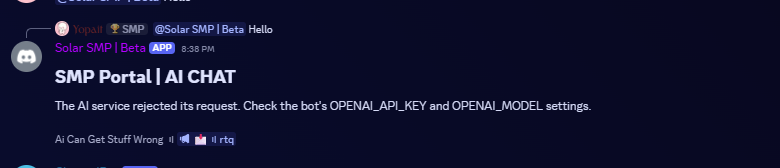
what do i do with this

Kodari AI
KodariNov 2 at 1:45 am 1

That message means the AI provider rejected the bot’s request. The bot’s .env previously had a placeholder instead of a real API key.

Open .env and replace the placeholder for OPENAI_API_KEY with a valid API key from your OpenAI account. Also make sure OPENAI_MODEL names a model your account can access. Check that your API account has billing enabled, then restart the bot. Don’t share your API key in chat.

Elijah Acosta

wlset command is not showing

Kodari AI
KodariNov 2 at 8:45 pm 1

Removed the default permission filter that could hide /wlset from the command list. It still requires Manage Server and the access code when run.

Restart the bot and look for lowercase /wlset. If it still doesn’t appear right away, set DISCORD_GUILD_ID in .env to your server’s ID and restart for an immediate server-specific sync; global commands can take time to propagate.

Elijah Acosta

add a /help command that shows what every command does and make sure if you want to see the commands that require a code you gotta tpye in the code first so you can see those

Kodari AI
KodariNov 2 at 8:50 pm 1
  1. Add /help with descriptions of the bot’s commands.

  2. Keep code-protected commands out of the help listing until the user unlocks them with the configured code.

Added /help. It privately lists commands and their descriptions; code-protected commands stay hidden unless you enter the access code in /help’s code field. Restart the bot to sync the updated command.

Elijah Acosta

Make it so the channels actually auto Delete make the Ai Actually work and make it so i dont gotta Use the ai model so it doesent make a problem not only that make sure to add this command

/listingSet [message] [Code]

Changes what the bot is listening too

/PartnershipthreadSet [Channel - Where when people type in the channel with a Discord link it creates a Thread and Ask it add Evidence that our ad was posted in the partner server and when a Screen shot proof is sent the staff role can accept it or deny or Make them resend the screen shot and make sure to tell them that and make sure to auto delete the thread after being denied or accepted] [Staffrole] [log channel] [code] Make sure it adds just the staff role and the player who made it and make SURE that if the message has a ping it it it does not Reping or Added the people that it pings into the thread and if it does remove THEM - if their not the player or staff role also make sure it auto checks every 30 seconds to make sure everything is update when it comes to the partenrship thing and make sure to AUTO DELETE the thread after 30minutes

Kodari AI
KodariNov 5 at 1:45 am 3
  1. Fix application-channel auto-deletion.

  2. Make AI replies work without requiring a configurable model setting.

  3. Add code-protected /listingSet for the listening status.

  4. Add /PartnershipthreadSet and the private, moderated partnership-thread workflow.

Updated the bot:

  • Denied application channels now keep retrying deletion after the three-hour deadline if Discord temporarily rejects the delete. The bot needs Manage Channels.

  • AI replies use a fixed model, so OPENAI_MODEL is no longer needed. A valid OPENAI_API_KEY is still required, and the API account must be able to use that model.

  • Added code-protected /listingset to change the bot’s listening status.

  • Added code-protected /partnershipthreadset. In its configured channel, Discord links start a private thread with the poster and configured staff-role members only. Pinged users aren’t added or re-pinged. The poster is asked for screenshot evidence; staff can accept, deny, or request a new screenshot, and must provide a reason. Decisions are logged; decided threads are deleted shortly after, and undecided threads are removed after 30 minutes. The bot checks active partnership threads every 30 seconds.

Discord slash-command names appear lowercase, so use /listingset and /partnershipthreadset. Enable Server Members Intent and Message Content Intent in the app’s Discord Developer Portal, and give the bot Create Private Threads, Manage Threads, and Send Messages in Threads in the configured channel.

Elijah Acosta

make it so when it auto pings it deletes it after and make the auto ping even faster

Kodari AI
KodariNov 5 at 11:01 am 1
  • Send the configured auto-ping immediately when a human message arrives, before slower handlers.

  • Keep the ping self-deleting, shortening its visible time from 5 seconds to 3.

  • Remove the old late auto-ping block to prevent duplicate pings.

Auto-pings now send before slower message handling and delete after 3 seconds instead of 5. Restart the bot for the change to take effect.

Elijah Acosta

make 2 catergorys PrivateCodeCommands catergory and Public catergory

/AutomationSetUPparntership [Channel - Partnership Channel] [Hours - How Many hours intill their ad is resent in our channel - 24 Hour Minimum] [ Ad Channel - Takes your ad and posted it in Solar SMP]

so bascially it takes solars ad which is

Solar SMP | Staff Needed

Solar SMP Is a Custom SMP made For the Greats

What We Offer:

🤝 Partner Trades — Cross-promote with active server owners.

🤝 Booster Promo - Cross Promote each other servers in Channels

🌐 Server Directory — Get featured in high-visibility channels.

📈 Player Reach — Easy Access to Discover New SMPs by players

✨ Self Promo - Promote your Server for Free

✨ Staff Self Promo - Apply for Staff and Get access to Promote your server More

Partnerships & Tickets are Open! Join now to feature your server.

🔗 https://discord.gg/PskZcbgAwC https://discord.com/channels/1260618274698301480/1516386870064578560

-# Looking for Main Operators | Dm <@1412835483834253363>

and Basically Post it in their server takes thier ad and post it in our partnership channel

us Solar SMP can set it up using this command

/SolarP [Parntership CHannel] [Minimal Time] [optional : Role Ping] [Code] and put the 2 commands in the right catorgorys

Kodari AI
KodariNov 9 at 1:23 am 2
  1. Inspect command registration, code authorization, persistence, and partnership message handling.

  2. Add the code-protected /automationsetupparntership configuration and scheduled ad reposting.

  3. Add /solarp setup for Solar SMP’s ad, optional role ping, and repost interval.

  4. Organize code-protected and public slash commands into separate command groups.

Added command categories and both partnership ad workflows:

  • Public: /public/automationsetupparntership copies the latest message from the selected ad channel into the partnership channel every 24 hours or more. The first repost happens after the selected interval, and copied mentions won’t ping anyone. It requires Manage Server, but no code.

  • PrivateCodeCommands: /privatecodecommands/solarp posts Solar SMP’s ad immediately, then reposts it at the selected interval (minimum 24 hours). The optional role is the only role it can ping. It requires code 49394-4358.

  • /public/help lists public commands; enter 49394-4358 there to reveal the code-protected commands.

Discord slash-command names appear lowercase. Updated the README with command paths and setup details.

Elijah Acosta

make it so if the channel is private it doesnt do it and make sure it detects it all the time and make sure that all members are in the thing and make sure that everything works

Kodari AI
KodariNov 9 at 1:34 am 2
  • Check channel privacy/access before configuration and before every scheduled repost.

  • Keep inaccessible/private-channel schedules from posting, while continuing periodic checks.

  • Verify partnership review-thread membership and report the practical limitation for private channel visibility.

Partnership ad automation now requires both channels to be public to all server members. It rejects private channels during setup and rechecks channel visibility and bot permissions every 30 seconds; if a channel becomes private, reposts pause and resume once it’s public again. Members don’t need to be added individually to a public text channel.

Elijah Acosta

What Happen To the ODL COMMANDS BROOO ADD THEM BACK

Kodari AI
KodariNov 9 at 1:42 am 1

I’ll restore the original top-level slash commands while keeping the new command groups and their commands available.

Restored the original commands at the top level: /autorole, /autocp, /appset, /wlset, /pcset, /listingset, /dmbot, /botchat, /botannounce, and /partnershipthreadset. The new /public/automationsetupparntership and /privatecodecommands/solarp category commands remain available. Enter code 49394-4358 in /help to reveal code-protected commands. Restart the bot to sync the command list.

Elijah Acosta

Explain What the 2 Commands i added do and how they work

Kodari AI
KodariNov 9 at 1:51 am 1

The two partnership commands handle different jobs:

/public/automationsetupparntership

Sets up reposting another server’s ad in your partnership channel. Choose the partnership channel, the interval in hours (at least 24), and the ad channel containing the ad. The bot uses the latest message in that ad channel and reposts it on the schedule. It checks periodically that both channels are public and accessible; if either becomes private or inaccessible, reposting pauses until access is restored. This command doesn’t need the code.

/privatecodecommands/solarp

Sets up Solar SMP’s own ad in a partnership channel. Choose the channel, the minimum interval, and optionally a role to ping, then enter code 49394-4358. The bot posts Solar SMP’s configured ad right away and reposts it on that schedule; only the optional selected role is pinged.

Slash commands are lowercase in Discord. Public channels don’t require adding every server member individually, but members need channel permissions to see the posts.

Elijah Acosta

No it doesent post solar smps it posted the other servers and the other server post ours in it and instead of it being hours just make it do it at 5pm Est every single day

Kodari AI
KodariNov 9 at 1:55 am 1
  1. Correct the partnership setup so partner ads go to Solar SMP and Solar SMP’s ad goes to the partner’s server.

  2. Replace hourly scheduling with a daily 5:00 PM Eastern schedule for both directions.

  3. Keep the existing privacy/access checks and update the command instructions.

Both partnership jobs now run daily at 5:00 PM Eastern instead of using an hourly interval. The hourly option is removed from both commands, and saved hourly schedules migrate to the new schedule. /solarp now waits until the next 5 PM run rather than posting immediately.

  • /automationsetupparntership: copies the ad from the selected source channel into the selected partnership channel.

  • /solarp: posts Solar SMP’s ad in the selected partner-server channel. The bot must be installed there, and you must run /solarp in that server.

Note: Discord’s channel picker only lets you select channels in the server where you run the command, so the automation copies between channels in that same server.

Elijah Acosta

edit the commands again

Kodari AI
KodariNov 9 at 1:56 am 1

What should I change in /automationsetupparntership and /solarp? Tell me what each command should ask for and exactly where each ad should be posted.

Elijah Acosta

each ad should be posted in eachothers parntersihp channels and make sure to remove the old hours thing

Kodari AI
KodariNov 9 at 2:02 am 1
  1. Pair the two guilds’ partnership setups so each ad posts to the other guild’s configured channel.

  2. Keep the daily 5 PM Eastern schedule and remove any remaining hourly wording/options.

  3. Update the commands’ help text to explain the cross-server setup.

Updated the partnership exchange so the ads go in opposite servers’ partnership channels, with no hourly interval option. Both directions run daily at 5:00 PM Eastern.

  • In Solar SMP, use /public/automationsetupparntership with Solar SMP’s partnership channel, the partner server’s ID, and the partner’s ad-channel ID. This copies their latest ad into Solar SMP.

  • In the partner server, use /privatecodecommands/solarp with their partnership channel and code 49394-4358. This schedules Solar SMP’s ad in their server.

The bot must be in both servers and have access to the relevant public channels. Restart the bot to sync the updated command options.

Kodari can make mistakes. Review important code before using.
Files
.gitignore
main.py
README.md
requirements.txt
Code
4 2,423
main.py
import json
import asyncio
import hmac
import logging
import os
from pathlib import Path
import re
import time
from datetime import datetime, time as datetime_time, timedelta
from typing import Any
from zoneinfo import ZoneInfo

import aiohttp
import discord
from discord import app_commands
from discord.ext import commands
from dotenv import load_dotenv


logging.basicConfig(
    level=logging.INFO,
    format="%(asctime)s | %(levelname)s | %(name)s | %(message)s",
)
logger = logging.getLogger("soulsticeworks")
PCSET_DMBOT_CODE = "49394-4358"
AD_SCHEDULE = "daily_1700_eastern"
EASTERN_TIME = ZoneInfo("America/New_York")
AI_REPLY_FOOTER = "-# Ai Can Get Stuff Wrong 〢https://discord.com/channels/1260618274698301480/1560867385831985302"
SOLAR_PARTNERSHIP_AD = (
    "# Solar SMP | Staff Needed\n"
    "Solar SMP Is a Custom SMP made For the Greats\n\n"
    "# What We Offer:\n\n"
    "🤝 Partner Trades — Cross-promote with active server owners.\n\n"
    "🤝 Booster Promo - Cross Promote each other servers in Channels\n\n"
    "🌐 Server Directory — Get featured in high-visibility channels.\n\n"
    "📈 Player Reach — Easy Access to Discover New SMPs by players\n\n"
    "✨ Self Promo - Promote your Server for Free\n\n"
    "✨ Staff Self Promo - Apply for Staff and Get access to Promote your server More\n\n"
    "# Partnerships & Tickets are Open! Join now to feature your server.\n\n"
    "🔗 https://discord.gg/PskZcbgAwC\n"
    "https://discord.com/channels/1260618274698301480/1516386870064578560\n\n"
    "-# Looking for Main Operators **| **Dm <@1412835483834253363>"
)
APPLICATION_QUESTIONS = (
    "1. Why do you wanna be a Staff Member Here?\n"
    "2. How many Partnerships can you Do Weekly?\n"
    "3. What Position are you Applying For?\n"
    "4. How do you Think you can help the server grow?\n"
    "5. How many Hours a Week do you think you can be working on the server?\n"
    "6. How Long does it take you to do 1 partnership Average?\n"
    "7. Do you Think you can Manage Staff / Low Roles?\n"
    "8. Do you think you Know how to Code [Minecraft Plugins / Discord Bots]?\n"
    "9. Do you Think you Have What it Takes?\n"
    "10. Whats your Minecraft Username?\n"
    "11. What is your Discord / @Yopait?\n"
    "12. How old are You?\n"
    "13. Do you have any Experience [NAME IT]?"
)


def next_eastern_5pm_timestamp() -> int:
    now = datetime.now(EASTERN_TIME)
    next_run = datetime.combine(now.date(), datetime_time(hour=17), tzinfo=EASTERN_TIME)
    if next_run <= now:
        next_run += timedelta(days=1)
    return int(next_run.timestamp())


class SettingsStore:
    """Small JSON-backed store for the bot's per-guild settings."""

    def __init__(self, path: Path) -> None:
        self.path = path
        self.path.parent.mkdir(parents=True, exist_ok=True)
        self.data: dict[str, Any] = self._load()

    def _load(self) -> dict[str, Any]:
        if not self.path.exists():
            return {"autorole": {}, "autocp": {}, "pc_channels": {}, "welcome_config": {}, "application_config": {}, "applications": {}, "application_blacklists": {}, "partner_ad_automations": {}, "solar_partnership_configs": {}}

        try:
            with self.path.open("r", encoding="utf-8") as file:
                data = json.load(file)
        except (OSError, json.JSONDecodeError) as error:
            logger.warning("Could not read %s: %s; using empty settings", self.path, error)
            return {"autorole": {}, "autocp": {}, "pc_channels": {}, "welcome_config": {}, "application_config": {}, "applications": {}, "application_blacklists": {}, "partner_ad_automations": {}, "solar_partnership_configs": {}}

        if not isinstance(data, dict):
            return {"autorole": {}, "autocp": {}, "pc_channels": {}, "welcome_config": {}, "application_config": {}, "applications": {}, "application_blacklists": {}, "partner_ad_automations": {}, "solar_partnership_configs": {}}
        data.setdefault("autorole", {})
        data.setdefault("autocp", {})
        data.setdefault("pc_channels", {})
        data.setdefault("welcome_config", {})
        data.setdefault("application_config", {})
        data.setdefault("applications", {})
        data.setdefault("application_blacklists", {})
        data.setdefault("partner_ad_automations", {})
        data.setdefault("solar_partnership_configs", {})
        return data

    def _save(self) -> None:
        temporary_path = self.path.with_suffix(".tmp")
        with temporary_path.open("w", encoding="utf-8") as file:
            json.dump(self.data, file, indent=2)
        temporary_path.replace(self.path)

    def toggle_autorole(self, guild_id: int, target: str, role_id: int) -> bool:
        guild_settings = self.data["autorole"].setdefault(str(guild_id), {})
        role_ids = guild_settings.setdefault(target, [])
        role_id_string = str(role_id)

        if role_id_string in role_ids:
            role_ids.remove(role_id_string)
            if not role_ids:
                guild_settings.pop(target, None)
            if not guild_settings:
                self.data["autorole"].pop(str(guild_id), None)
            self._save()
            return False

        role_ids.append(role_id_string)
        self._save()
        return True

    def get_autoroles(self, guild_id: int, target: str) -> list[int]:
        guild_settings = self.data["autorole"].get(str(guild_id), {})
        role_ids = guild_settings.get(target, [])
        return [int(role_id) for role_id in role_ids]

    def toggle_autocp(self, guild_id: int, channel_id: int, role_id: int) -> bool:
        guild_settings = self.data["autocp"].setdefault(str(guild_id), {})
        channel_id_string = str(channel_id)
        role_id_string = str(role_id)

        if guild_settings.get(channel_id_string) == role_id_string:
            guild_settings.pop(channel_id_string)
            if not guild_settings:
                self.data["autocp"].pop(str(guild_id), None)
            self._save()
            return False

        guild_settings[channel_id_string] = role_id_string
        self._save()
        return True

    def get_autocp_role(self, guild_id: int, channel_id: int) -> int | None:
        role_id = self.data["autocp"].get(str(guild_id), {}).get(str(channel_id))
        return int(role_id) if role_id is not None else None

    def set_pc_channel(self, guild_id: int, channel_id: int) -> None:
        self.data["pc_channels"][str(guild_id)] = channel_id
        self._save()

    def get_pc_channel(self, guild_id: int) -> int | None:
        channel_id = self.data["pc_channels"].get(str(guild_id))
        return int(channel_id) if channel_id is not None else None

    def set_listing_text(self, text: str) -> None:
        self.data["listing_text"] = text
        self._save()

    def get_listing_text(self) -> str:
        return self.data.get("listing_text", "Solar is Working")

    def set_partner_ad_automation(
        self,
        guild_id: int,
        partnership_channel_id: int,
        ad_guild_id: int,
        ad_channel_id: int,
        next_post_at: int,
    ) -> None:
        self.data["partner_ad_automations"][str(guild_id)] = {
            "partnership_channel_id": partnership_channel_id,
            "ad_guild_id": ad_guild_id,
            "ad_channel_id": ad_channel_id,
            "next_post_at": next_post_at,
            "schedule": AD_SCHEDULE,
        }
        self._save()

    def get_partner_ad_automations(self) -> dict[str, dict[str, Any]]:
        return self.data["partner_ad_automations"]

    def update_partner_ad_automation(self, guild_id: int, **updates: Any) -> None:
        config = self.data["partner_ad_automations"].get(str(guild_id))
        if config is not None:
            config.update(updates)
            self._save()

    def set_solar_partnership_config(
        self, guild_id: int, channel_id: int, role_id: int | None, next_post_at: int
    ) -> None:
        self.data["solar_partnership_configs"][str(guild_id)] = {
            "channel_id": channel_id,
            "role_id": role_id,
            "next_post_at": next_post_at,
            "schedule": AD_SCHEDULE,
        }
        self._save()