Spear FFA

can you make a skript where that if a players /stats a thing pops up in front of them saying like there username and than like there kills playtimes deaths and money?

Kodari AI
KodariOct 29 at 12:25 am 1
PlayerStatsDisplay
A Minecraft Skript that displays a player's statistics in a holographic interface when they type /stats. The hologram appears in front of the player showing their username, kill count, total playtime, death count, and current money balance. The display updates in real-time and disappears when the player moves away or closes it. Features include automatic stat tracking for kills, deaths, and playtime, with money integration from the server's economy system.

Save as stats.sk in plugins/Skript/scripts/, then run /sk reload stats. Money display requires Vault and a Vault-compatible economy plugin; tracked kills, deaths, and playtime start accumulating after installation.

Spear FFA

okay can you start?

Kodari AI
KodariOct 29 at 12:34 am 1

Place stats.sk in plugins/Skript/scripts/, then run /sk reload stats. Playtime and kill/death counts begin tracking after the script is loaded.

Spear FFA

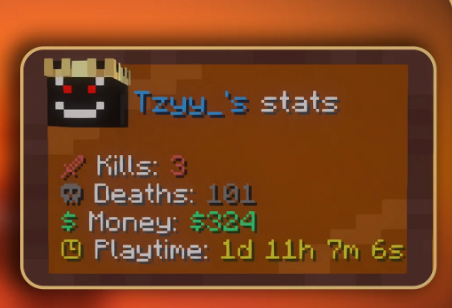
like i want it not a gui to pop up like infornt of me and that it goes away in like 5 seconds like the image i have skript, skebee and poask

Kodari AI
KodariOct 29 at 1:12 am 1

Updated stats.sk to show your stats as a floating text display about 2 blocks in front of you, then remove it after 5 seconds. It uses SkBee and requires Minecraft 1.19.4 or newer.

Put it in plugins/Skript/scripts/ and run /sk reload stats. Money display requires Vault and a compatible economy plugin.

Spear FFA

better make it go away in 5 seconds and make it look like the one above with there like player icon and how it looks good background transpaernt adn text interval 1s

Kodari AI
KodariOct 29 at 1:23 am 1

Updated stats.sk so the floating stats card refreshes every second and disappears after 5 seconds. It has a profile-style text icon and colored card formatting; the icon is not the player’s actual skin head.

Place it in plugins/Skript/scripts/ and run /sk reload stats.

Kodari can make mistakes. Review important code before using.
Files
stats.sk
Code
1 45
stats.sk
# Money display requires Vault and a Vault-compatible economy plugin.
# The floating text display uses SkBee and requires Minecraft 1.19.4 or newer.

on join:
    set {stats.session::%uuid of player%} to now

on quit:
    if {stats.session::%uuid of player%} is set:
        add difference between {stats.session::%uuid of player%} and now to {stats.playtime::%uuid of player%}
        delete {stats.session::%uuid of player%}

on death of player:
    add 1 to {stats.deaths::%uuid of victim%}
    if attacker is a player:
        add 1 to {stats.kills::%uuid of attacker%}

command /stats:
    trigger:
        set {_id} to uuid of player
        set {_location} to location 2 blocks in front of player
        add 1.5 to y-coordinate of {_location}
        spawn a text display at {_location}
        set {_display} to last spawned entity
        set billboard of {_display} to center

        loop 5 times:
            set {_kills} to {stats.kills::%{_id}%}
            set {_deaths} to {stats.deaths::%{_id}%}
            set {_playtime} to {stats.playtime::%{_id}%}

            if {_kills} is not set:
                set {_kills} to 0
            if {_deaths} is not set:
                set {_deaths} to 0
            if {_playtime} is not set:
                set {_playtime} to 0 seconds
            if {stats.session::%{_id}%} is set:
                add difference between {stats.session::%{_id}%} and now to {_playtime}

            set {_money} to player's balance
            set {_displayText} to colored "&8╭────────────────────╮%nl%&b☻ &f%player%'s &bStats%nl%&8├────────────────────┤%nl%&c⚔ &fKills: &c%{_kills}%%nl%&7☠ &fDeaths: &7%{_deaths}%%nl%&a$ &fMoney: &a%{_money}%%nl%&e◷ &fPlaytime: &e%{_playtime}%%nl%&8╰────────────────────╯"
            set text of {_display} to {_displayText}
            wait 1 second

        delete {_display}