
📄
pasted-code-1794049391876.txt
txt
599 lines
▶
# CROWN BREAKER – COMPLETE CUSTOM WEAPON PLUGIN DEVELOPMENT PROMPT

## 1. PROJECT OVERVIEW

Develop a fully functional legendary custom mace weapon for:

- Minecraft Java Edition: 26.2
- Server Software: Paper 26.2
- Weapon Name: CROWN BREAKER
- Weapon Type: Legendary Divine Mace / Hammer
- CustomModelData: **1000**
- Custom 3D Model: Required
- Resource Pack: Provide a compatible ZIP if the model cannot be bundled directly into the plugin.

CROWN BREAKER must be the only weapon of its kind on the entire server.

It must have three abilities:

1. Sky Launcher
2. Thunder Hammer
3. Ultimate: Soul Reaper

All abilities must work reliably in multiplayer.

---

## 2. WEAPON MODEL AND APPEARANCE

Create a custom Minecraft-compatible 3D mace/hammer model.

### Visual design

- Large, powerful divine hammer head.
- Dark metallic body.
- Blue cosmic flames.
- Glowing blue energy details.
- Ancient golden engravings.
- Blue-white lightning effects.
- A unique legendary appearance.

### Model requirements

- CustomModelData must be exactly **1000**.
- Use the correct mace/hammer model, not a Netherite Axe texture.
- Model must have correct proportions.
- Do not make the weapon excessively large.
- Ensure it renders correctly in first-person, third-person and inventory views.
- Provide the resource pack and textures.
- Keep the model consistent during the throwing animation.

---

## 3. WEAPON STATISTICS

| Attribute | Value |
|---|---|
| Weapon | CROWN BREAKER |
| Weapon Type | Divine Mace |
| CustomModelData | 1000 |
| Melee Damage | 9 HP |
| Attack Speed | 0.6 |
| Sky Launcher Height | 30 blocks |
| Thunder Hammer Damage | 10 HP / 5 hearts |
| Thunder Hammer Radius | 5 blocks |
| Soul Reaper Charge | 100 damage points |
| Soul Reaper Radius | 7 blocks |
| Soul Reaper Damage | 100 damage points |

Preserve the configured damage values in the actual combat implementation.

---

## 4. MINECRAFT ITEM DESCRIPTION / COLOURED LORE

**IMPORTANT: This is a major requirement.**

All three abilities must be permanently displayed inside the actual Minecraft item's inventory tooltip using coloured item lore.

The design must closely match the supplied reference screenshot.

Do not display the ability descriptions only in chat, a separate GUI, a command menu or an external interface.

### Required item lore layout

Use this exact style and structure:

**CROWN BREAKER**

ULT: 50/50 Hearts Charge

**• Sky Launcher [Shift + Right Click]**
- Launch 30 blocks high.
- +1 Damage per block of fall distance.
- No fall damage after Crown Breaker Wind Burst launch.
- Cooldown: 10s.

**• Thunder Hammer [Right Click]**
- Throw a spinning lightning hammer forward.
- Explosive divine impact.
- 5-block impact radius.
- Deals exactly 5 Hearts True Damage.
- Bypasses Armour and Protection.
- Automatically returns to owner.
- Cooldown: Use the configured Thunder Hammer cooldown.

**• ULTIMATE: Soul Reaper [Shift + Left Click]**
- Charge by landing Crown Breaker smash attacks.
- Requires 100 damage points / 50 hearts of qualifying damage.
- Deals 100 HP damage to eligible targets.
- 7-block radius.
- Divine area-of-effect blast.
- Requires full charge.

**Weapon Statistics**
- 9 Attack Damage.
- 0.6 Attack Speed.
- Unbreakable.
- CustomModelData: 1000.

### Lore formatting requirements

Use Minecraft item lore with separate lines and colours.

Suggested colour scheme:

- Weapon title: Gold.
- Ultimate charge: Light purple.
- Sky Launcher heading: Aqua or cyan.
- Thunder Hammer heading: Blue.
- Soul Reaper heading: Red or dark red.
- Ability descriptions: White or light grey.
- Damage values: Red or gold.
- Cooldown values: Grey.
- Weapon statistics: Green.
- Unbreakable: Blue.

Use blank lines to separate ability sections.

The lore must be readable on both laptop and mobile screens.

Do not use excessively long lines that make the tooltip difficult to read.

Use MiniMessage or the appropriate Paper-supported formatting system.

Ensure that all lore remains attached to the item after:
- Server restart.
- Player death.
- Inventory movement.
- Weapon recovery.
- Ability usage.

Do not allow other plugins or item updates to accidentally erase the lore.

---

## 5. ABILITY ONE: SKY LAUNCHER

**Activation: Shift + Right Click**

**Cooldown: 10 seconds**

### Mechanics

1. The owner activates Sky Launcher.
2. CROWN BREAKER performs a powerful upward mace-launch animation.
3. Launch the owner approximately 30 blocks into the air.
4. Create a blue cosmic energy burst.
5. Display a circular blue flame effect beneath the player.
6. Apply the mace-style smash attack mechanics.
7. Add +1 damage for every block of relevant fall distance.
8. Prevent fall damage resulting from the Crown Breaker Wind Burst launch.

### Damage and fall mechanics

- Use the appropriate mace-like smash damage calculation.
- Add +1 damage per block of qualifying fall distance.
- Do not grant fall-damage immunity for unrelated falls.
- Only the Crown Breaker launch should activate the special fall protection.
- Avoid accidentally triggering Thunder Hammer.

### Visual effects

- Blue circular energy burst.
- Cosmic flame particles.
- Smooth upward launch.
- Divine impact particles when the player lands.

---

## 6. ABILITY TWO: THUNDER HAMMER

**Activation: Right Click**

### Main mechanics

1. Owner right-clicks while holding CROWN BREAKER.
2. A spinning visual hammer launches in the exact direction of the player's crosshair.
3. It must work in open air and must not require the player to aim at a block.
4. The hammer travels quickly.
5. Blue flames and blue-white lightning particles follow its movement.
6. Detect its impact location.
7. Trigger a lightning impact even when the weather is clear.
8. Affect eligible targets within a 5-block radius.
9. Return the hammer safely to its owner.

### Exact damage requirement

Critical damage requirement

Every eligible target inside the 5-block impact radius must receive exactly:

**10 HP = 5 hearts of damage.**

This must remain true against:

- No armour.
- Full Iron Armour.
- Full Diamond Armour.
- Full Netherite Armour.
- Full Netherite Armour with Protection IV.
- Armour with high toughness.
- Resistance effects.

### Damage implementation

- Use a dedicated plugin-managed damage application method.
- Ensure the actual health reduction is exactly 10 HP when the target has sufficient health.
- Do not rely on ordinary armour-reduced damage.
- Bypass armour, armour toughness, Protection enchantments and Resistance for this ability.
- Ensure lightning visuals do not apply extra damage.
- Do not accidentally apply damage once per lightning strike.
- Each eligible target must receive exactly one damage application per activation.
- Track already-hit entity UUIDs.
- Exclude the weapon owner.
- Handle lethal damage and normal death processing correctly.

**Important:** Five hearts means 10 HP, not 5 HP.

### Impact radius

- Radius: 5 blocks.
- Check all eligible living entities within the radius.
- Do not damage targets outside the radius.
- Each target must be damaged only once.

### Lightning and impact effects

- Lightning must appear even in clear weather.
- Use blue-white lightning and cosmic particles.
- Add a visible circular shockwave.
- Play a powerful thunder/impact sound.
- Lightning visuals must not apply additional damage.

### Hammer return system

- Return CROWN BREAKER safely to its owner.
- Do not create a duplicate weapon.
- Do not permanently remove the original item.
- Do not allow the temporary projectile to be collected as a separate weapon.
- Handle owner disconnects and inventory-full situations safely.

---

## 7. ABILITY THREE: ULTIMATE – SOUL REAPER

**Activation: Shift + Left Click**

**Charge Requirement: 100 damage points / 50 hearts**

### Charging mechanics

- Every qualifying CROWN BREAKER smash attack contributes to the ultimate charge.
- Charge is accumulated from actual qualifying damage dealt.
- Full charge is reached at 100 damage points.
- Display the charge in the item lore or an appropriate action bar.
- Do not allow unrelated damage to increase the charge.
- Prevent repeated event handling from charging twice for one attack.

### Activation

Once the ultimate reaches 100 damage points:

1. Owner activates Soul Reaper using Shift + Left Click.
2. A powerful divine energy blast forms around the owner.
3. Blue and red cosmic particles spread outward.
4. A circular energy wave expands.
5. Every eligible target within a 7-block radius receives the configured damage.
6. Display a powerful divine explosion effect.
7. Notify the weapon owner that Soul Reaper has activated.

### Damage requirement

- Damage: 100 HP per eligible target.
- Radius: 7 blocks.
- Apply damage to eligible players and mobs.
- Ensure each target receives damage only once per activation.
- Prevent repeated damage from particle or animation ticks.

### Charge reset

After successful activation:
- Reset the ultimate charge to zero.
- Update the displayed charge.
- Require another 100 damage points to recharge.

### Persistence

- Save the charge state reliably.
- Preserve it through server restarts.
- Prevent charge duplication or accidental reset.

---

## 8. GLOBAL ONE-TIME CRAFTING SYSTEM

CROWN BREAKER must be craftable only once across the entire server.

### Requirements

- Only one CROWN BREAKER can exist.
- The crafting recipe must produce a special ritual item, not the finished weapon.
- Preserve the existing CROWN BREAKER crafting recipe.
- The centre ingredient must be a Netherite Ingot.
- Use the exact previously configured ingredient positions for all other recipe slots.
- Prevent shift-click crafting exploits.
- Prevent simultaneous crafting exploits.
- Prevent automated crafting duplication.
- Save the global crafting lock permanently.

Once the first ritual item is crafted, nobody can craft another one.

Even if the ritual item is lost, the global crafting restriction must remain active.

---

## 9. FIVE-MINUTE CINEMATIC RITUAL

The ritual must last exactly 300 seconds.

It starts only when the crafted ritual item is placed on the ground.

### Ritual requirements

- Ritual block is unbreakable during the ritual.
- Other players cannot interrupt it.
- Ritual continues if the starter disconnects.
- Ritual survives server restarts.
- Save ritual progress and location.
- Prevent duplicate ritual starts.
- Prevent duplicate weapon rewards.

### Ritual visuals

Create a cinematic red-and-blue energy animation.

Particles must rotate around the ritual location within a 5-block area.

The hammer must gradually form in the air.

The animation should become more intense as the ritual progresses.

At completion:
- The fully formed CROWN BREAKER appears.
- A final divine energy explosion occurs.
- The finished weapon is awarded exactly once to the registered owner.
- The ritual item is consumed.

### Ritual announcement

Display a centered golden title:

**CROWN BREAKER RITUAL**

Subtitle:

**Started by PlayerName**

Also broadcast a separate server-wide chat message containing:

- Starter's username.
- World name.
- Exact X coordinate.
- Exact Y coordinate.
- Exact Z coordinate.

Do not omit the coordinates.

The title must be readable on laptop and mobile screens.

Do not interrupt the ritual animation.

---

## 10. PERMANENT OWNER BINDING

CROWN BREAKER must be permanently bound to its registered owner.

Store the owner's UUID.

### Protection requirements

- Cannot be permanently destroyed.
- Cannot be lost in the void.
- Cannot burn in fire or lava.
- Cannot be destroyed by cactus.
- Cannot be destroyed by explosions.
- Cannot despawn.
- Cannot be dropped using Q or Ctrl + Q.
- Cannot be dropped by dragging outside the inventory.
- Cannot be placed in normal chests.
- Cannot be transferred through ordinary player inventory interactions.
- Ender Chest storage is allowed.
- Transfer through an item frame is allowed.

### Death handling

When the owner dies:
- CROWN BREAKER must not drop normally.
- Recover it automatically after respawn.
- If the inventory is full, use safe owner-specific recovery storage.
- Do not create duplicates.

### Ability exception

The intentional Thunder Hammer projectile must remain functional.

This projectile is a controlled plugin representation of the weapon, not an ordinary dropped item.

The original weapon must remain tracked throughout the ability.

---

## 11. UNIQUE ITEM IDENTIFICATION AND PERSISTENCE

Assign a unique persistent weapon ID.

Do not rely on CustomModelData 1000 alone for authenticity.

Save:

- Unique weapon ID.
- CustomModelData 1000.
- Owner UUID.
- Crafting state.
- Ritual state.
- Ritual location.
- Ritual progress.
- Soul Reaper charge.
- Ability cooldowns.
- Recovery state.

All data must survive server restarts.

Prevent duplication through:
- Inventory exploits.
- Death events.
- Hopper interactions.
- Projectile errors.
- Simultaneous ability activation.
- Server restarts.
- Administrative recovery.

---

## 12. ADMINISTRATOR COMMANDS

Provide permission-protected commands:

- `/crownbreaker status`
- `/crownbreaker give ` – Recover or deliver the existing unique weapon without creating another.
- `/crownbreaker recover `
- `/crownbreaker reload`
- `/crownbreaker info`
- `/crownbreaker ritual status`

Administrative commands must never accidentally create duplicate weapons.

---

## 13. TECHNICAL REQUIREMENTS

- Target Minecraft Java 26.2.
- Target Paper 26.2.
- Verify the actual Paper API compatibility.
- Use supported Java and plugin APIs.
- Use persistent item metadata.
- Use reliable server-side storage.
- Use efficient particle scheduling.
- Clean up temporary projectile entities.
- Avoid memory leaks.
- Prevent repeated damage applications.
- Keep all ability cooldowns reliable.
- Handle multiplayer events safely.
- Keep item lore synchronized with actual weapon settings.
- Make particle and sound settings configurable.

Organize the code into separate modules for:
- Weapon management.
- Sky Launcher.
- Thunder Hammer.
- Soul Reaper.
- Ritual management.
- Owner protection.
- Persistence.
- Item lore and formatting.

---

## 14. FINAL TESTING CHECKLIST

### Weapon and lore
- [ ] CustomModelData exactly 1000.
- [ ] Correct custom 3D hammer model.
- [ ] Correct model size.
- [ ] Coloured lore visible in actual inventory tooltip.
- [ ] All three abilities displayed.
- [ ] Keyboard controls displayed correctly.
- [ ] Damage and cooldown descriptions displayed.
- [ ] Lore survives restart.

### Sky Launcher
- [ ] Shift + Right Click works.
- [ ] Launches approximately 30 blocks high.
- [ ] +1 damage per block.
- [ ] No fall damage from Crown Breaker launch.
- [ ] 10-second cooldown.

### Thunder Hammer
- [ ] Right Click launches hammer.
- [ ] Exact crosshair direction.
- [ ] Works in open air.
- [ ] Spinning hammer animation.
- [ ] Blue flame trail.
- [ ] Lightning works in clear weather.
- [ ] 5-block radius.
- [ ] Exactly 10 HP / 5 hearts damage per target.
- [ ] Bypasses armour and Protection.
- [ ] Bypasses Resistance.
- [ ] Owner excluded.
- [ ] Each target damaged once.
- [ ] Weapon returns safely.

### Soul Reaper
- [ ] Shift + Left Click activation.
- [ ] Requires 100 damage points.
- [ ] 50 hearts charge display.
- [ ] 7-block radius.
- [ ] 100 HP damage per eligible target.
- [ ] Each target damaged once.
- [ ] Charge resets after activation.
- [ ] Charge survives restart.

### Ritual
- [ ] Global one-time crafting.
- [ ] Correct existing recipe.
- [ ] Centre ingredient is Netherite Ingot.
- [ ] Ritual starts only when placed.
- [ ] Exactly 300 seconds.
- [ ] Red and blue cinematic particles.
- [ ] Hammer forms in the air.
- [ ] Ritual block protected.
- [ ] Golden centered announcement.
- [ ] Starter name and exact coordinates in chat.
- [ ] Ritual survives disconnect and restart.
- [ ] Weapon awarded exactly once.

### Protection
- [ ] Permanent owner binding.
- [ ] Cannot be ordinarily dropped.
- [ ] Cannot be destroyed by fire, lava, cactus or explosions.
- [ ] Cannot be lost in void.
- [ ] No death drops.
- [ ] Ender Chest storage allowed.
- [ ] Item frame transfer allowed.
- [ ] Normal chest storage prohibited.
- [ ] No duplication.
- [ ] Safe recovery after death.

---

## 15. FINAL DELIVERABLES

Provide:

1. Compiled CROWN BREAKER plugin `.jar`.
2. Complete source code.
3. Compatible custom resource pack `.zip`.
4. Installation instructions.
5. Configuration files.
6. Admin command documentation.
7. Testing report.

Do not claim that the plugin is compiled, tested or fully functional unless those steps have actually been completed.

**FINAL OBJECTIVE:**

Create CROWN BREAKER as a unique legendary divine mace for Glamour SMP, with CustomModelData 1000, three functional abilities, a five-minute cinematic ritual, permanent owner protection, and a beautiful coloured Minecraft inventory tooltip displaying every ability exactly like the supplied reference screenshot.

The Thunder Hammer must deal exactly 5 hearts (10 HP) to every eligible target inside its 5-block radius, regardless of armour, Protection or Resistance. 
Add the Paper plugin entry point, configuration, persistent weapon/ritual state, and admin commands.
Implement the three abilities, single-craft ritual flow, and owner-bound recovery/protection.
Keep the weapon’s lore and CustomModelData synchronized; the custom 3D model/resource pack can’t be generated while Studio is disabled.
Added the Crown Breaker plugin source with the weapon item and lore, three abilities, persistent charge and cooldowns, a one-time ritual flow, owner-bound recovery/protection, and admin commands.
A few limits to note:
The prompt didn’t provide the “existing” recipe layout, so I used a default shaped recipe with a Netherite Ingot in the center.
The custom 3D model and resource pack aren’t included because Studio is disabled for this project. Enable it in Settings → Generation to make them, or at https://kodari.ai/settings?tab=features.
I haven’t verified a build or test run, so I can’t claim a tested plugin JAR. To build and download it, click Compile in the desktop top bar (or ⋮ → Compile Project on mobile), then Compile, and download the successful build.
📄
pasted-code-1794050791503.txt
txt
96 lines
▶
# CROWN BREAKER – ANNOUNCEMENT SYSTEM UPDATE

Implement the following announcement system in the CROWN BREAKER plugin for Minecraft Java 26.2 / Paper 26.2.

## 1. CENTRE-SCREEN ANNOUNCEMENT

When the CROWN BREAKER ritual starts, display a prominent announcement in the exact centre of every online player's screen.

Use Minecraft's Title and Subtitle display system.

**Main Title:**
CROWN BREAKER RITUAL

**Subtitle:**
Started by PlayerName

### Visual requirements
- Main title colour: Bright Golden (#FFD700).
- Subtitle colour: Light Gold (#FFEA8A).
- Main title must be bold.
- Subtitle must be clearly readable.
- Both lines must appear in the centre of the screen.
- Use a clean, professional Minecraft announcement style.
- Keep text appropriately sized for laptop and mobile screens.
- Do not make the text excessively large.
- Do not display the announcement only in chat.
- Do not use action bar or boss bar as a replacement for the centre-screen title.

### Display timing
- Fade in: 10 ticks.
- Stay visible: 60 ticks.
- Fade out: 15 ticks.

The announcement must be sent to all online players when the ritual starts.

## 2. SEPARATE CHAT ANNOUNCEMENT

Alongside the centre-screen announcement, send a separate server-wide chat message.

Display:

CROWN BREAKER RITUAL HAS BEGUN!

Initiated by: PlayerName

Location:
World: WorldName
X: Exact X Coordinate
Y: Exact Y Coordinate
Z: Exact Z Coordinate

Use golden and white text formatting.

Coordinates must come from the actual ritual placement location, not an estimated or hardcoded position.

## 3. RITUAL COMPLETION ANNOUNCEMENT

When the five-minute ritual successfully completes, display another centre-screen announcement.

**Main Title:**
CROWN BREAKER HAS AWAKENED

**Subtitle:**
The Legendary Mace Has Chosen Its Wielder

Use the same golden colour scheme and centre-screen positioning.

Also send a separate server-wide chat message confirming that CROWN BREAKER has been successfully summoned.

## 4. TECHNICAL REQUIREMENTS

- Use the Paper-supported Title and Subtitle API.
- Ensure the title appears in the centre of the screen.
- Broadcast to all online players.
- Do not replace the title with chat-only messages.
- Do not interrupt the five-minute ritual animation.
- Do not restart or reset the ritual because an announcement is sent.
- Handle players joining during an active ritual appropriately.
- Ensure the announcement system works after server restarts.
- Keep announcement formatting configurable.
- Use correct MiniMessage or Adventure text formatting supported by the target Paper version.

## 5. FINAL ACCEPTANCE TEST

The feature is complete only when:

- [ ] Start announcement appears in the exact centre of the screen.
- [ ] Main title is bold golden text.
- [ ] Subtitle is light golden text.
- [ ] Announcement is readable on desktop and mobile.
- [ ] Separate chat message contains starter name and exact coordinates.
- [ ] Completion announcement appears in the centre.
- [ ] Ritual animation continues without interruption.
- [ ] All online players receive the announcement.

**IMPORTANT:** The centre-screen golden Title and Subtitle announcement is mandatory. A chat-only announcement does not satisfy this requirement.Add configurable MiniMessage title, subtitle, chat templates, and title timing while preserving the current ritual duration and animation.
Announce starts to everyone; give players joining an active ritual its persisted starter and placement details.
Add the completion title and server-wide success chat when the ritual ends.
Implemented the announcements with Paper Adventure titles: golden bold start/completion titles use the requested timing, and the start chat includes the ritual’s actual world and coordinates. Players joining during an active ritual receive its announcement; the starter name and ritual state are persisted.
Title text, colors, bold styling, timing, and chat labels are configurable in config.yml.
Change the crafting recipe
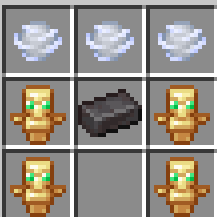
Updated the recipe to match the screenshot: three bowls across the top, totems on both sides of the middle row with a netherite ingot in the center, and totems in the bottom-left and bottom-right slots.
The Soul reaper attack is not recharging. Create a bossbar typ when i hold the crownbreker and that bossbar will show the soul reaper 50 hearts damage dealing so that i can see the damage dealt and when the attach charged agai
Add a live boss bar while Crown Breaker is held, showing charge progress toward 50 hearts and readiness.
Track actual Soul Reaper damage dealt and display the latest total on the bar.
Clean up boss bars on item switch, quit, and plugin shutdown; keep the existing smash-based recharge mechanic.
Soul Reaper now recharges from Crown Breaker melee and smash damage. While you hold Crown Breaker, a boss bar shows charge toward 50 hearts, displays READY at full charge, and reports the damage dealt by your last Soul Reaper attack. It hides when you switch items and is cleaned up when you leave or the plugin shuts down.
- Add a inbuild enchantments of Wind Burst 3 and Density 5
- Replace the bowl with wind charge in crafting recipe
- Add 1 more ability that will open a GUI menu in which all the heads will be there of the online players in the server and when i will click on a particular head i can do inventory lock of that player and the player can't use any items in there inventory or in hotbar they can only use there main hand item. When i will again open the GUI menu and again click on the same player head then the player's inventory will be unlock and they can use all the items in their inventory. I can do max 5 players inventory lock. The key bind of this ability will be "N". When i will do their inventory lock and if they want to switch items then a chat will be appear in their screen. The msg is: "Your inventory is lock by CrownBreaker". There will be no cooldown of this ability
Apply Wind Burst III and Density V to the mace and swap the recipe’s top-row bowls for wind charges.
Add a paginated online-player head menu, persistent lock state, and a five-player cap; block inventory/hotbar changes while locked, but leave the main-hand item usable.
Paper plugins can’t detect an arbitrary
Nkeypress, so provide an owner-only/crownbreaker targetstrigger with no cooldown instead.
Added Wind Burst III and Density V to Crown Breaker, and replaced the recipe’s three top-row bowls with wind charges.
The new player-head menu shows online players (with pagination) and lets you toggle their inventory locks. Up to five players can be locked at once; locks persist across restarts. Locked players can use their current main-hand item, but inventory/hotbar switching, off-hand use, drops, and pickups are blocked with the requested message.
Paper plugins can’t detect an arbitrary N keypress, so the menu opens with /crownbreaker targets instead. It has no cooldown and requires the registered owner to be holding Crown Breaker.
package com.kodari.crownbreaker;

import com.kodari.crownbreaker.command.CrownBreakerCommand;
import com.kodari.crownbreaker.ritual.RitualManager;
import com.kodari.crownbreaker.storage.StateStore;
import com.kodari.crownbreaker.weapon.WeaponManager;
import com.kodari.crownbreaker.listener.AbilityListener;
import com.kodari.crownbreaker.listener.ProtectionListener;
import com.kodari.crownbreaker.listener.CrownBreakerLockMenu;
import org.bukkit.Bukkit;
import org.bukkit.plugin.java.JavaPlugin;

public final class CrownBreakerPlugin extends JavaPlugin {
    private StateStore stateStore;
    private WeaponManager weaponManager;
    private RitualManager ritualManager;
    private AbilityListener abilityListener;

    @Override
    public void onEnable() {
        saveDefaultConfig();
        stateStore = new StateStore(this);
        weaponManager = new WeaponManager(this, stateStore);
        ritualManager = new RitualManager(this, stateStore, weaponManager);
        CrownBreakerLockMenu lockMenu = new CrownBreakerLockMenu(this, stateStore, weaponManager);

        abilityListener = new AbilityListener(this, stateStore, weaponManager);
        Bukkit.getPluginManager().registerEvents(abilityListener, this);
        Bukkit.getPluginManager().registerEvents(lockMenu, this);
        Bukkit.getPluginManager().registerEvents(new ProtectionListener(this, stateStore, weaponManager), this);
        Bukkit.getPluginManager().registerEvents(ritualManager, this);
        ritualManager.registerRecipe();
        ritualManager.startTicker();

        CrownBreakerCommand command = new CrownBreakerCommand(this, stateStore, weaponManager, ritualManager, lockMenu);
        getCommand("crownbreaker").setExecutor(command);
        getCommand("crownbreaker").setTabCompleter(command);
    }

    @Override
    public void onDisable() {
        if (abilityListener != null) {
            abilityListener.stopBossBars();
        }
        if (stateStore != null) {
            stateStore.save();
        }
    }

    public StateStore getStateStore() {
        return stateStore;
    }

    public WeaponManager getWeaponManager() {
        return weaponManager;
    }
}